Claude’s paid plans now include whiteboards, sheets and Data, each suited to a different kind of work. Whiteboards turn ideas into editable layouts, while sheets pairs a spreadsheet with an assistant and Data builds dashboards from uploaded information. In one test, a whiteboard mapped a beginner workout event with a $300 promotional budget, as demonstrated by The AI Advantage.
Compare Claude sheets with Google Sheets to see where similar AI-assisted results meet different limits on features and sharing. Explore how a whiteboard can organize an event plan or workflow while leaving room for edits. Then examine how to add focused views to a Data dashboard and check whether the result follows the original instructions.
TL;DR Key Takeaways :
- Claude sheets is an AI-centered spreadsheet with Google Sheets and Excel imports, but it lacks pivot tables, macros and other advanced features.
- In a six-month gym revenue and expense test, Claude sheets and Google Sheets with the Claude extension produced virtually identical results. Google Sheets was stronger for sharing and collaboration, and there appeared to be no reason to migrate.
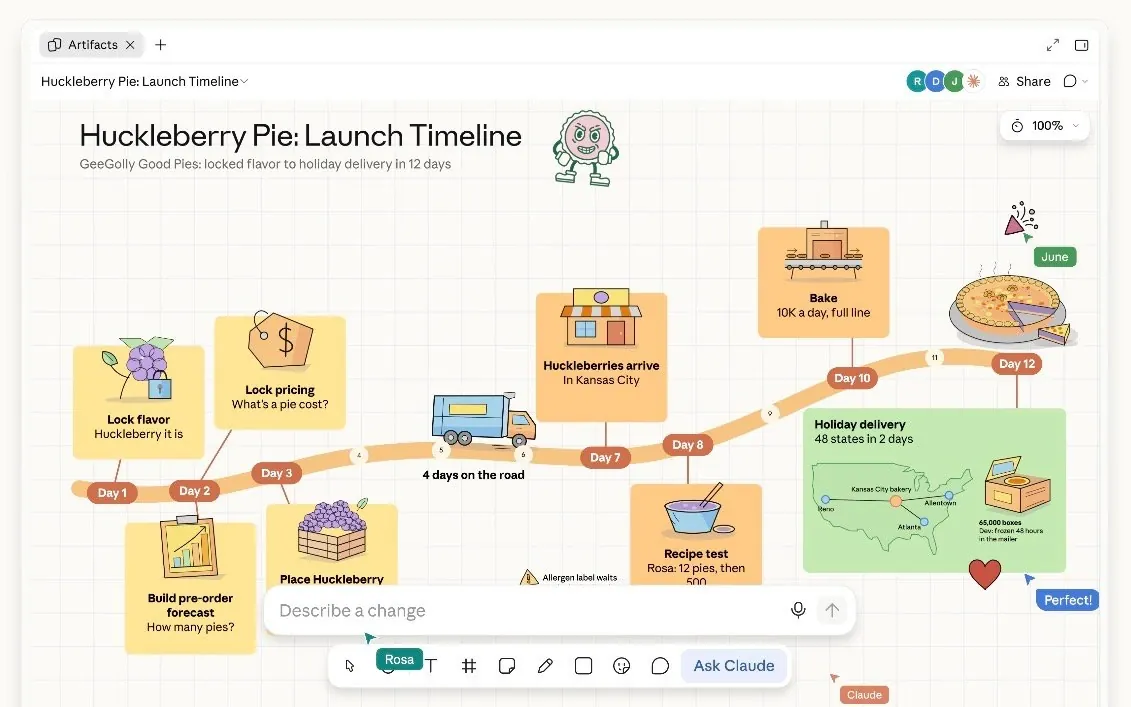
- Claude whiteboards turn early ideas into editable visual layouts. In a test, Claude created an event flow and checklist for a beginner workout with a $300 promotional budget.
- Claude Data creates dashboards and focused slide views from uploaded information. One test needed follow-up to fill in missed details; whether focused views can be reapplied to other data views is unconfirmed.
- Claude’s features are on all paid plans, while ChatGPT spaces are on the $100 plan. Spaces lack whiteboards but offer native image generation, which Claude does not have.
Claude Sheets vs Google Sheets
Claude sheets opens as an editable spreadsheet with import buttons for Google Sheets and Excel. Its interface centers on AI: after you submit data and a prompt, Claude works inside the sheet, with a sidebar showing the assistant alongside the document.
The spreadsheet is narrower than its established counterparts. It lacks pivot tables, which readjust around data, and macros, or multi-step presets, as well as many other advanced features. Google Sheets, by comparison, has a wide range of functions in its data tab alone.
To test the feature, the team created a fictional Phoenix gym owner, John, and his business, Desert Strength. The task was to make a sheet covering six months of revenue and John’s expenses. After the team uploaded the data with a short contextual prompt, Claude completed the task.
The team then ran the same task in Google Sheets using Anthropic’s official Claude extension, which also provides a sidebar. In Google Sheets, Claude made a plan first rather than starting work immediately, but the results were virtually the same. On that basis, the in-sheet AI experience is not yet a distinctive reason to switch.
Sharing is another difference. Claude requires people to be invited to a Claude account or to use a shared account; making content public might also be possible. Google Sheets came across as the stronger choice for sharing, and a connector also lets you work directly inside a Google Sheet from Claude.
A small, quick task could be faster in Claude sheets, but there appeared to be no reason to migrate from Google Sheets, given its established use and how well it works with AI.
Whiteboards for Early Ideas
Claude whiteboards take a less structured approach than a sheet or slide deck. They can turn a brainstorming session into a visual layout, making them useful when ideas are still taking shape or have not yet found an obvious place in a project.
The Desert Strength example gives John a different task: planning a free beginner workout with a $300 promotional budget and presenting the idea to his team. In the test, Artifacts was opened, Whiteboard and Ask Claude were selected, and the example was supplied. Claude laid out the plan visually, with an event flow and checklist.
This free-flowing format proved appealing for organizational charts, workflows and event plans, particularly during ideation. It could also serve as a visual backup for a pitch or presentation. Miro and Whimsical already offer whiteboarding and flowcharts; the creator has not let AI pilot those tools, and says he might start now that a whiteboard sits inside Claude.
Other examples show how a layout can be changed. A team-created whiteboard tracing a coffee bean from farm to cup could be restyled and given a chart. In an event-notes example, changing the promotional budget updated the editable whiteboard.
For team collaboration more broadly, Google Sheets remained the stronger choice in testing: people know the interface and can add data, tabs and alternatives or link things together. Whiteboards instead offer a more flexible way to explore alternatives, map a workflow or sketch an application or feature before building it.

Here are more detailed guides and articles that you may find helpful on Claude Artifacts and sheets.
- Anthropic Launches Whiteboards: Bringing New Visual Tools to Claude AI in Beta
- What are Claude Artifacts and how do you use them?
- Why Claude’s New Live Artifacts Are Replacing Static Dashboards
- How to share and publish Claude 3 Artifacts
- How to Turn Claude Into a Custom Visual Generator in 5 Minutes
Dashboards and Focused Data Views
Claude Data provides a standardized route from uploaded information to a dashboard. The resulting dashboards proved good, and Claude came across as having been among the strongest tools for this kind of work.
You can also add slides to a dashboard in a new tab, creating a visual explainer focused on a particular part of the data. This could provide a short visual story after the main dashboard or draw attention to one aspect of a presentation. Similar results were possible before by prompting and building submenus in a website, but the new workflow makes focused views quicker to create.
The results did need correction in one case. In a storyteller test about gaps in a company’s revenue, Claude missed some instructions, and the team had to follow up to get the requested details filled in. That need for follow-up proved unusual with Claude. Natural-language requests can often prompt the tool to make the desired adjustments.
The creator guesses that presets may sit behind Data’s visualization workflow and hopes the easily created views can be reapplied to other data views. Those possibilities sit alongside the demonstrated ability to build a base dashboard and add a more focused view.
ChatGPT Spaces and Other Updates
Claude’s artifact collection also includes documents, slides and Claude design, which can make graphics and videos. Sheets and whiteboard are the two new additions; the other artifacts have been available for longer, with Data renamed from dashboards.
ChatGPT spaces offer some similar functions, including pages and slides, but are available only on the $100 plan as of now. They do not have Claude’s whiteboard feature. Their advantage is native image generation, including photorealistic images using a person’s likeness.
Claude design has proved good at visuals and arguably the best at videos, particularly with Fable 5.2. But Claude does not have native image generation. Photorealistic images of you would require an outside image source, such as a Higgsfield connection or a fal.ai API. Separately, Fable 5.2 proved strong for creative work.
A ChatGPT Business addition lets a business connect with ChatGPT. It came across as an AI-era Yellow Pages, and registered businesses are expected to be recommended over unregistered ones.
Dots custom instructions now accept rules and behavior up to 35,000 characters; previously, Dots could not accept system instructions. The creator welcomes the change but wants Dots to reach the $20 plan, while the feature discussed remains on the $100 plan.
The AI Advantage sees whiteboards as a planning interface for visual thinkers and Data as a way to build dashboards and focused views. It sees no reason for Google Sheets users to migrate: the gym test produced virtually identical results, and Claude sheets lacks pivot tables and macros. The AI Advantage hopes the focused views can be reapplied to whatever kind of data view you are creating. Access is another dividing line: Claude’s features are on all paid plans, while ChatGPT spaces are on the $100 plan.
Media Credit: The AI Advantage
Disclosure: Some of our articles include affiliate links. If you buy something through one of these links, Geeky Gadgets may earn an affiliate commission. Learn about our Disclosure Policy.
