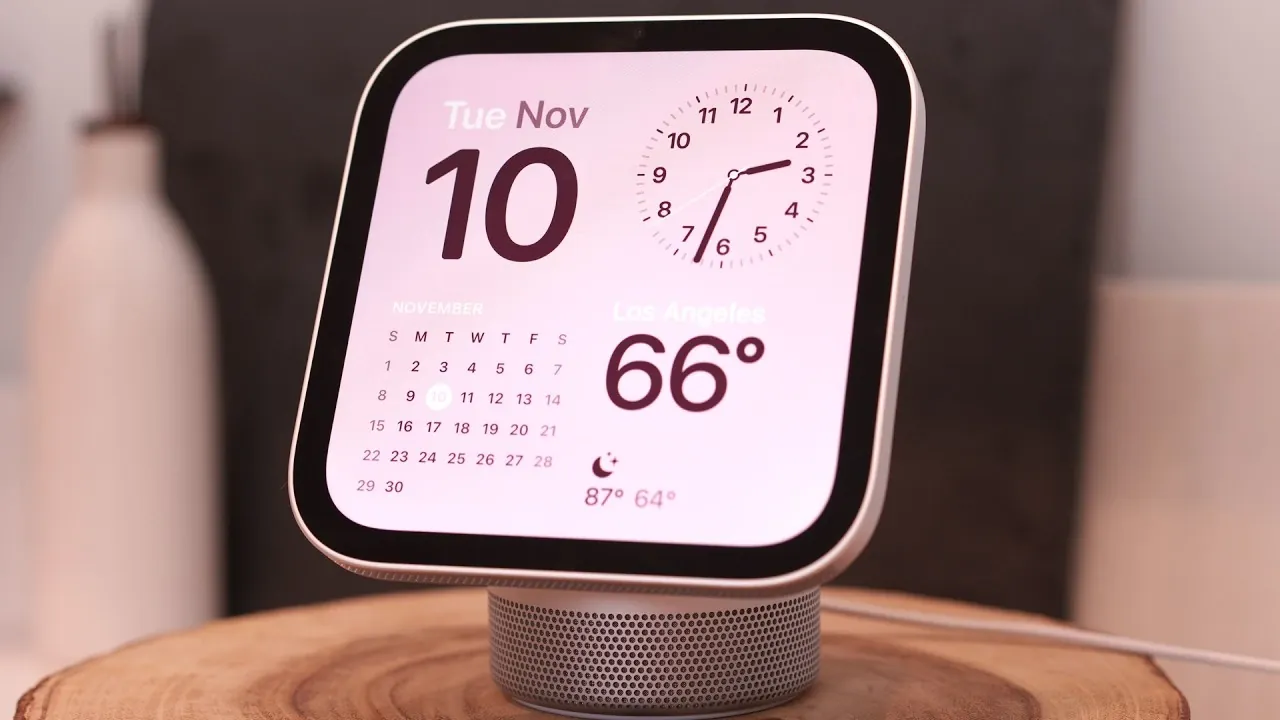
The Apple HomeView represents a significant addition to Apple’s smart home ecosystem, combining advanced technology with everyday practicality. This smart display is designed to seamlessly integrate into your home, offering a 7-inch Liquid Retina display, innovative AI capabilities and full HomeKit compatibility. Priced at $299, the HomeView is versatile enough to serve as a kitchen assistant, bedside companion, or entertainment hub. Available in multiple colors and with an optional wall-mounted design, it caters to a wide range of preferences and home aesthetics.
TL;DR Key Takeaways :
- 7-Inch Liquid Retina Display: Features a crisp 1088 x 1088 resolution panel with True Tone that adjusts automatically from 500 nits down to 0.3 nits at night.
- Personalized Siri AI & Recognition: Powered by the A18 chip with facial and voice recognition to dynamically tailor calendars, messages, and font sizes based on who is looking.
- Two Form Factors: Offered as a domed countertop speaker base in four colors or a streamlined wall-mounted display in Silver and Space Gray starting at $299.
- HomeKit & Matter Hub: Centralizes smart home controls, environmental sensors, and 12MP Center Stage FaceTime calls in one dedicated household screen.
Key Features at a Glance
- 7-inch Liquid Retina display with adaptive True Tone brightness (500 nits peak down to 0.3 nits) for optimal visibility
- HomeKit and Matter integration for centralized smart home control
- Siri AI powered by the A18 chip for hands-free commands and personalized interactions
- Dynamic photo display synced with iPhone albums
- High-quality speakers and a 12MP Center Stage camera for immersive audio and video
- Privacy-focused features like on-device facial recognition and guest mode
Design and Build
The Apple HomeView is a blend of sleek design and functional utility. Its compact 7-inch square Liquid Retina display (1088 × 1088 pixels) offers sharp visuals with a peak brightness of 500 nits, making sure vibrant clarity during the day, while dimming to 0.3 nits for comfortable nighttime use. The countertop model is available in four finishes—silver, starlight, rose pink and space gray—allowing it to complement a variety of home décors.
The adjustable stainless steel tilt stand ensures that you can achieve the perfect viewing angle, whether placed on a countertop or bedside table. For those seeking a minimalist aesthetic, the optional wall-mounted version (available in silver and space gray) eliminates the domed speaker base, creating a streamlined profile. Built-in four-microphone beamforming arrays and custom spatial audio speakers enhance the overall user experience, making the HomeView a practical and stylish addition to any room.
Setup and Personalization
Setting up the Apple HomeView is straightforward, particularly for users already familiar with Apple devices. The device pairs effortlessly with your iPhone or iPad, using facial and voice recognition to personalize settings. This ensures that the HomeView adapts to your preferences, such as adjusting brightness, scaling text size based on your distance from the screen, and shifting light/dark modes based on ambient lighting conditions.

One standout feature is the dynamic photo display, which syncs with shared iPhone albums. When idle, the HomeView transforms into a digital photo frame, showcasing your favorite memories. This feature not only adds a personal touch but also enhances the device’s role as a decorative element in your home.
Smart Home Control and Functionality
The HomeView acts as a central hub for managing your smart home devices. With full HomeKit and Matter integration, you can control locks, thermostats, cameras and more directly from the display. The inclusion of Siri AI allows for hands-free commands, allowing you to interact with apps like Messages, Calendar, Reminders, and Safari without lifting a finger.
Additionally, the HomeView features sound recognition technology, which can detect critical events such as smoke or carbon monoxide alarms, alongside built-in temperature and humidity sensors. When critical alerts are identified, the device sends immediate notifications to your iPhone, making sure that you can take action. This combination of convenience and safety makes the HomeView an indispensable tool for modern smart homes.
Kitchen Assistant and Productivity
In the kitchen, the HomeView proves to be an invaluable assistant. Its simplified recipe mode in Safari provides visual, step-by-step instructions, complete with live timers to streamline meal preparation. Siri’s hands-free navigation ensures that you can manage tasks without interrupting your workflow, whether you’re cooking or multitasking.
The countertop HomeView’s custom full-range speakers and down-firing woofer deliver rich audio, making it ideal for listening to music, podcasts, or audiobooks while you cook. With AirPlay and Handoff support, you can seamlessly transfer audio to and from your iPhone or other Apple products, creating a cohesive and integrated audio experience throughout your home.
Bedside Companion
The HomeView is equally effective as a bedside device, offering features tailored for nighttime use. Night mode reduces eye strain by dimming the display to 0.3 nits and shifting to red text for notifications. Its alarm functionality is customizable, making sure you wake up on time with your preferred settings.
Quick access to your calendar, reminders and weather updates helps you start your day organized and informed. The HomeView’s compact design and adaptive True Tone brightness make it a discreet yet functional addition to your bedside table.
Entertainment and Communication
The Apple HomeView enhances both entertainment and communication, making it a versatile device for various activities. Its computational audio system delivers an immersive listening experience, automatically balancing sound on the fly. Whether you’re streaming music, watching videos, or enjoying a podcast, the sound quality is consistently impressive.
The 12MP Center Stage camera improves video calls, making sure smooth and dynamic FaceTime interactions. Motion tracking keeps you in focus as you move around the room, making conversations more engaging and natural. Additionally, the HomeView supports Apple TV, Apple Music, and CarPlay-compatible third-party apps like Spotify, expanding its entertainment capabilities beyond Apple’s native services.
Privacy and Security
Privacy is a cornerstone of the HomeView’s design. On-device facial recognition backed by Apple’s Secure Enclave ensures that sensitive apps and personal content are accessible only to recognized household members, while guest mode provides limited access to basic features like music and timers. Notifications keep the primary user informed of any personal content requests, adding an extra layer of security.
These privacy-focused features are complemented by Apple’s commitment to data protection, making sure that your information remains secure without compromising the device’s functionality. This balance of privacy and usability makes the HomeView a trusted addition to your home.
Accessibility Features
Apple has prioritized inclusivity with the HomeView, incorporating a range of accessibility features to accommodate diverse user needs. VoiceOver functionality, AssistiveTouch, and sound recognition make the device accessible to individuals with varying abilities. Adaptive text size and distance-aware display adjustments further enhance usability, making sure that the HomeView delivers a user-friendly experience for everyone.
Overall Assessment
The Apple HomeView is a polished and versatile addition to Apple’s smart home lineup. Its advanced features, including HomeKit integration, Siri AI and a high-quality Liquid Retina display, make it an excellent choice for users seeking a premium smart home hub. Whether you’re managing your home, enhancing productivity, or enjoying entertainment, the HomeView offers a seamless and intuitive experience. While it is positioned as a high-end alternative to competitors like the Amazon Echo Show, its appeal is particularly strong for those already invested in Apple’s ecosystem.
Here are more guides from our previous articles and guides related to Apple HomeView that you may find helpful.
- Apple HomeView Buyer’s Guide: Features, Pricing and What to Know
- Apple HomeView: Things You Need to Know Before Spending $299
- Apple TV and HomeView Release Dates Leaked Ahead of Today’s Event
- Is Apple HomeView the Smart Display We’ve All Been Waiting For?
- Apple HomeView Price and Features: Is Apple’s New $299 Smart Display Worth Buying?
Source & Image Credit: Brandon Butch
Disclosure: Some of our articles include affiliate links. If you buy something through one of these links, Geeky Gadgets may earn an affiliate commission. Learn about our Disclosure Policy.
