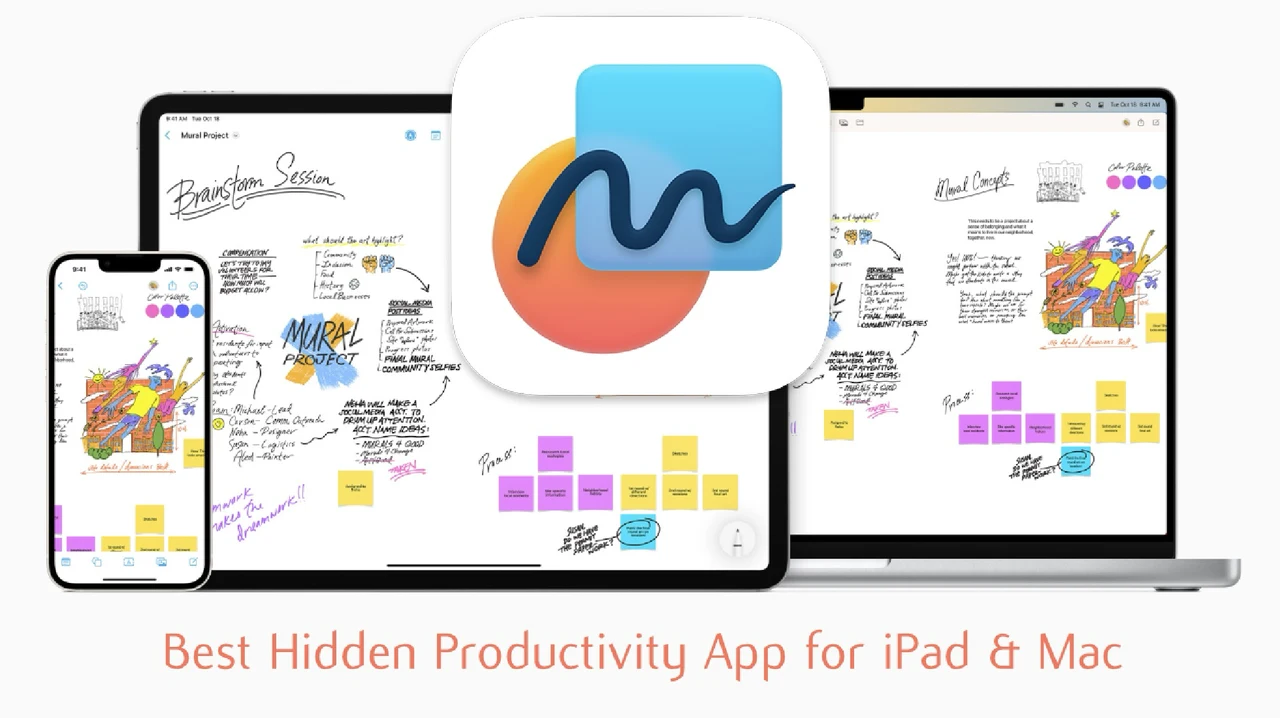
Have you ever felt constrained by rigid productivity tools that force your ideas into predefined boxes? Imagine a workspace where your thoughts can flow freely, expanding without limits, and adapting to your unique way of thinking. Enter Apple Freeform, the hidden gem of the Apple ecosystem that’s quietly transforming how we brainstorm, organize, and collaborate. With its infinite canvas, seamless iCloud syncing, and intuitive Apple Pencil integration, Freeform offers a rare blend of structure and creativity. Whether you’re sketching out a bold new project, mapping workflows, or simply capturing fleeting ideas, this app transforms your iPad or Mac into a boundless playground for productivity.
In this review, Bill McLean uncovers why Apple Freeform might just be the most underrated tool in your digital arsenal. From its ability to support visual thinkers with flexible layouts to its collaborative features that make teamwork effortless, Freeform is designed to meet the needs of both creative minds and organized professionals. You’ll discover how its unique features—like embedding files directly into your boards or linking ideas with intuitive connectors—can elevate your workflow in ways you didn’t know were possible. By the end, you might just find yourself wondering how this app stayed under the radar for so long.
Apple Freeform Overview
TL;DR Key Takeaways :
- Apple Freeform is a versatile productivity app with an infinite canvas, Apple Pencil support, and seamless iCloud syncing, ideal for brainstorming, organizing, and collaborating.
- Key features include support for various file types, real-time co-editing for teamwork, and tools for structuring and visualizing ideas like shapes, connectors, and scene creation.
- Practical applications range from brainstorming and workflow visualization to project planning, annotation, and creative exploration, catering to diverse personal and professional needs.
- Limitations include lack of integration with other Apple apps, minimal updates, and absence of advanced project management features like task assignments or Gantt charts.
- Despite its limitations, Freeform is a powerful, free tool within the Apple ecosystem, offering flexibility, creativity, and collaboration for unstructured workflows and innovative projects.
Key Features That Make Freeform Unique
Apple Freeform stands out as a productivity tool by catering to visual thinkers and collaborative teams. Its features are designed to enhance creativity and streamline workflows:
- Infinite Canvas: The app provides a limitless workspace, allowing you to expand your ideas without boundaries. This makes it ideal for brainstorming, mind mapping, and creative exploration.
- Apple Pencil Integration: With Apple Pencil support, you can sketch, annotate, and highlight directly on the canvas. Multiple brush styles and precision tools enhance your ability to bring ideas to life.
- iCloud Syncing: Freeform automatically syncs your boards across all Apple devices, making sure a seamless transition between iPhone, iPad, and Mac. This feature is especially useful for users who work on the go.
- File Compatibility: The app supports a wide range of file types, including PDFs, images, audio files, and Pages documents. You can embed and preview content directly within your boards, making it a centralized hub for your projects.
These features make Freeform a versatile tool for capturing, organizing, and sharing ideas in a way that aligns with your workflow.
Tools for Structuring and Visualizing Ideas
Freeform is equipped with a variety of tools that allow you to structure and visualize your ideas effectively. These tools are designed to help you create engaging and organized boards:
- Add and resize shapes, symbols, sticky notes, and images to create visually appealing layouts that suit your project’s needs.
- Use arrows and connectors to link elements, making it easier to map relationships and dependencies between ideas.
- Divide large boards into sections using the scene creation feature, which is particularly helpful for managing complex projects or brainstorming sessions.
These capabilities provide the flexibility to adapt Freeform to a wide range of tasks, from designing presentations to outlining workflows or planning events.
Apple Freeform Productivity Features for iPad & Mac

Unlock more potential in Apple Freeform by reading previous articles we have written.
- Apple Freeform App notetaking and sketching tips and tricks
- How to Use Apple Freeform for Creativity and Collaboration
- Apple Freeform Features: Infinite Canvas, Scenes & More Explained
- New Apple Freeform Scenes features makes it easier to organize
- iOS 18 Beta 8 Released: What’s New
- Transform Your iPad Notes: The Ultimate Guide
- 15 Essential Apple Notes Tips for Efficient Note-Taking
- New Apple Pencil 3 with USB-C charging and pairing port
- 11 Apple Notes Tips to Boost Productivity and Stay Organized
- The Ultimate iOS 18 Home Screen Guide
Collaboration Features for Teamwork
Freeform excels in fostering collaboration, making it an invaluable tool for group projects and team planning. Its real-time co-editing capabilities allow multiple users to work on the same board simultaneously. This feature is particularly beneficial for:
- Group brainstorming sessions where ideas can be shared and developed collectively.
- Collaborative design projects that require input from multiple team members.
- Team planning and organization, making sure everyone stays aligned on goals and tasks.
When it’s time to share your work, Freeform allows you to export boards as PDFs. This ensures your ideas are accessible and portable, even outside the Apple ecosystem, making it easy to present, archive, or share progress with stakeholders.
Practical Applications of Freeform
Freeform’s adaptability makes it suitable for a wide range of personal and professional uses. Here are some practical ways you can use the app:
- Brainstorming: Use the infinite canvas to generate and organize ideas in an unstructured, creative space.
- Workflow Visualization: Map out processes, establish connections between tasks, and visualize project timelines.
- Project Planning: Track milestones, organize tasks, and create detailed plans for personal or professional projects.
- Annotation: Mark up documents, images, or designs using Apple Pencil or text tools for clarity and emphasis.
- Creative Exploration: Experiment with layouts, designs, and concepts in a freeform environment that encourages innovation.
Whether you’re a student, designer, or business professional, Freeform adapts to your unique needs, offering a balance of structure and creativity.
Limitations to Be Aware Of
While Freeform is a robust and versatile tool, it does have some limitations that may impact its functionality for certain users:
- Lack of Integration: The app does not integrate with other Apple apps like Notes or Reminders, which could enhance its utility within the Apple ecosystem.
- Minimal Updates: Since its release, Freeform has received limited updates, leaving room for improvement and the addition of new features.
- Basic Project Management: Advanced features such as task assignments, timeline tracking, or Gantt charts are absent, making it less suitable for managing complex workflows.
These limitations mean that while Freeform is excellent for brainstorming and visual organization, it may not fully replace dedicated project management tools for more intricate tasks.
The Value of Freeform in Your Workflow
Apple Freeform is a hidden gem within the Apple ecosystem, offering a unique combination of flexibility, creativity, and collaboration. Its infinite canvas, robust Apple Pencil support, and cross-device syncing make it an invaluable tool for unstructured workflows and creative exploration. While it has room for improvement, Freeform remains a powerful, free resource for personal and collaborative projects.
If you’re seeking a versatile app to enhance your productivity and creativity, Freeform is worth exploring. Its ability to adapt to various use cases makes it a valuable addition to your digital toolkit, whether you’re brainstorming ideas, planning projects, or collaborating with a team.
Media Credit: Bill McLean
Disclosure: Some of our articles include affiliate links. If you buy something through one of these links, Geeky Gadgets may earn an affiliate commission. Learn about our Disclosure Policy.
