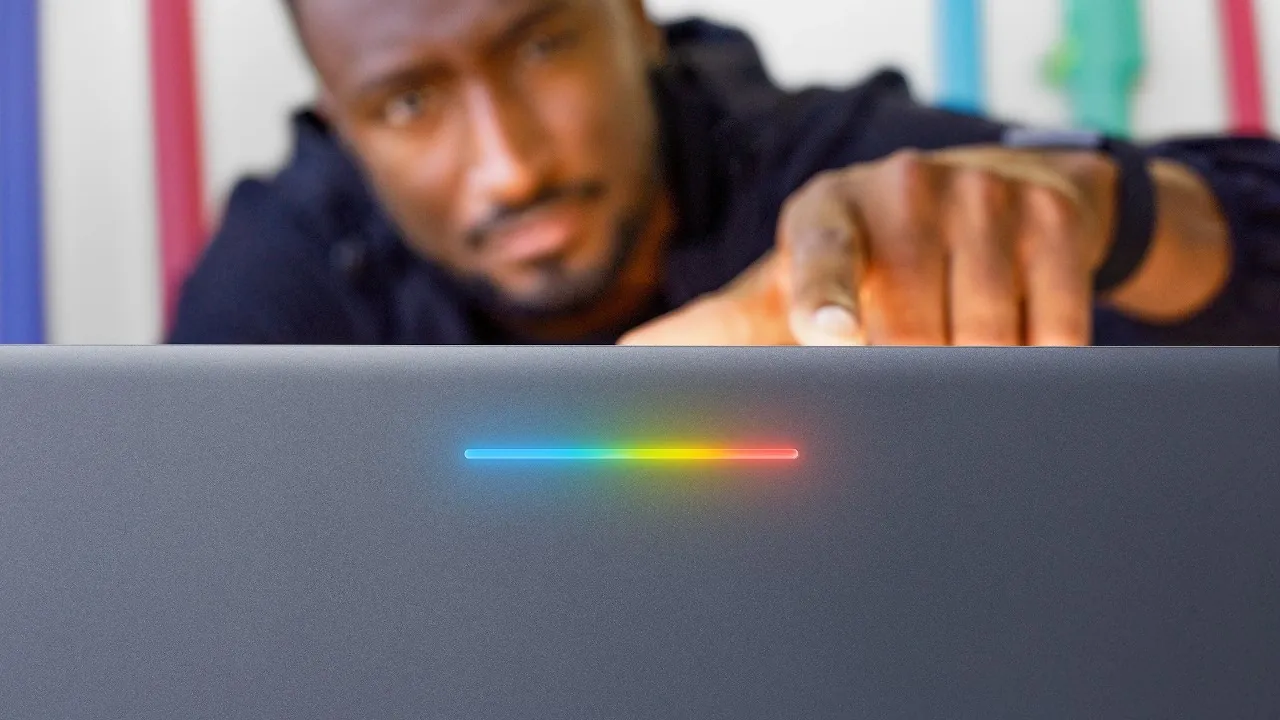
Google has unveiled a new category of laptops called Google Books, designed to offer a fresh perspective on portable computing. These devices are powered by the proprietary Google Book OS, which aims to deliver a seamless integration with Android devices, particularly Pixel phones. With features like Android app compatibility, AI-powered tools, and a cohesive ecosystem, Google Books promise a premium and lightweight experience. However, their practicality is under scrutiny due to a combination of high pricing, limited app optimization, and an unclear target audience. This is especially relevant when comparing them to Chromebooks or other established laptop options. The video below from Marques Brownlee gives us more details.

Hardware Features: A Blend of Premium Design and Functionality
Google Books are positioned as premium laptops, crafted to compete with high-end devices in the market. Their design emphasizes portability and functionality, making them appealing to users who prioritize sleek aesthetics and advanced hardware. Key hardware highlights include:
- Configurations offering 16GB to 32GB of RAM, making sure smooth multitasking and productivity.
- 2K+ OLED touchscreen displays with up to 1000-nit brightness, delivering vibrant visuals and usability in diverse lighting conditions.
- Innovative features like the “Glow Bar,” which provides quick battery and status updates at a glance.
- A variety of full-size ports, including USB-C, USB-A, and HDMI, enhancing connectivity and compatibility with peripherals.
- Optimized battery life, catering to users who are frequently on the move.
While these features establish Google Books as a strong contender in the premium segment, their pricing, ranging from $900 to $1,800, places them in direct competition with established players such as the MacBook Air and high-end Chromebooks. This raises questions about their value proposition, particularly for budget-conscious buyers who may find similar functionality at a lower cost.
Google Book OS: Android Meets Desktop
The defining feature of Google Books is the Google Book OS, a new operating system built on Android 17 but tailored for a desktop-like experience. This OS bridges the gap between mobile and desktop environments, offering users the ability to run Android apps from the Play Store while introducing features designed for productivity. Key functionalities include:
- Task continuity and file sharing, allowing seamless integration with Android phones for a unified workflow.
- Notification syncing, making sure users stay connected across devices without missing important updates.
Despite these promising features, the OS faces challenges. App optimization for larger screens and desktop use remains inconsistent, limiting its appeal for professionals who depend on robust, desktop-class software. Additionally, Google has not clarified whether existing Chromebooks will be eligible for an upgrade to Google Book OS, leaving current Chromebook users uncertain about their devices’ future compatibility. This lack of clarity may deter potential buyers who are already invested in the Chromebook ecosystem.
AI-Powered Features: Smarter Productivity
Google Books aims to differentiate itself with a suite of AI-driven tools designed to enhance productivity and simplify workflows. These tools include:
- Gemini AI: A semantic file search tool that allows users to locate files using natural language queries, making file management more intuitive.
- Rambler: A speech-to-text tool that facilitates effortless transcription, ideal for note-taking and documentation.
- Custom widget creation, allowing users to personalize their workflows and access frequently used tools quickly.
- Magic Pointer: An AI-powered task management assistant that helps users organize and navigate complex projects efficiently.
These features are designed to provide a smarter, more intuitive user experience. However, their real-world effectiveness will depend on how seamlessly they integrate into daily workflows. If these tools can deliver tangible benefits without adding unnecessary complexity, they could become a significant selling point for Google Books. Otherwise, they risk being perceived as gimmicks rather than essential productivity enhancements.
Challenges and Limitations
Despite their innovative features, Google Books faces several challenges that could hinder their adoption in the broader market. These include:
- The high price point, which limits accessibility for casual users, students, and budget-conscious buyers.
- Inconsistent app optimization for desktop use, which restricts functionality compared to traditional laptops running established operating systems like Windows or macOS.
- The absence of robust, desktop-class applications, making them unsuitable for gamers, video editors, and professionals requiring high-performance software.
- An unclear upgrade path for existing Chromebooks, creating uncertainty for current users who may wish to transition to the new platform.
- A lack of a well-defined target audience, raising questions about the product’s long-term viability and market positioning.
These limitations suggest that while Google Books may appeal to a niche audience, such as Pixel and Android enthusiasts, their broader market appeal remains uncertain. Addressing these challenges will be critical for Google to establish a sustainable foothold in the competitive laptop market.
Who Are Google Books For?
Google Books are primarily designed for users who are deeply integrated into the Android ecosystem, particularly those who own Pixel phones and rely heavily on Google services. These laptops are ideal for individuals who value seamless device integration and are willing to invest in a premium product. However, their high cost and limited app ecosystem make them less appealing to certain groups, including:
- Students and casual users seeking affordable, versatile options for everyday tasks.
- Creatives and professionals requiring specialized software for tasks like photo editing, video production, or graphic design.
- Gamers and power users who need high-performance capabilities and access to a broader range of applications.
As a first-generation product, Google Books shows potential for future iterations. However, they face stiff competition from more affordable Chromebooks and versatile laptops like MacBooks, which offer broader functionality and a more established ecosystem. Whether Google Books can carve out a sustainable niche will depend on how effectively Google addresses its current limitations and refines the product in subsequent versions.
Become an expert in Android with the help of our in-depth articles and helpful guides.
- Install Armada OS on Android Handhelds to Create a Steam Deck in Under 5 Minutes
- iOS 27 Lets You Watch YouTube on Apple CarPlay: How It Works
- Droid Deck Brings SteamOS to Android Phones Without a Root
- How to play Skyrim locally on your Android phone
- Android 17 vs. iOS 27: Which OS Handles True Multitasking Better?
- Apple Isn’t Done with CarPlay: What Just Changed in iOS 27 Beta 8
Source & Image Credit: Marques Brownlee
Disclosure: Some of our articles include affiliate links. If you buy something through one of these links, Geeky Gadgets may earn an affiliate commission. Learn about our Disclosure Policy.
