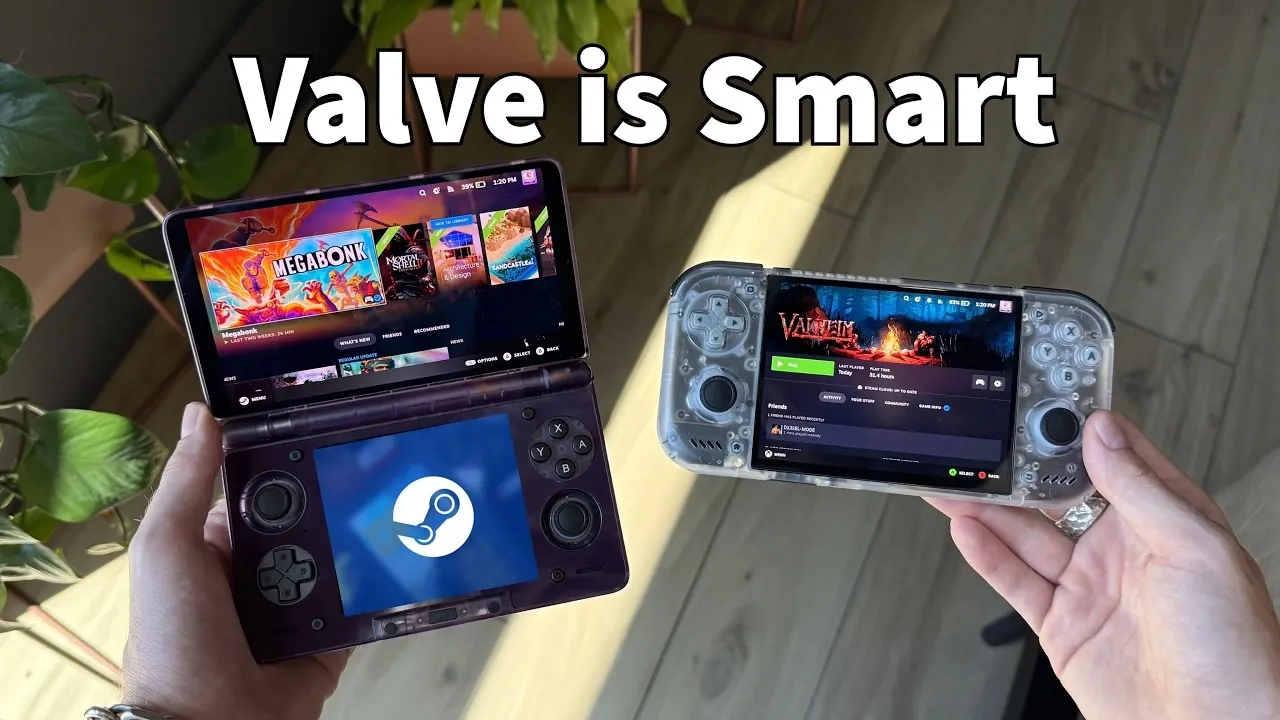
The introduction of SteamOS on smartphone hardware offers a new avenue for repurposing mobile devices into gaming platforms. As explained by Cyber Dopamine, this development allows users to install a Linux-based operating system on devices like the Odin 3 and Retroid Pocket Nova. The process involves downloading the OS from its GitHub repository and setting it up on either a microSD card or internal storage. With features such as Steam integration and experimental x86-to-ARM conversion, this approach provides a practical way to explore gaming on existing smartphone hardware.
Armada OS is a SteamOS-like Linux for ARM handhelds. Below learn more about the performance trade-offs when running Steam games on ARM-based devices and the customization options available through pre-installed software. Additionally, understand the challenges users might face, such as occasional glitches or battery performance concerns and how these factors influence the overall experience.
Armada OS
TL;DR Key Takeaways :
- Armada OS is a Linux-based operating system designed to transform Android handheld devices like Odin 3, Thor and Retroid Pocket Nova into SteamOS-like gaming platforms, offering a cost-effective alternative to gaming PCs and consoles.
- The OS features seamless Steam integration, performance modes, x86-to-ARM game conversion and a functional sleep mode, delivering a near-console-like gaming experience on smartphone hardware.
- Installation is user-friendly, requiring minimal technical expertise and can be completed in under five minutes via a microSD card or internal storage.
- While the OS supports many Steam games, it faces challenges such as occasional glitches, limited LED functionality and lower frame rates compared to dedicated gaming systems.
- Armada OS is community-driven, with active developer-user collaboration through platforms like Discord, making sure frequent updates and continuous improvement of the platform.
Supported Devices and Installation Process
Armada OS is specifically tailored for Android-based handheld devices, including popular models like the Odin 3, Thor and Retroid Pocket Nova. These devices, already optimized for gaming, serve as an ideal foundation for the OS, making sure smooth performance and compatibility.
Installing Armada OS is a straightforward process, designed to be accessible even for those with minimal technical expertise. The steps are as follows:
- Download the OS from its official GitHub repository.
- Install it onto a microSD card or directly onto the device’s internal storage.
- The entire setup process typically takes less than five minutes.
This streamlined installation ensures that users can quickly transform their devices into gaming hubs without requiring advanced technical knowledge.
Key Features That Set Armada OS Apart
Armada OS is packed with features designed to replicate the Steam Deck experience on smartphone hardware. Its capabilities make it a standout choice for portable gaming enthusiasts:
- Steam Integration: Full compatibility with Steam, including Steam Sync, ensures your game library, achievements and progress are always up to date.
- Deki Loader: Pre-installed software that offers customization options, power management tools and an intuitive user interface for seamless navigation.
- Performance Modes: Switch between eco, balanced, or performance modes to optimize power consumption and gaming performance based on your preferences.
- x86-to-ARM Conversion: Experimental support for running x86-based games on ARM architecture expands the range of playable titles, pushing the boundaries of what smartphone hardware can achieve.
- Sleep Mode: A functional sleep mode allows you to pause gaming sessions and resume later with minimal power loss, enhancing portability and convenience.
These features collectively make Armada OS a versatile platform, offering a near-console-like experience on handheld devices while maintaining the flexibility of smartphone hardware.

Expand your understanding of SteamOS with additional resources from our extensive library of articles.
- SteamOS 3.8 Changes the Game for Steam Deck, Legion Go and Xbox Ally X Users
- Its Time to Ditch Windows for Valve’s Lightweight SteamOS Gaming Platform
- Valve Brings Official SteamOS Support to NVIDIA Desktop GPUs
- SteamOS 3.8 Adds Ray Tracing and Improved 4K Display Support
- SteamOS Beta Update Fixes CPU Degradation and Wi-Fi Bugs
- ONEXPLAYER X2 Mini Pro Runs SteamOS with Ryzen AI Max Plus 388
- How to Build a DIY Steam Machine Using Your Existing PC and SteamOS
- Why Valve’s Steam OS is Quietly Replacing Windows on Gaming PCs
- DIY Steam Machines : Valve Drops SteamOS 3.8 with Expanded AMD Hardware Support
- Valve’s Free SteamOS Runs Arch Linux for Daily Desktop Use
Performance Insights and Challenges
While Armada OS delivers an impressive gaming experience, it is not without its limitations. Understanding these challenges is essential for setting realistic expectations:
- Performance: The OS handles many Steam games well, particularly older or less demanding titles. However, frame rates may be lower compared to native Android gaming or dedicated gaming consoles.
- Glitches: Occasional issues, such as display glitches or download interruptions, may occur, reflecting the experimental nature of the OS.
- LED Support: Limited LED light functionality may affect certain devices, particularly those with customizable lighting features.
- Sleep Mode: While functional, the sleep mode may draw minor power even when idle, which could impact battery life over extended periods.
These limitations highlight the OS’s developmental stage, but frequent updates aim to address these issues and improve overall performance. For users willing to embrace its experimental nature, Armada OS offers a unique and evolving gaming experience.
A Collaborative and Community-Driven Platform
One of the most compelling aspects of Armada OS is its community-driven development model. Developers actively engage with users through platforms like Discord, gathering feedback to refine and enhance the OS. Frequent updates are rolled out to improve compatibility, stability and performance, making sure the platform evolves in response to user needs.
This collaborative approach fosters a dynamic ecosystem where users and developers work together to push the boundaries of portable gaming. The active involvement of the community not only accelerates the OS’s development but also creates a sense of shared ownership and innovation.
The Future of Armada OS
Armada OS is paving the way for more accessible and affordable portable gaming by repurposing existing smartphone hardware. Its innovative features, combined with its budget-friendly approach, position it as a promising alternative to dedicated gaming systems. While still in its early stages, the OS’s active development and growing community support suggest significant potential for growth and improvement.
For gamers seeking a cost-effective way to enjoy Steam gaming on the go, Armada OS offers a compelling solution. With ongoing updates, experimental features and an expanding user base, now is an exciting time to explore this platform and join its journey into the future of portable gaming.
Media Credit: Cyber Dopamine
Disclosure: Some of our articles include affiliate links. If you buy something through one of these links, Geeky Gadgets may earn an affiliate commission. Learn about our Disclosure Policy.
