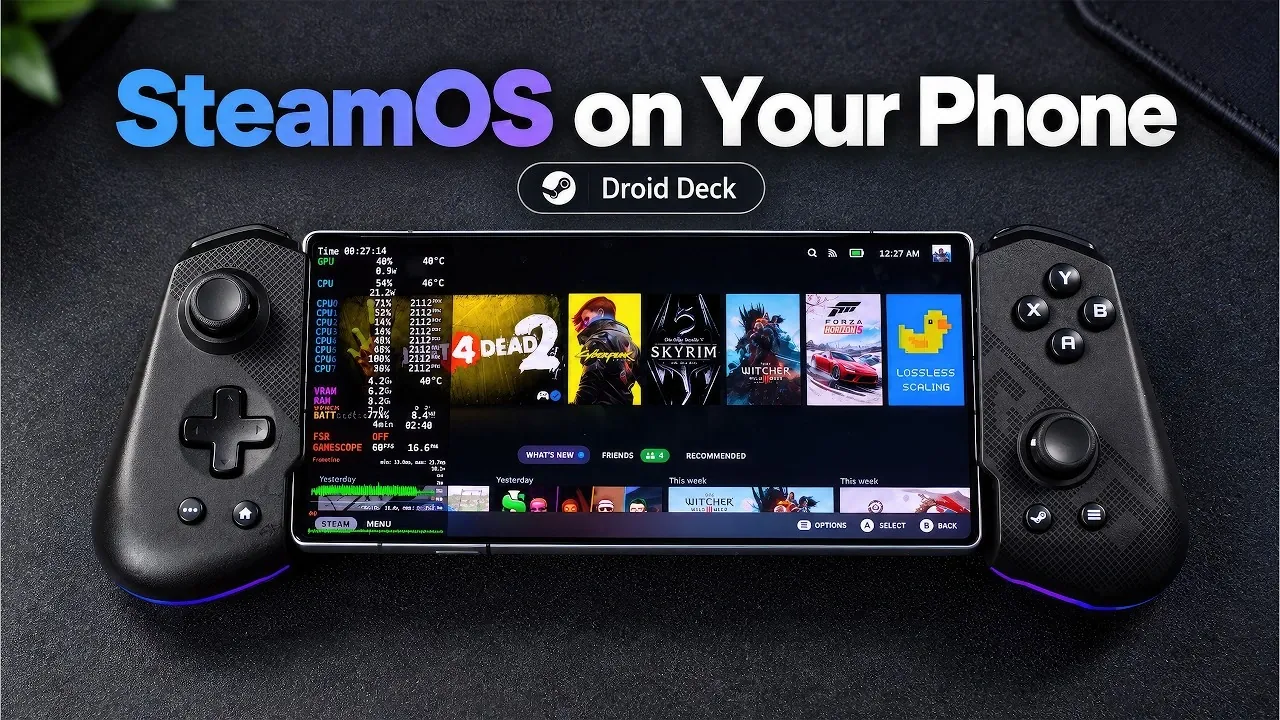
SteamOS is now accessible on mobile devices through the Droid Deck application, allowing users to experience PC gaming on Android phones and tablets without replacing their operating system. Droid Deck emulates SteamOS within Android, allowing compatibility with x86 games using technologies like Proton and FEX layers. As explained by ETA Prime, this method supports popular PC titles on devices with hardware such as Snapdragon 8 Gen 1 processors and Adreno 730 GPUs, while maintaining the functionality of the original Android system.
Dive into the steps for setting up Droid Deck, including downloading the APK and adjusting system settings for better performance. Learn how to customize features like resolution scaling and thermal management to optimize your gaming experience. Additionally, explore ways to enhance gameplay using external controllers or on-screen touch controls, making sure a versatile setup for PC gaming on Android.
What Makes Droid Deck Unique?
TL;DR Key Takeaways :
- Droid Deck enables PC gaming on Android devices by emulating SteamOS without requiring rooting or OS replacement, making it accessible and safe for users.
- The app is optimized for high-performance devices with Snapdragon 8 Gen 1 processors and Adreno 730 GPUs, making sure smooth gameplay for demanding titles.
- Advanced features like frame generation, resolution scaling and thermal management tools enhance performance and prevent overheating during extended gaming sessions.
- Droid Deck supports external controllers like Xbox controllers and offers customizable on-screen touch controls for a flexible gaming experience.
- While offering new accessibility, the app may require tweaking for optimal performance on less powerful devices and faces occasional compatibility challenges with certain PC games.
Droid Deck is a innovative app designed to emulate SteamOS within the Android ecosystem. Unlike traditional methods that require rooting or replacing your device’s operating system, Droid Deck operates without altering your existing Android setup. This makes it a safer and more accessible option for users who want to explore PC gaming on their mobile devices.
The app is compatible with Android 9 and above, but it performs best on devices equipped with Snapdragon 8 Gen 1 processors or newer and Adreno 730 GPUs or better. These hardware requirements ensure smooth gameplay and broad compatibility with modern devices. By eliminating the need for complex modifications, Droid Deck opens up PC gaming to a wider audience, making it an appealing choice for both casual and dedicated gamers.
How to Set Up Droid Deck
Getting started with Droid Deck is a straightforward process, even for users with limited technical expertise. Follow these steps to install and configure the app:
- Download the APK file from the official Droid Deck GitHub repository.
- Enable developer settings on your Android device to allow installation from unknown sources.
- Adjust system configurations, such as disabling child process limits, to optimize performance.
- Install the app and set up a Linux runtime environment within Droid Deck.
- Log in to your Steam account to access your library of PC games.
Once the setup is complete, you can start playing PC games directly on your Android device. This process transforms your smartphone or tablet into a portable gaming hub, offering unparalleled convenience and flexibility.

Unlock more potential in SteamOS by reading previous articles we have written.
- Valve Restructures SteamOS with Distinct X86 and ARM Builds
- ONEXPLAYER X2 Mini Pro Runs SteamOS with Ryzen AI Max Plus 388
- SteamOS Beta Update Fixes CPU Degradation and Wi-Fi Bugs
- Valve’s Free SteamOS Runs Arch Linux for Daily Desktop Use
- Install Armada OS on Android Handhelds to Create a Steam Deck in Under 5 Minutes
- SteamOS Update Adds Seamless Account Switching During Gameplay
- Valve Adds Initial NVIDIA GPU Driver Support to SteamOS
- How to Install Valve’s SteamOS on the MSI Claw 8 AI+ Handheld
- Valve Adds Desktop Mode Toggle to SteamOS for PC Tasks
- Steam Machine Benchmarks: Windows 11 Wins at 4K vs Steam OS
Performance and Compatibility
Droid Deck is optimized for high-performance Android devices, making sure a smooth gaming experience for demanding titles. Devices featuring Snapdragon 8 Gen 1 processors and Adreno 730 GPUs can handle games like Cyberpunk 2077, Skyrim, and Left 4 Dead 2 with ease. The app also includes advanced features to enhance gameplay, such as:
- Frame generation for smoother visuals and reduced latency.
- Resolution scaling to balance performance and visual fidelity based on your device’s capabilities.
These features allow users to customize their gaming experience, making sure optimal performance even for resource-intensive games. However, it’s important to note that older or less powerful devices may require additional tweaking to achieve satisfactory results.
Customization and Thermal Management
One of Droid Deck’s standout features is its extensive customization options. Users can adjust settings for resolution, frame rates and overall performance to suit their device’s capabilities. For those concerned about overheating during extended gaming sessions, the app includes thermal management tools, such as the ability to disable specific CPU cores. These tools help maintain device performance and prevent thermal throttling, making sure a stable gaming experience.
Additionally, Droid Deck offers a built-in Linux desktop environment, allowing multitasking capabilities. This feature allows users to run other applications alongside their games, making Droid Deck a versatile tool for both gaming and productivity.
Controller and Input Options
Droid Deck supports a wide range of external controllers, including popular options like Xbox controllers, for a console-like gaming experience. For users without external controllers, the app provides customizable on-screen touch controls, making sure accessibility for all. This flexibility allows gamers to tailor their input methods to their preferences, enhancing the overall experience.
Challenges and Considerations
While Droid Deck offers a new solution for mobile gaming, it does come with certain challenges. These include:
- Some games may require extensive tweaking to achieve optimal performance, particularly on less powerful devices.
- Thermal management is crucial for high-demand games, as extended play sessions can lead to overheating and performance throttling.
- Not all PC games are fully optimized for mobile hardware, which may result in occasional compatibility issues.
These challenges highlight the importance of using a compatible, high-performance device to fully enjoy the benefits of Droid Deck. Despite these limitations, the app represents a significant step forward in making PC gaming more accessible on mobile platforms.
The Future of Droid Deck
Droid Deck is paving the way for a new era in mobile gaming by making SteamOS accessible on Android devices. Unlike older methods that required complex modifications, this app simplifies the process, making it user-friendly and widely available. As the technology behind Droid Deck continues to evolve, it has the potential to further bridge the gap between PC and mobile gaming. Future updates could bring enhanced compatibility, improved performance and additional features, offering an increasingly seamless experience for gamers.
By combining advanced emulation technologies with robust customization options, Droid Deck is not just a tool, it’s a platform that redefines what mobile devices are capable of. Whether you’re a casual gamer or a tech enthusiast, Droid Deck opens up new possibilities, making PC gaming more portable and accessible than ever before.
Media Credit: ETA PRIME
Disclosure: Some of our articles include affiliate links. If you buy something through one of these links, Geeky Gadgets may earn an affiliate commission. Learn about our Disclosure Policy.
