Valve’s Steam Controller is an input device designed to expand control options for PC gaming. It features customizable trackpads, magnetic thumbsticks and capacitive grip sensors, allowing players to tailor their experience to different game genres. For example, the trackpads can be configured for precise cursor control in strategy games or for motion-based input in first-person shooters. The controller connects via a wireless receiver and supports firmware updates through the Steam platform to maintain compatibility with modern titles.
Discover how to configure the trackpads for tasks like camera movement or radial menu navigation. Learn how to remap the grip buttons to suit your playstyle and create game-specific profiles for tailored setups. Understand the process of updating firmware and establishing a stable wireless connection to ensure optimal performance.
TL;DR Key Takeaways :
- The Steam Controller offers advanced features like magnetic thumbsticks, customizable trackpads, gyro sensors and remappable grip buttons, providing precision and adaptability for various gaming styles.
- Its seamless integration with the Steam platform ensures compatibility with a wide range of games, from indie titles to AAA blockbusters, making it a versatile choice for PC gamers.
- The controller includes a wireless receiver, USB-C cable and charging puck, allowing a clutter-free setup and reliable wireless connectivity with minimal latency.
- Customization options allow users to remap buttons, adjust sensitivity and create game-specific profiles, tailoring the controller to individual preferences and gaming genres.
- Regular firmware updates enhance performance, introduce new features and ensure the controller remains future-proof for modern gaming demands.
What’s in the Box?
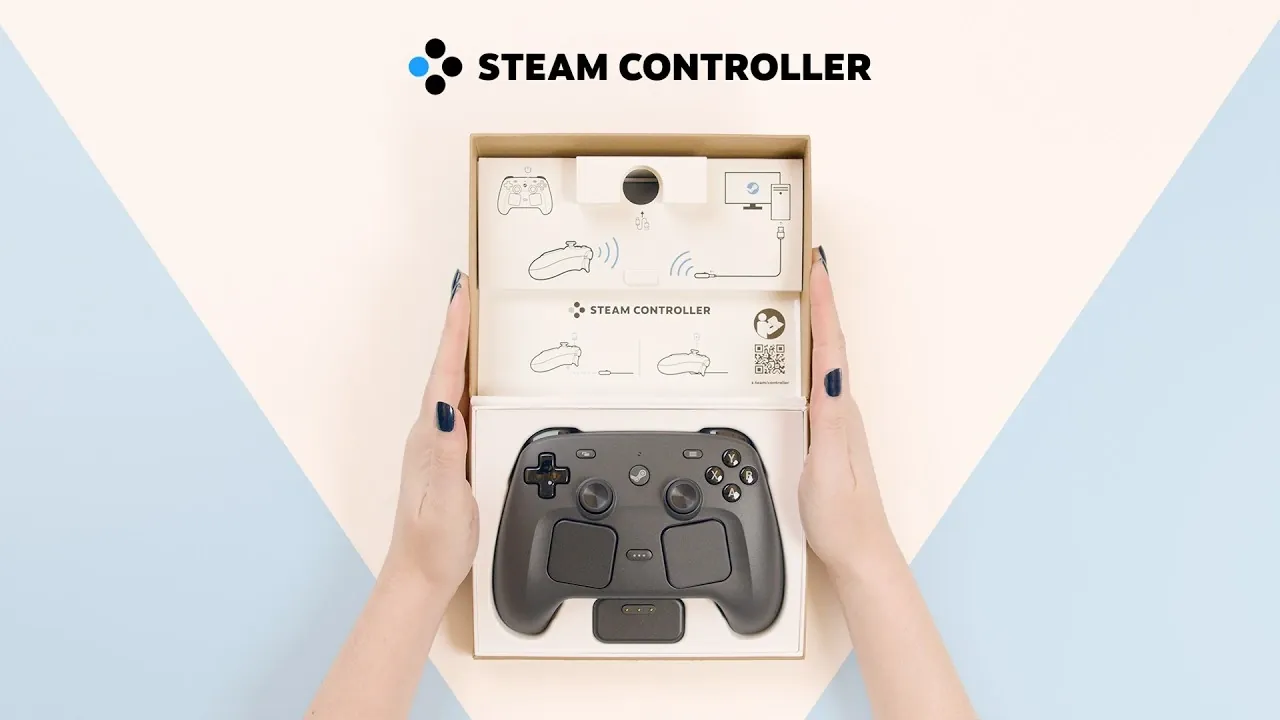
When you unbox the Steam Controller, you’ll find everything you need to get started right away. The package includes:
- The Steam Controller itself, featuring a sleek and ergonomic design.
- A wireless receiver that also functions as a charging puck for added convenience.
- A USB-A to USB-C cable for charging and wired connectivity options.
- A quick-start guide with clear setup instructions to help you get started effortlessly.
Each component is thoughtfully designed to ensure a smooth setup process and reliable performance, making it easy to dive into your favorite games without delay.
How to Set Up and Connect
Setting up the Steam Controller is a straightforward process that ensures you can start gaming quickly:
- Connect the charging puck to your PC using the provided USB-C cable.
- Press the Steam button on the controller to power it on.
- The controller will automatically pair with the wireless puck, confirmed by the LED indicator light on the device.
This wireless connection provides a clutter-free gaming setup while maintaining a stable and responsive link. The result is uninterrupted gameplay with minimal latency, making sure a seamless experience.

Discover other guides from our vast content that could be of interest on Steam Controller.
- $60 Steam Controller 2 is Packing Features PC Gamers Have Been Waiting For
- Is Valve’s New $99 Steam Controller Actually Worth the Price?
- Steam Controller Hands on First Look : Worth the Premium $99 Upgrade?
- Why the New Steam Controller’s Deep Customization Might Overwhelm You
- New Valve Steam Controller Tested by Gamers Nexus : Here’s What They Found
- Valve’s New Steam Controller Puts Comfort and Precision Control First
- Why Valve’s New Steam Machine Is Taking Direct Aim at the PS5
Keeping Your Controller Updated
Regular firmware updates are essential for maintaining optimal performance. These updates not only fix bugs but also introduce new features and improve compatibility with the latest games. Both the controller and the charging puck can be updated directly through the Steam platform. By keeping your firmware up to date, you ensure that your device remains reliable and future-proof, ready to handle the demands of modern gaming.
Steam Controller Features
The Steam Controller is packed with innovative features that enhance your gaming experience:
- Magnetic Thumbsticks: These durable and responsive thumbsticks provide precise control, making them suitable for a wide range of games.
- Customizable Trackpads: Acting as a mouse, radial menu selector, or camera control input, these trackpads offer a versatile alternative to traditional thumbsticks.
- Gyro Sensor: Motion-based input allows for intuitive control, particularly useful for aiming or movement in certain genres like shooters or racing games.
- Remappable Grip Buttons: Four grip buttons on the back of the controller can be customized to match your preferred control layout, offering additional input options.
- Capacitive Grip Sensors: These sensors detect hand placement and enable extra input options, such as toggling gyro controls or activating in-game menus.
Each of these features is designed to provide flexibility and adaptability, making sure the controller can meet the demands of various gaming genres and playstyles.
Trackpads and Grip Sensors: A Closer Look
The trackpads and capacitive grip sensors are standout features that significantly enhance the controller’s functionality:
- Trackpads: These can replace a traditional mouse for precise cursor control, making them ideal for strategy games or navigating menus. Additionally, they can be configured for radial menu selection or camera control in first- and third-person games, offering a versatile input method.
- Grip Sensors: These sensors detect when your hands are gripping the controller and can trigger specific functions, such as allowing gyro controls or opening in-game menus. This adds an extra layer of customization and convenience.
These features allow you to fine-tune the controller to suit your preferences, providing a tailored gaming experience that adapts to your unique playstyle.
Charging Made Simple
Charging the Steam Controller is designed to be quick and hassle-free. The controller securely snaps into the charging puck, making sure a stable connection during charging. Once fully charged, simply press the Steam button to activate the controller. The LED indicator light confirms that it’s ready for use. This streamlined charging process minimizes downtime, allowing you to focus on what matters most, your gaming sessions.
Customization and Compatibility
One of the Steam Controller’s greatest strengths is its extensive customization options. You can:
- Remap buttons to create a control layout that suits your playstyle.
- Adjust sensitivity settings for precise control in fast-paced or tactical games.
- Create game-specific profiles to optimize the controller for different genres or titles.
If you’re familiar with the Steam Deck, you’ll find the interface and input options intuitive and easy to navigate. The controller’s seamless integration with the Steam ecosystem ensures compatibility with a wide range of games, from indie titles to AAA blockbusters. This makes it a versatile choice for PC gamers looking to enhance their gaming experience.
A Controller Built for Gamers
The Steam Controller is a feature-rich device designed to meet the diverse needs of modern gamers. Its magnetic thumbsticks, customizable trackpads, and advanced sensors provide the precision and flexibility required for a wide variety of gaming genres. With wireless connectivity, regular firmware updates and robust customization options, the Steam Controller ensures a reliable and personalized gaming experience. Whether you’re navigating complex menus, aiming with precision in shooters, or exploring vast open-world adventures, this controller delivers the tools you need to perform at your best. Its seamless integration with the Steam platform and intuitive setup process make it a valuable addition to any PC gamer’s arsenal.
Media Credit: Valve
Disclosure: Some of our articles include affiliate links. If you buy something through one of these links, Geeky Gadgets may earn an affiliate commission. Learn about our Disclosure Policy.
