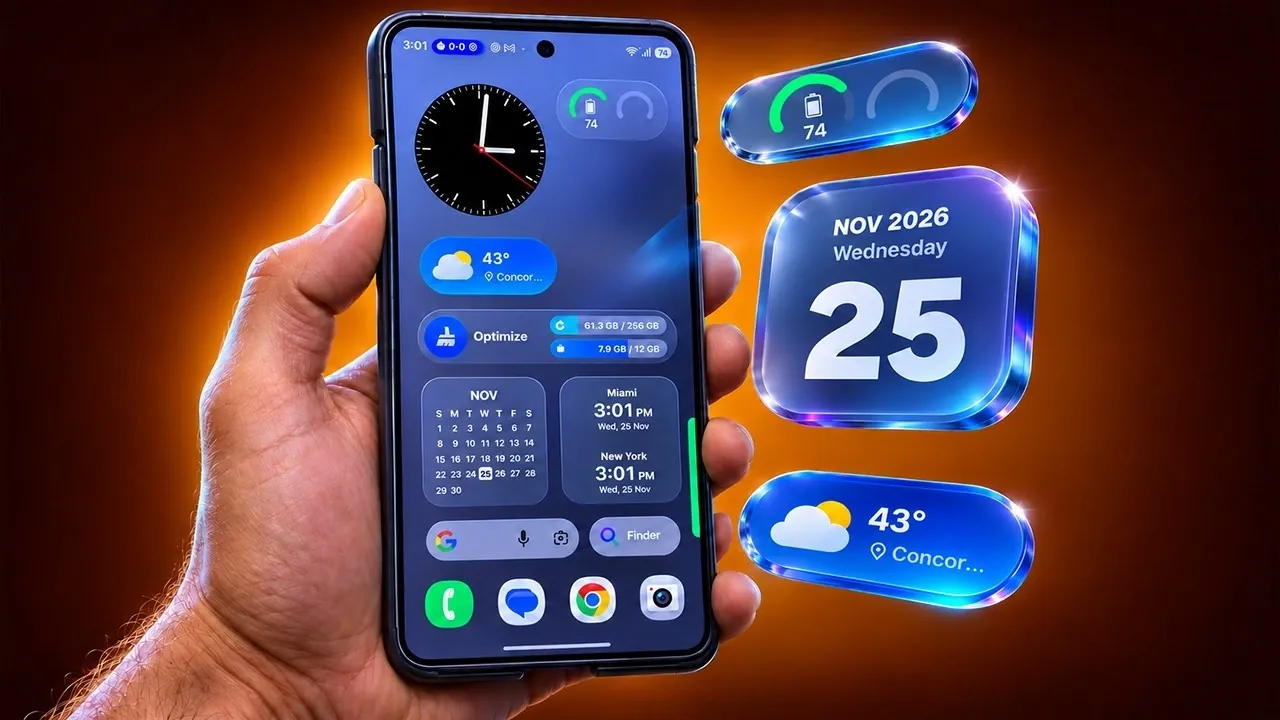
A crisp, thin perimeter border separates transparent widgets from your home screen wallpaper in the Samsung One UI 9.5 beta, Samsung’s latest pre-release software update for Galaxy smartphones. Accessible through a new fourth opacity setting inside individual widget controls, the finish adds visual depth rather than simply making backgrounds faint—though support currently varies across widgets, with most third-party options left out for now, as shown in Sakitech’s video walkthrough. Because One UI 9.5 is still in beta testing ahead of its wider public release, visual details, supported widgets, and rollout timelines remain subject to change.
TL;DR Key Takeaways :
- Outlined glass finish: One UI 9.5 adds a fourth opacity option that makes supported widgets transparent while framing them with a thin edge border.
- Beta enrollment: Galaxy S26 series owners in Germany, India, South Korea, Poland, the UK, and the US can enroll through the Samsung Members app.
- Expected rollout: The unannounced Galaxy S27 lineup is expected to debut with stable One UI 9.5, with older eligible Galaxy phones following in early 2027.
- Widget compatibility: Stock tools like Calendar and Clock support the glass-style setting, whereas third-party widgets generally do not yet support it.
- Customization tools: According to NokiaPowerUser, updated widget settings also pair opacity levels with theme color matching, shape presets, and a live preview card.
Samsung’s One UI 9.5 beta—which opened on November 18, 2026—introduces an extra transparency tier that gives home screen widgets a subtle, glass-like finish. Galaxy S26, Galaxy S26+, and Galaxy S26 Ultra owners in Germany, India, South Korea, Poland, the UK, and the US can sign up through the Samsung Members app, while Samsung’s unannounced Galaxy S27 series is expected to launch with stable One UI 9.5 before older models follow in early 2027.
While online discussions often refer to the aesthetic as “Liquid Glass,” Samsung has not used that label in its beta announcement or changelog. Instead, the visual shift comes from an added transparency step and refined border styling inside Samsung’s native widget customization menu rather than a separately branded toggle.
Choose the Fourth Opacity Option
Applying the transparent outlined style takes only a few taps directly from your Galaxy home screen:
- Open widget controls: Press and hold a supported widget on your home screen and tap Settings.
- Select the fourth opacity tier: One UI 9.5 keeps the three transparency steps from One UI 9.0 and introduces a fourth option at the transparent end of the scale.
- Preview and save: Check legibility against your wallpaper in the preview pane, then tap Done (or Save) to apply the look.
Selecting that fourth option turns the widget background transparent while adding a delicate, light-catching outline around its perimeter—creating a layered glass appearance with clearer visual separation. By comparison, choosing the lowest opacity level on a One UI 9.0 device running the exact same widgets simply fades the background without drawing a border, allowing text and icons to blend more easily into detailed wallpapers.

Preview the Look and Check Widget Support
According to reporting from NokiaPowerUser, Samsung has also made widget customization more uniform across stock apps in One UI 9.5, pairing the four-step opacity control with color matching (to align widget accents with your phone’s color palette), selectable shape presets, and a live preview card at the top of the settings screen so you can check contrast against your current wallpaper before saving.
| Widget Aspect | One UI 9.0 | One UI 9.5 Beta |
|---|---|---|
| Opacity Steps | Three opacity levels | Four opacity levels, adding an outlined transparent tier |
| Edge Definition | Transparent setting fades the background without a border | Fourth level adds a thin perimeter line for glass-like depth |
| Customization Menu | Varies by individual stock widget | Consistent opacity, color matching, shape presets, and live preview |
| Third-Party Support | Limited to developer-built widget themes | Generally unsupported by third-party widgets in current beta |
In Sakitech’s hands-on comparison, the outlined glass finish works cleanly on core stock widgets such as Calendar and Clock, and Samsung notes more consistent customization across built-in One UI widgets. Even so, at least one tested widget lacked the option, and third-party widgets from the Play Store generally do not support the fourth opacity style yet—meaning mixing stock and third-party cards on the same screen can still create mismatched visual styles.
The thin border around the widget ends up doing more practical work than the extra transparency itself. On a colorful or high-contrast wallpaper, a purely transparent widget quickly loses legibility, whereas a crisp perimeter line keeps the card looking like an intentional glass layer floating above your background—a difference made obvious when placed side by side with One UI 9.0’s borderless transparency.
Even if third-party widgets do not match the new finish yet, the fourth opacity tier gives Galaxy S26 beta testers a cleaner way to showcase custom wallpapers without sacrificing readability. As One UI 9.5 moves from beta testing toward its expected early-2027 stable rollout, fine visual details and widget support could still evolve before general release.
Below are more guides on Samsung One UI 9.5 features from our extensive range of articles.
- The Biggest Samsung Update in Years: Everything Coming in One UI 9.5
- Samsung One UI 9.5 Beta Adds Native App Lock, 3D Lock Screens & More
- Why Samsung’s New One UI 9.5 Beta Is Packing Way More Than Expected
- All the Top New Features Included in One UI 9.5 Beta
- The Best New Features Added to Samsung One UI 9.5 Beta
Source & Image Credit: Sakitech
Disclosure: Some of our articles include affiliate links. If you buy something through one of these links, Geeky Gadgets may earn an affiliate commission. Learn about our Disclosure Policy.
