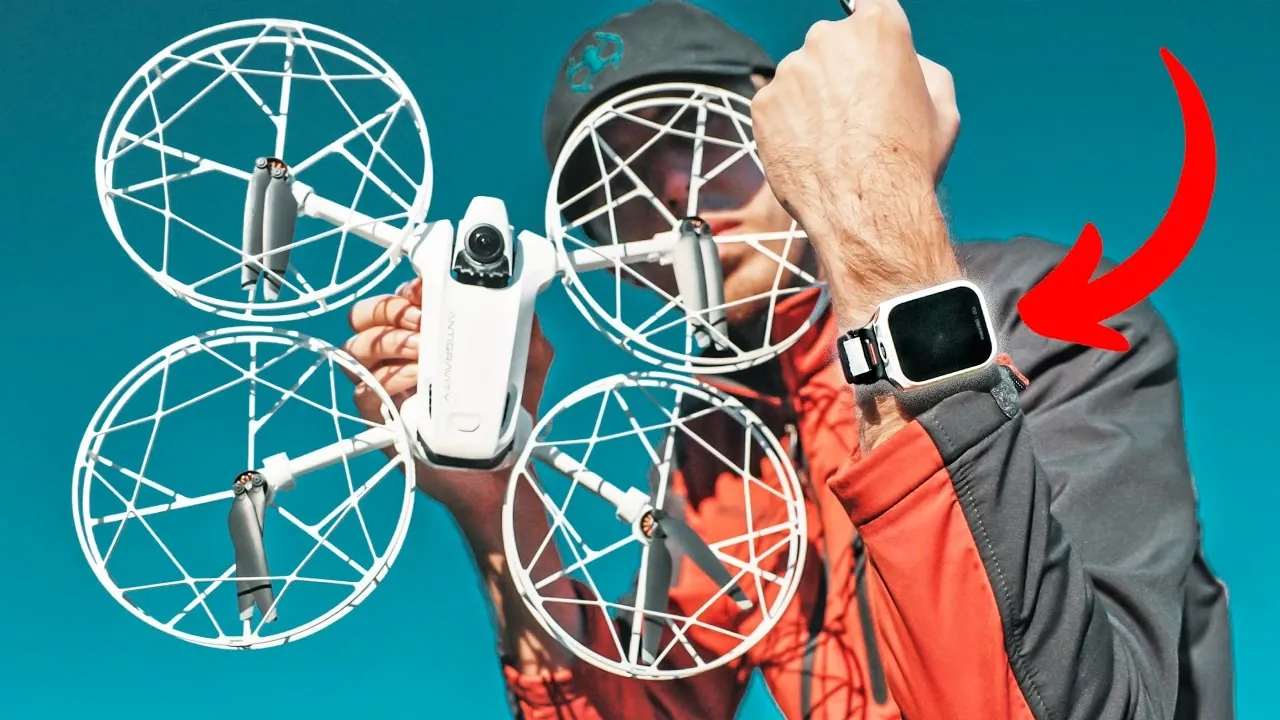
In Flying Filmmaker’s hands-on, the Antigravity A1 Follow Me Bundle lost its subject twice, and each time tracking was restarted from a watch on the wrist. The bundle offers watch and ring controls in place of the camera drone’s goggles, so you can take off, choose a follow mode and reposition the drone with hand movements, then pick your camera view afterward by reframing the 8K 360-degree footage. Get the details on how those controls worked during walking, running and four-wheeler tests, including a 50 m fly-away that failed.
Antigravity A1 Follow Me Bundle: Wearable Flight Controls
TL;DR Key Takeaways :
- The Antigravity A1 Follow Me Bundle combines an 8K 360-degree camera drone with wearable watch and ring controls.
- The Watch Remote combines GPS with visual tracking and controls takeoff, recording and follow modes without Vision goggles.
- In a walking and running test, the A1 lost tracking initially but completed a second run after the subject was reselected on the watch.
- Removable full-coverage propeller guards stay out of the footage but raise the drone’s takeoff weight above 249 g.
- In the US, the bundle costs $599 during Antigravity’s November 19 to December 7 Black Friday sale, down from $799.
The Antigravity A1 Follow Me Bundle pairs an 8K 360-degree camera drone with wearable controls, letting you use follow mode without Vision goggles. Antigravity released the original foldable A1 in late 2025 with a follow mode, but its goggles were often impractical while walking, running or cycling.
Antigravity announced and made the bundle available on October 20, 2026. It includes the drone and these accessories:
- Insta360 Watch Remote and Insta360 Ring Remote for wearable control.
- Four Full-Coverage Propeller Guards that surround the propellers.
- One High-Capacity Flight Battery and one lens guard.
- Four spare propellers and one crossbody bag.
Control Follow Mode From Your Wrist
The Insta360 Watch Remote controls takeoff, recording and Follow Me modes without Vision goggles. The system combines visual subject tracking with GPS in the watch, whose screen shows the drone’s position and whether it is still following, and the remote can also help you recover the A1 if tracking is lost. Hold the green button to take off or the land button to bring the A1 down, and to start another tracking run, select yourself on the watch screen and press start.
The wrist-mounted control is less conspicuous in a shot than a handheld remote and gives self-filming creators more control than regular follow-me drones. Flying Filmmaker says the DJI Neo 2 and HOVERAir X1 PROMAX need another device or a landing to change settings, and can leave the subject half out of frame, while follow drones without remotes have lost their subjects, crashed into trees or become lost.
A manual-control button provides another way to reposition the A1: the watch can turn the drone, move it up or down, and use a slider to move it forward or backward. In testing, the controls were workable for repositioning, although the watch screen had a little lag.

Discover other guides from our vast content that could be of interest on drones.
- Leaked Patents Show Insta360 May Launch a Sub-250g Drone
- DJI Neo auto-follow drone for effortless content creation $199
Move the Drone With the Ring
The Insta360 Ring Remote adds gesture control without requiring a tap on the watch screen. Holding its button can prepare the drone for takeoff, while Antigravity’s Drag-to-Fly controls let you reposition it with hand movements. With the button held, you can move the A1 sideways, up or down, and forward or backward, and twisting the ring sends the drone farther away or brings it closer, depending on the direction of the twist.
A1 has omnidirectional obstacle avoidance and, in testing, stopped when directed toward a bush. It also turned to use its forward sensors around branches while flying backward, with its 360-degree camera continuing to record around it as it changed direction.
Tracking Resumes After Lost Subjects
Follow mode is the default, with options including Deep Track, Orbit Follow and Cycling Track. Orbit Follow moves around the subject while following, and each tracking mode lets you adjust distance and altitude.
In a walking and running test, the A1 lost track during an initial run, possibly because the subject moved into shade too quickly, but it completed a second run while avoiding obstacles once the subject was selected again on the watch, whose screen also showed the drone’s position during the flight. Cycling Track faced a harder route on a four-wheeler, with medium distance and altitude selected and the drone following from behind. There the A1 lost the subject between trees, in shade and beneath a large branch, possibly while avoiding the trees, although after tracking was restarted it followed through a second run and then hovered.
In a narrow space, Orbit Follow displayed a complex environment message and adjusted where it tracked from. A tree prevented it from completing an orbit at one point, though it moved to the subject’s side and partly in front as the four-wheeler slowed.
Fit or Remove the Propeller Guards
The Full-Coverage Propeller Guards enclose the propellers for flights closer to objects or in more enclosed spaces. They are removable and remain outside the recorded 360-degree frame, so they do not appear in the footage. Flying without the guards gives the A1 better efficiency and longer flight time, while fitting them raises its takeoff weight to over 249 g. For transport, you can partially fold the arms and clip them into a more compact position with the guards still attached.
Reframe Footage and Use Automated Shots
The A1 records 8K 360-degree video that you can reframe after a flight. You can also park the drone in manual mode, record from a fixed position and choose the view afterward. Flying Filmmaker rated that parked-camera approach 10 out of 10 for filming an adventure.
The bundle supports Sky Genie automated flight templates, including Orbit and Fly Away, and other listed quick shots include Ascend, Oval Orbit, Spiral Ascend, Arc Shot and Arc Out. In a test, a Fly Away shot moved the drone 4 m away from the selected subject, but a later attempt set to 50 m at fast speed returned an unable to execute the task message, and the drone appeared to have lost its position. The drone was brought back manually with the remote; the watch battery later died after it had not been fully charged before the session.
Choose the Bundle or Accessory Kit
The Follow Me Bundle is sold through Antigravity’s online store, with availability varying by region. In the US, it also launched through BestBuy.com and 266 selected Best Buy Camera Experience Stores.
- US: $599 for Black Friday, down from $799.
- UK: £479 for Black Friday, down from £639.
- Germany: €539 during the promotion, down from €719.
- Australia: AU$869 during the promotion, down from AU$1,159.
Antigravity’s Black Friday sale runs from November 19 to December 7, 2026. Existing A1 owners can instead buy the Follow Me Accessory Kit, which has an exclusive 20% discount announced for them: it is discounted from $339.99 to $271.99 in the US, from £309 to £247.20 in the UK, and from AU$539 to AU$431.20 in Australia.
In our view, the most useful part is not hands-free control but being able to see the drone and step in when tracking fails. Follow modes tend to slip at awkward moments, and a way to recover matters more than one extra convenience. We think this suits solo creators who want to film themselves outdoors without carrying a visible remote. The watch screen showed a little lag in testing. It is a poor fit for anyone who wants precise manual flying, since a wrist screen is better for repositioning than for careful piloting.
Flying Filmmaker thinks the Antigravity A1 Follow Me Bundle might be one of the best drones for adventure content creation, favoring it for filming yourself over the original goggles’ immersive flying experience. Wrist control lets you recover lost tracking, while reframing lets you choose the view after recording. For existing A1 owners, that change does not require another drone: the Follow Me Accessory Kit provides a route to the wearable setup.
Media Credit: Flying Filmmaker
Disclosure: Some of our articles include affiliate links. If you buy something through one of these links, Geeky Gadgets may earn an affiliate commission. Learn about our Disclosure Policy.
