
What if your next gaming setup wasn’t a towering PC or a sleek console, but a compact, retro-inspired keyboard that packs a serious punch? The Raspberry Pi 500 Plus is here to challenge everything you thought you knew about gaming and light computing. With its mechanical keyboard, customizable RGB backlighting, and 16GB of RAM, this all-in-one Linux workstation isn’t just a gadget, it’s a statement. Whether you’re a retro gaming enthusiast, a tinkerer who loves to push hardware to its limits, or someone who simply appreciates a blend of nostalgia and innovative tech, the Pi 500 Plus promises to redefine your expectations. But is this bold little device truly ready to take on the gaming world, or is it more of a niche curiosity?
In this overview, Jeff Geerling explains how the Raspberry Pi 500 Plus balances style, performance, and customization to carve out its place in the tech landscape. From its NVMe SSD storage and energy-efficient design to its surprisingly capable eGPU support, the Pi 500 Plus is packed with features that cater to both hobbyists and professionals. But it’s not without its quirks, limited connectivity options and a higher price tag may leave some wondering if it’s worth the investment. Whether you’re here for the nostalgia, the practicality, or the sheer curiosity of what this device can do, the Pi 500 Plus has plenty to unpack. After all, when was the last time a keyboard made you rethink what gaming could look like?
Raspberry Pi 500 Plus Keyboard PC
TL;DR Key Takeaways :
- The Raspberry Pi 500 Plus features significant hardware upgrades, including a mechanical keyboard with customizable RGB backlighting, 16GB of RAM, and NVMe SSD storage, enhancing performance and usability.
- Its retro-inspired design integrates all components into a single keyboard unit, appealing to vintage computing enthusiasts while maintaining a compact and portable form factor.
- Energy efficiency is a key strength, with power consumption ranging from 3W (idle) to 7W (with full RGB backlight), making it an economical choice for long-term use.
- While suitable for light computing, educational purposes, and hobbyist projects, its limited connectivity options and lack of certain features (e.g., RTC battery, PoE support) may hinder advanced use cases.
- Priced at $200, the Pi 500 Plus targets a niche audience of enthusiasts and professionals, offering excellent value for advanced features but less appeal for basic computing needs compared to the original Pi 500.
Key Hardware Enhancements
The Raspberry Pi 500 Plus builds upon its predecessor with several notable improvements that enhance both performance and usability:
- Mechanical Keyboard: The inclusion of Gateron KS33 switches provides a tactile typing experience, complemented by customizable RGB backlighting for added personalization.
- Expanded RAM: With 16GB of memory, the device doubles the capacity of the original Pi 500, allowing smoother multitasking and better handling of demanding applications.
- NVMe SSD Storage: An M.2 slot supports high-speed data transfers and increased storage capacity, catering to users with extensive data needs.
Despite these upgrades, the device maintains its compact form factor, weighing 1.3 lbs (600g). This slight increase in weight enhances durability, making it a practical choice for everyday use while retaining portability.
Performance and Connectivity
The Pi 500 Plus delivers reliable performance for everyday tasks such as web browsing, video playback, and light computing. However, its hardware specifications, including micro HDMI ports, USB 3.0 connectivity, Wi-Fi 5, and 1GB Ethernet, limit its ability to handle more resource-intensive workloads.
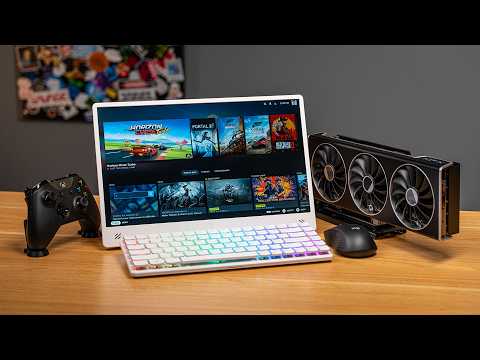
For users seeking enhanced performance, the device supports external GPU (eGPU) setups, which can significantly boost graphical capabilities. However, this feature requires advanced technical expertise and is not officially supported, making it less accessible for casual users or beginners.
Raspberry Pi 500 Plus Hands On
Enhance your knowledge on Raspberry Pi 5 by exploring a selection of articles and guides on the subject.
- How to Build a Raspberry Pi 5 Docker Swarm Cluster
- Build Your Own 10″ Raspberry Pi 5 Tablet Running KDE Mobile
- Raspberry Pi 5 cooling fan vs passive heatsinks compared
- Raspberry Pi 5 vs Raspberry Pi 4 mini PCs compared
- How to Build a Mini-ITX Desktop PC with Raspberry Pi 5
- AI Vision Devices Compared: Raspberry Pi 5 vs Jetson Orin Nano
- Orange Pi 5 Pro vs Raspberry Pi 5 mini PCs compared
- Raspberry Pi 5 Galactic aluminum case with integrated passive
- Raspberry Pi 5 games emulation tested
- How to Solve Raspberry Pi 5 Power Issues for Maximum
Mechanical Keyboard and Customization
One of the standout features of the Pi 500 Plus is its mechanical keyboard. The Gateron KS33 switches offer a premium typing experience with tactile feedback, making it ideal for extended use. The keyboard’s RGB backlighting is fully customizable, allowing users to adjust colors and effects to suit their preferences. Additionally, keycaps can be swapped, and keys can be programmed using Raspberry Pi’s configurator app, further enhancing personalization.
While the keyboard’s design emphasizes usability, its noise level may not be suitable for all environments, such as shared workspaces or quiet settings, potentially limiting its versatility in professional contexts.
Retro-Inspired Design and Practical Build
The Raspberry Pi 500 Plus integrates all its components into a single keyboard unit, embracing a retro-inspired aesthetic that appeals to vintage computing enthusiasts. This design choice combines nostalgia with modern functionality, creating a unique blend of old and new. However, the device lacks certain conveniences that could enhance its practicality:
- No built-in battery for the real-time clock (RTC), requiring manual time adjustments after power loss.
- No power-over-Ethernet (PoE) support, which could simplify network setups in certain environments.
On the positive side, the internal components are easily accessible, encouraging user modifications and upgrades. This design makes the Pi 500 Plus particularly appealing to hobbyists and tinkerers who enjoy customizing their hardware.
Energy Efficiency and Power Consumption
Energy efficiency is a key strength of the Pi 500 Plus. The device consumes approximately 3W of power when idle, increasing to 7W with the RGB backlight at full brightness. Users can further reduce power consumption by opting for solid backlight colors or disabling the backlight entirely. This low power usage makes the Pi 500 Plus an economical choice for long-term operation, particularly in scenarios where energy efficiency is a priority.
Practical Applications and Use Cases
The Raspberry Pi 500 Plus is well-suited for a variety of applications, making it a versatile tool for different user groups:
- Light Computing: Ideal for everyday tasks such as web browsing, document editing, and media playback.
- Educational Purposes: A valuable resource for learning programming, experimenting with Linux-based systems, and exploring hardware customization.
- Hobbyist Projects: Appeals to enthusiasts interested in retro computing aesthetics and hardware modifications.
Its Linux-based operating system also offers privacy advantages by avoiding reliance on proprietary services, such as those provided by Google, making it a compelling alternative to Chromebooks for privacy-conscious users.
Cost and Value Assessment
Priced at $200, the Raspberry Pi 500 Plus represents a significant increase over the original Pi 500’s $90 price tag. Whether this additional cost is justified depends on individual needs and priorities:
- For users who require the enhanced RAM, faster SSD storage, and premium mechanical keyboard, the Pi 500 Plus offers excellent value.
- For basic computing tasks, the original Pi 500 remains a more cost-effective option, delivering adequate performance at a lower price.
The higher price point positions the Pi 500 Plus as a niche product, appealing primarily to enthusiasts and professionals who can fully use its advanced features.
Challenges and Limitations
While the Raspberry Pi 500 Plus offers several strengths, it also has notable limitations that may affect its appeal:
- Connectivity Constraints: The reliance on micro HDMI ports and limited network options can hinder performance for advanced tasks.
- eGPU Setup Complexity: While external GPU support is available, it requires significant technical expertise and is not officially supported, limiting its accessibility.
- Missing Features: The absence of a pre-installed RTC battery and PoE transformer reduces out-of-the-box functionality, requiring additional components for certain use cases.
The Pi 500 Plus is a compelling option for users who value its unique combination of retro design, customization options, and energy efficiency. However, its higher price and limited performance gains may not justify the investment for all users. For those with basic computing needs, the original Pi 500 remains a practical and budget-friendly alternative.
Media Credit: Jeff Geerling
Disclosure: Some of our articles include affiliate links. If you buy something through one of these links, Geeky Gadgets may earn an affiliate commission. Learn about our Disclosure Policy.
