Microsoft has shown off a new version of Edge at their Build 2019 conference, the company has also released a Canary build of the software for Windows 10. It will be released for other versions of Windows and also macOS soon.
In the video below we get to look at some of the new features in the latest version of Edge, this includes an Internet Explorer mode and more.

Less than a month ago, we shipped our first Dev and Canary channel preview builds of the next version of Microsoft Edge, built on the Chromium open-source project. Today, we’re sharing a bit more about how Microsoft Edge will simplify development and improve productivity for our core customer constituencies: consumers, developers, and enterprises.
In Satya’s vision keynote, we previewed a set of new features we’re exploring, designed to make Microsoft Edge users more productive than ever and feel more in control when getting things done on the web.
New Features in Microsoft Edge
The new version of Microsoft Edge is packed with a variety of features aimed at enhancing user experience and productivity. One of the standout features is the Internet Explorer mode, which allows users to access legacy websites that require Internet Explorer without leaving the Edge browser. This is particularly useful for businesses that rely on older web applications.
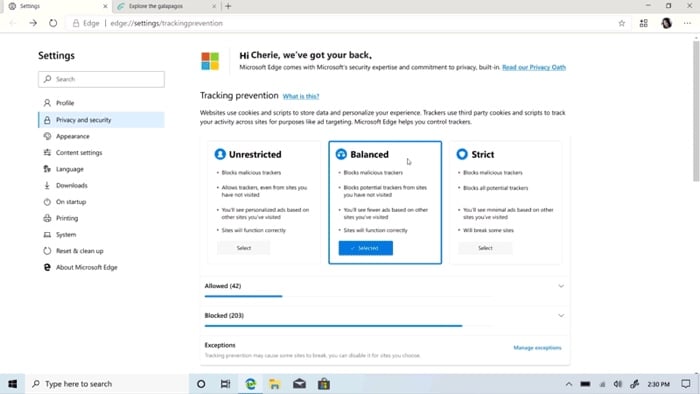
Another exciting feature is the enhanced privacy tools. Microsoft Edge now offers tracking prevention, which helps protect users from being tracked by websites they don’t visit directly. This feature is customizable, allowing users to choose from different levels of tracking prevention based on their privacy preferences.
Collections is another innovative feature that helps users organize and save content they find on the web. Whether you’re planning a trip, shopping for a new gadget, or conducting research for a project, Collections makes it easy to gather, organize, and share information.
Improved Developer Tools
Microsoft Edge is not just about end-user features; it also brings a host of improvements for developers. The new Edge browser is built on the Chromium open-source project, which means it supports the same web standards and developer tools as Google Chrome. This makes it easier for developers to create and test their web applications across different browsers.
One of the key improvements is the enhanced DevTools, which offer a more streamlined and efficient workflow for developers. The new DevTools include features like improved debugging, better performance profiling, and enhanced accessibility testing. These tools are designed to help developers build faster, more reliable, and more accessible web applications.
Microsoft has also introduced WebView2, a new control that allows developers to embed web content in their applications using the EdgeHTML rendering engine. This provides a seamless integration of web content within native applications, offering a consistent and high-performance user experience.
Enterprise Features
For enterprise users, Microsoft Edge offers a range of features designed to improve security, manageability, and productivity. The browser includes built-in support for Microsoft 365, allowing users to access their Office documents, emails, and other productivity tools directly from the browser.
Edge also offers advanced security features like Windows Defender SmartScreen, which helps protect users from phishing and malware attacks. Additionally, the browser supports Azure Active Directory, making it easier for IT administrators to manage user access and enforce security policies.
Another notable feature is the ability to deploy and manage Edge using Microsoft Endpoint Manager. This allows IT administrators to easily configure and manage the browser across their organization, ensuring that all users have a consistent and secure browsing experience.
You can find out more information about the latest version of Edge from Microsoft at the link below.
Source
Disclosure: Some of our articles include affiliate links. If you buy something through one of these links, Geeky Gadgets may earn an affiliate commission. Learn about our Disclosure Policy.
