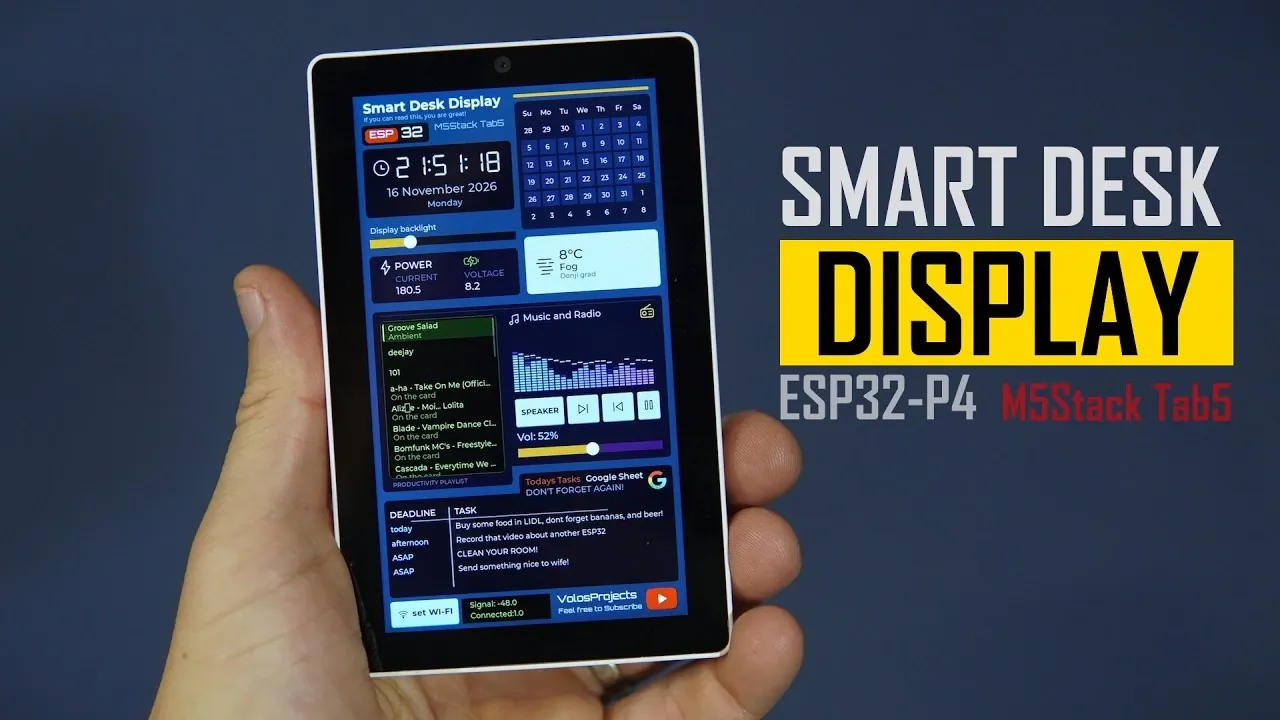
This DIY smart desk display brings a clock, weather, audio playback and a to-do list together on the M5Stack Tab5, an ESP32-based device with a built-in screen. Its interface was created in LCD Wizard without editing code, though the finished app still had to be uploaded to the hardware, according to Volos Projects.
This overview explains how to configure OpenWeatherMap with an API key and town, and how to supply a Google Sheets GET link that returns JSON for the to-do list. It also covers the ESP32-C6 firmware update recommended before setting up Wi-Fi, so you can prepare the Tab5 for a connected display.
Smart Desk Display
TL;DR Key Takeaways :
- The Smart Desk Display uses an M5Stack Tab5 to show the time, date and local temperature, play audio and display a to-do list.
- Volos Projects built the interface in LCD Wizard without editing code, though code was uploaded to the device. Most build time went into colors, positioning and font sizes.
- The weather card uses OpenWeatherMap and requires an API key and town. The to-do list uses Google Sheets data fetched through a GET link in JSON format.
- The display plays internet radio and MP3 files from a microSD card, with a button to switch between the built-in speaker and 3.5 mm output. It also includes a spectrum analyzer.
- The Tab5 uses an ESP32-P4 and an ESP32-C6 for Wi-Fi. Volos Projects advises updating the ESP32-C6 firmware first; the display stayed connected and showed a current draw of 260 milliamps.
The Smart Desk Display combines a clock, weather information, audio playback and a to-do list on the M5Stack Tab5. Built in LCD Wizard, the desk project required no code editing, although code was uploaded to the device.
The display shows the time, date and local temperature, plays internet radio and MP3 files, and retrieves data from Google Sheets. The creator found the build easy to make in LCD Wizard, which supports the Tab5 and offers tools beyond interface design.
Audio, weather and data on the desk
The weather card uses OpenWeatherMap to show conditions in Zagreb. To set it up, sign up for OpenWeatherMap, obtain a key and select a town. Then enter the API and key into LCD Wizard’s web data. The service is free.
For audio, the display plays internet radio or MP3 files from a microSD card. A button switches between the Tab5’s built-in speaker and its 3.5 mm output, which can connect to a larger speaker. The output proved useful.
The interface also includes a spectrum analyzer that proved easy to set up in LCD Wizard.
A simple to-do list draws on Google Sheets data. It needs a GET link that fetches a sheet’s data in JSON format. When you paste that JSON into LCD Wizard, the tool detects the needed data and can turn it into variables for display. The Google Sheets data display was found really easy to make.

Here are more detailed guides and articles that you may find helpful on ESP32 projects and boards.
- Build a $20 Desk Buddy with an ESP32 C6 Microcontroller
- Build a Clock with Wave Share ESP32 C6 Touch AMOLED 2.16
- Elecrow Builds a $60 Dual-Chip 10.1-Inch ESP32 Display Board
- Build a 10.1-Inch Home Assistant Panel with the ESP32
- ESP32 Lineup Compared: S3 Handles AI While C6 Tackles Matter
Tab5 hardware and Wi-Fi
The Tab5 is an ESP32-P4 device with a second chip, the ESP32-C6, handling Wi-Fi. That second microcontroller made Wi-Fi programming on the ESP32-P4 difficult for the creator, but LCD Wizard solved the problem.
The display shows signal quality, connects to nearby networks and has a button to switch Wi-Fi on or off. In the project, it stays connected to the network, and the Wi-Fi on/off control proved useful. An external antenna can also be connected and is expected to improve the signal substantially.
The device can show its own current draw: it displayed 260 milliamps, though power consumption is expected to be much lower with reduced screen brightness and music turned off. You can buy the Tab5 with a battery. It is probably the creator’s favorite ESP32-P4 board: despite its expensive appearance, it has the desired built-in features without being expensive.
Building the interface
The Wi-Fi setup widget was easy to make and connect in LCD Wizard. For Wi-Fi in a Tab5 project, the advice is to update the ESP32-C6 firmware first. LCD Wizard provides an updater in its Tab5 project setup, after which you can make and flash an app. That process was easy in testing.
Most of the build time went into matching colors, positioning elements and choosing font sizes. The creator enjoys designing interfaces and placing items personally and does not view AI as an option for making an interface like this, despite limited coding experience. In the creator’s view, LCD Wizard makes it very easy to create whatever is wanted.
Volos Projects found LCD Wizard easy to use for a display designed without editing code, and prefers placing interface elements personally rather than using AI. The project is planned for sharing in the LCD Wizard gallery. Its weather card needs an OpenWeatherMap key and town, while the Google Sheets display needs a GET link that returns JSON. For Wi-Fi on the Tab5, Volos Projects advises updating the ESP32-C6 firmware first.
Media Credit: Volos Projects
Disclosure: Some of our articles include affiliate links. If you buy something through one of these links, Geeky Gadgets may earn an affiliate commission. Learn about our Disclosure Policy.
