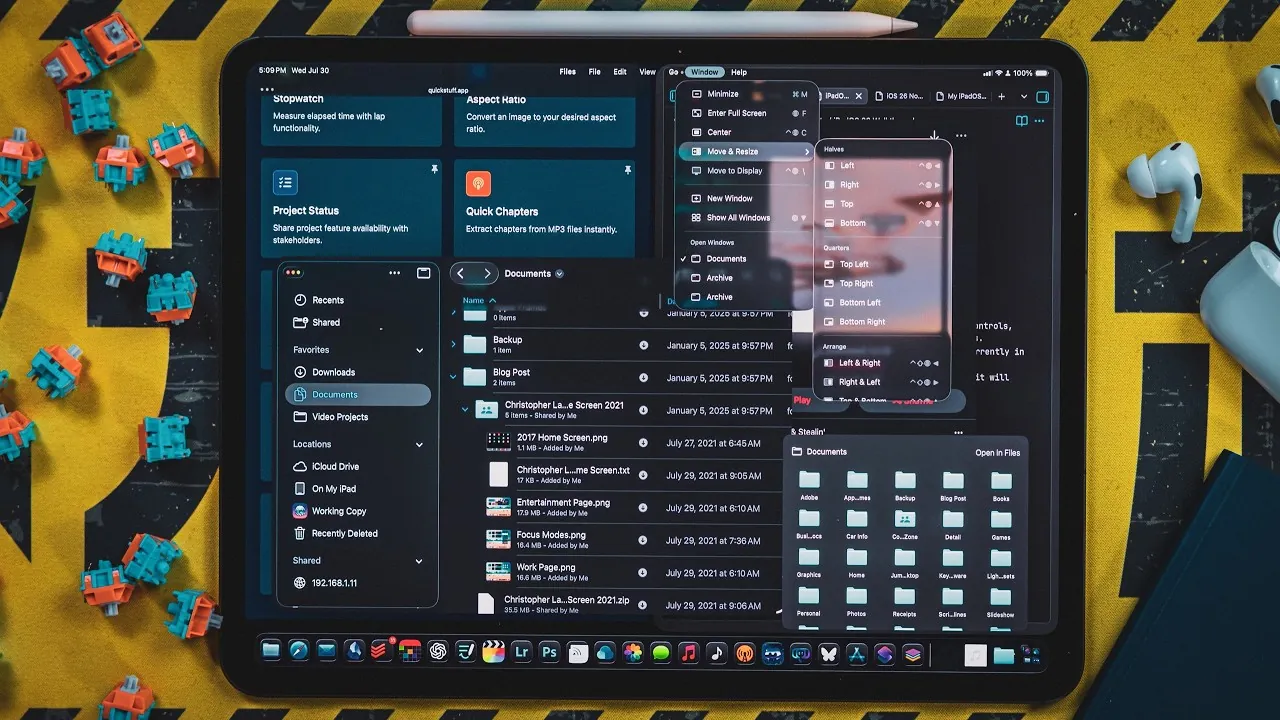
iPadOS 26 brings a host of updates designed to enhance productivity, improve multitasking, and refine the overall user experience. Whether you use your iPad for professional tasks, creative projects, or casual browsing, these features aim to narrow the gap between tablet and desktop functionality while maintaining the iPad’s signature intuitive interface. Below, we explore the most impactful updates and how they can transform your workflow. The video below from Christopher Lawley gives us more details about the new iPadOS 26 and its features.

Resizable Windowing Mode: Redefining Multitasking
One of the standout features in iPadOS 26 is the resizable windowing mode, which introduces a new level of flexibility for multitasking. This feature allows you to open apps in adjustable windows, allowing you to customize your workspace to suit your needs. The system also remembers the size and position of these windows across sessions, making sure a seamless experience when switching between tasks.
Key highlights include:
- Support for up to 12 open apps on high-end iPads, allowing advanced multitasking capabilities.
- Enhanced dock functionality for quicker app switching and launching.
This update is particularly beneficial for users who frequently juggle multiple apps, offering a more efficient and organized workflow. Whether you’re managing spreadsheets, editing photos, or browsing the web, the resizable windowing mode ensures smoother transitions and greater control.
Stoplight Controls and Expanded Tiling Options
Borrowing a familiar feature from macOS, iPadOS 26 introduces stoplight controls for app windows. These controls allow you to minimize, close, or switch to full-screen mode with a single tap, simplifying window management and aligning the iPad experience more closely with desktop systems.
Additionally, the update expands tiling options, offering:
- A new three-column mode for organizing apps side by side, ideal for multitasking.
- Improved split-view adjustments, giving users greater customization over their workspace.
These enhancements make it easier to work with multiple apps simultaneously, reducing the need to constantly toggle between screens. Whether you’re comparing documents or referencing multiple sources, these tools streamline your workflow.
Revamped Files App: Smarter File Management
The Files app receives a significant overhaul in iPadOS 26, introducing features that make file navigation and management more intuitive and efficient. New capabilities include:
- A revamped list view with collapsible folders for better organization and easier navigation.
- Keyboard shortcuts for faster access, especially useful for users with external keyboards.
- The ability to set default apps for specific file types via the “Open With” menu offers more control over file handling.
- Dock integration for instant access to frequently used folders, improving accessibility.
- Background task support for file transfers and downloads, complete with live activity tracking for better transparency.
These updates ensure smoother workflows, allowing you to manage files with greater efficiency and minimal interruptions. Whether you’re organizing project files or transferring large datasets, the revamped Files app simplifies these tasks.
Introducing the Native Preview App
For the first time, iPadOS includes a native Preview app, offering robust tools for handling PDFs and images. This addition eliminates the need for third-party software, making document and image management more integrated and straightforward.
Key features include:
- Support for text fields, signatures, and autofill forms, making document editing more convenient.
- Integration with Pencil Kit tools for annotations and markups, ideal for creative and professional use.
Whether you’re signing contracts, annotating documents, or reviewing images, the Preview app provides a seamless and efficient solution for these tasks.
Shortcuts App: Enhanced Automation and AI Integration
The updated Shortcuts app in iPadOS 26 takes automation to new heights, introducing features that allow users to create more complex workflows. One of the most notable additions is the “Use Model” action, which enables the integration of AI models into your routines. This can be achieved through on-device AI, private cloud solutions, or ChatGPT.
Additional improvements include:
- Expanded tagging and variable management, allowing for more sophisticated automation setups.
- Streamlined creation and execution of multi-step processes, saving time and effort.
These enhancements are particularly valuable for users looking to automate repetitive tasks or build advanced routines. From scheduling tasks to managing data, the Shortcuts app enables users to optimize their workflows.
Cursor and Mouse Updates for Greater Precision
iPadOS 26 introduces several updates to improve the cursor and mouse experience, making the iPad even more versatile for users who rely on external pointing devices. Key improvements include:
- A redesigned cursor that offers better precision when interacting with smaller interface elements, enhancing usability.
- The “shake to enlarge” feature, inspired by macOS, which makes it easier to locate the cursor on the screen.
These updates are particularly beneficial for tasks that require detailed work, such as graphic design or document editing, making sure a smoother and more precise user experience.
Background Task Support: Streamlining Multitasking
Background task support is another major addition in iPadOS 26, allowing apps to handle tasks like file transfers, video exports, and downloads in the background. This feature ensures that you can focus on other activities without interruptions, making multitasking more efficient.
Whether you’re exporting a large video file or downloading extensive datasets, background task support minimizes downtime and enhances productivity. This capability is especially valuable for workflows involving time-intensive processes.
Bringing the iPad Closer to a Desktop Experience
The features introduced in iPadOS 26 collectively bring the iPad closer to a desktop-like experience while preserving its unique strengths. From resizable windows and enhanced multitasking to smarter file management and AI-powered automation, these updates cater to a wide range of users.
Whether you’re a professional seeking advanced productivity tools or a casual user looking for a more intuitive interface, iPadOS 26 delivers meaningful improvements that elevate the iPad experience. These updates not only enhance functionality but also ensure that the iPad remains a versatile and powerful tool for both work and leisure.
Master iPadOS 26 features with the help of our in-depth articles and helpful guides.
- Discover the New Features in iPadOS 26 Beta 4
- iPadOS 26 Features: Compatibility and Limitations Explained
- iPadOS 26 Beta 2 Features and Performance Updates Explained
- What’s New in iPadOS 26 Beta 2: Features, Fixes, and Updates
- iPadOS 26: The Massive Update That Changes Everything
Source & Image Credit: Christopher Lawley
Disclosure: Some of our articles include affiliate links. If you buy something through one of these links, Geeky Gadgets may earn an affiliate commission. Learn about our Disclosure Policy.
