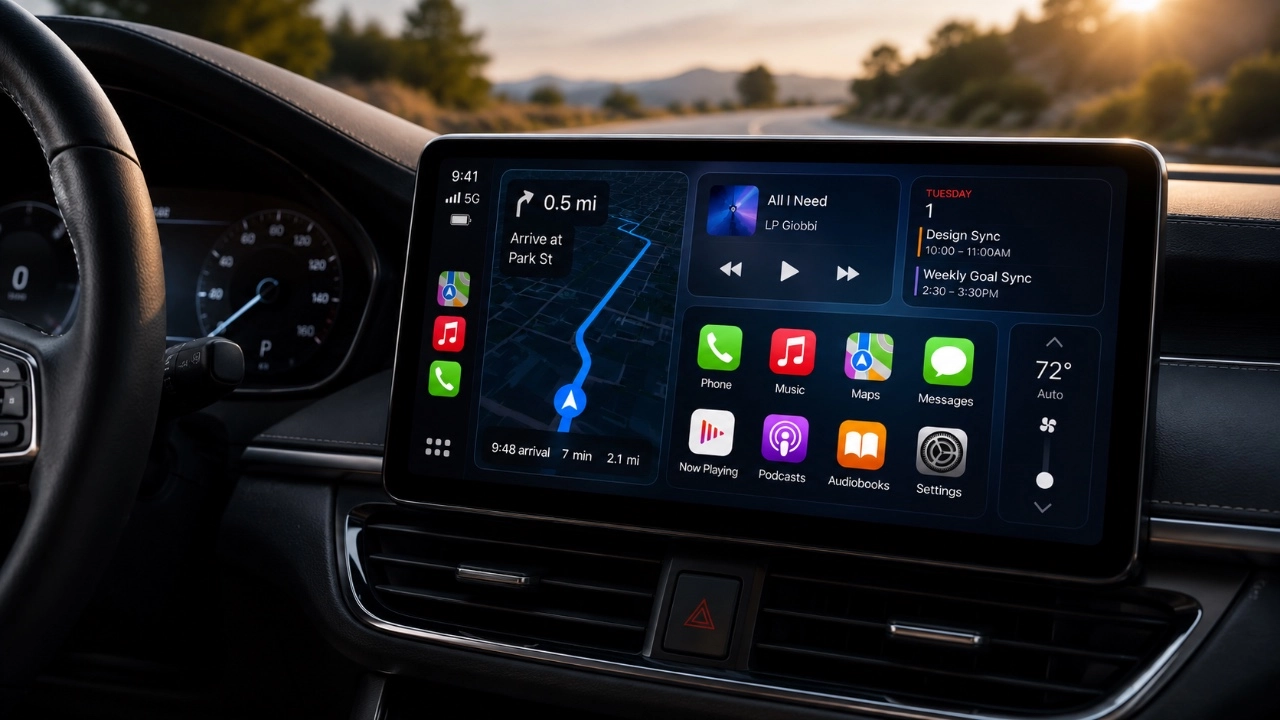
Apple’s iOS 27 brings a substantial upgrade to CarPlay, redefining how you interact with your car’s infotainment system. With smarter AI, a refined design, and expanded functionality, this update is designed to make your driving experience more connected, intuitive, and enjoyable. Whether you’re a seasoned CarPlay user or exploring it for the first time, understanding these updates will help you maximize its potential. The video below from HotShotTek gives us a look at the latest version of Apple CarPlay in iOS 27.

Compatibility and Setup
To take advantage of the new features in iOS 27, ensure your iPhone is updated to the latest software version. Once updated, connect your device via the CarPlay settings to enable the enhanced functionalities. The update also broadens compatibility, supporting a wider range of vehicles and devices. This expanded support ensures that more users can experience the benefits of the latest CarPlay features, regardless of their car model or device type.
For a seamless setup:
- Ensure your car supports CarPlay and that your iPhone is running iOS 27.
- Use a compatible cable or wireless connection to link your device to your car’s infotainment system.
- Access the CarPlay settings on your iPhone to customize your dashboard and enable new features.
What’s New in the User Interface
The redesigned interface is one of the most noticeable changes in iOS 27 CarPlay. The new “liquid glass” aesthetic gives the system a sleek, modern appearance, enhancing visual clarity and usability. Updated icons provide better readability, while subtle changes to the toolbar, such as a refreshed battery indicator, improve functionality. Additionally, vibrant new wallpapers allow for greater personalization, though some older designs have been retired to make room for these updates.
These visual enhancements are not just about aesthetics, they are designed to improve usability. The polished interface ensures that key features are easily accessible, reducing distractions and making navigation more intuitive.
Enhanced Music and Media Controls
Managing your media has never been easier with the improved controls in iOS 27 CarPlay. New playback shortcuts allow you to skip tracks, pause music, or adjust volume directly from the interface. Integration with third-party apps like Spotify ensures that you’re not limited to Apple Music, giving you greater flexibility in choosing your preferred streaming service.
Playlist filtering is another standout feature, allowing you to organize and access your favorite tracks effortlessly. Whether you’re curating the perfect playlist for a road trip or quickly finding a specific song, these enhancements make controlling your media more seamless and enjoyable.
Widgets and Customization
Customization takes center stage in iOS 27 with the introduction of third-party widget support. You can now add compatible iPhone widgets directly to your CarPlay dashboard, tailoring the interface to suit your preferences. Whether you want quick access to weather updates, calendar events, or navigation shortcuts, these widgets provide a personalized and efficient user experience.
Adjusting widgets is straightforward, thanks to the streamlined customization options available in the settings menu. This flexibility allows you to create a dashboard that aligns with your specific needs, enhancing both convenience and functionality.
Smarter Siri with AI Updates
Siri has received a significant upgrade in iOS 27, making it more responsive and visually engaging. A glowing orb animation now provides a dynamic visual cue during interactions, making sure that you know when Siri is actively listening. The addition of a dedicated Siri app allows you to manage past conversations and initiate new ones with ease.
These updates also improve Siri’s performance in practical tasks. Whether you’re dictating a message, checking real-time weather updates, or requesting quick replies, Siri delivers faster and more accurate responses. This enhanced functionality helps you stay informed and connected without diverting your attention from the road.
Improved Navigation with Apple Maps
Apple Maps in iOS 27 has been enhanced to provide a more reliable and user-friendly navigation experience. The new “share directions” feature allows you to transfer navigation details directly to your car’s built-in GPS system, offering greater flexibility in how you use the app. Pinch-to-zoom functionality improves map interaction, making it easier to explore your route or find specific locations.
Upgraded GPS accuracy ensures precise location tracking, while features like parking location tracking, supported by Backtrack and Apple Watch, help you locate your car effortlessly. These improvements make navigation more efficient and stress-free, whether you’re commuting to work or embarking on a long road trip.
Other Notable Features
iOS 27 introduces several additional updates that enhance the overall CarPlay experience:
- Detailed status indicators for notifications provide more context about app activity, such as microphone usage or background processes.
- The “liquid glass” aesthetic extends across all apps, creating a cohesive and visually appealing interface.
- While video streaming support is not yet available, the groundwork has been laid for future implementation by manufacturers.
These smaller updates, while subtle, contribute to a more polished and functional system, making sure that every aspect of CarPlay feels cohesive and user-friendly.
Maximizing Your CarPlay Experience
The iOS 27 update for CarPlay represents a significant step forward in in-car technology. From the sleek new interface and enhanced media controls to smarter Siri functionality and improved navigation tools, this update is designed to make your driving experience smoother and more enjoyable. By exploring the customization options, integrating third-party apps, and using the latest features, you can tailor CarPlay to meet your unique needs and preferences. Whether you’re navigating city streets, managing your playlists, or staying connected on the go, iOS 27 ensures that CarPlay remains an indispensable part of your driving routine.
Take a look at other insightful guides from our broad collection that might capture your interest in Apple CarPlay.
- iOS 27 RC is Out: CarPlay Adds Video Streaming and New Siri
- Apple CarPlay’s 2026 Overhaul: Dashboard Upgrades to Try
- Every New Apple CarPlay Feature Coming in iOS 27
- Apple Keeps Refining CarPlay: Every New Change Found in iOS 27 Beta 6
- Apple Just Tweaked CarPlay Again in iOS 27 Public Beta 2
- How to Use Waze’s Latest 2026 Features on Apple CarPlay & Android Auto
Source: HotshotTek
Disclosure: Some of our articles include affiliate links. If you buy something through one of these links, Geeky Gadgets may earn an affiliate commission. Learn about our Disclosure Policy.
