Have you ever wished your Apple Notes could be as organized and visually appealing as a professional document, without the hassle of clunky formatting tools? If you’re a fan of Markdown—a simple, intuitive syntax for creating structured content—you might have assumed it was incompatible with Apple’s native note-taking app. But here’s the good news: with the help of a third-party tool called ProNotes, you can now bring the power of Markdown directly into Apple Notes. This integration isn’t just about aesthetics; it’s about transforming how you capture, organize, and share ideas across your Apple devices. Imagine crafting beautifully formatted notes on your Mac that sync seamlessly to your iPhone or iPad, ready to impress at a moment’s notice.
In this step-by-step guide, Greg Hyatt walks you through how to unlock the potential of Markdown in Apple Notes using ProNotes. Whether you’re a student juggling assignments, a professional managing projects, or a writer organizing drafts, this guide will show you how to create notes that are both functional and polished. You’ll discover how to use Markdown for everything from streamlined formatting to task management, all while maintaining cross-device consistency. Along the way, you’ll also learn about ProNotes’ unique features and limitations, helping you decide if this tool is the right fit for your workflow. Ready to rethink your note-taking strategy? Let’s explore what’s possible.
Markdown Support in Apple Notes
TL;DR Key Takeaways :
- ProNotes is a third-party tool for macOS that integrates Markdown functionality into Apple Notes, allowing users to create and format notes using Markdown syntax.
- Key features include creating titles, subheadings, lists, checklists, and emphasizing text, making it ideal for structured and professional note-taking.
- Notes created with ProNotes on macOS can be seamlessly viewed and edited across Apple devices, making sure cross-device consistency and accessibility.
- ProNotes is currently limited to macOS 13.0 or later, with potential future updates expected to expand functionality to iOS devices like iPhones and iPads.
- Using Markdown in Apple Notes simplifies formatting, enhances sharing, and improves organization, making it a valuable tool for students, professionals, and writers.
What is Markdown in Apple Notes?
ProNotes serves as a bridge between Markdown and Apple Notes, allowing you to write and format notes directly on your Mac using Markdown syntax. This approach simplifies the process of creating structured content, making sure that your notes maintain a consistent appearance across Apple’s ecosystem. Whether you’re using an iPhone, iPad, or Mac, your notes will display uniformly, providing a seamless experience across devices. By integrating Markdown, ProNotes enhances the functionality of Apple Notes, making it a valuable tool for users who prioritize organization and clarity in their note-taking.
Key Features of ProNotes
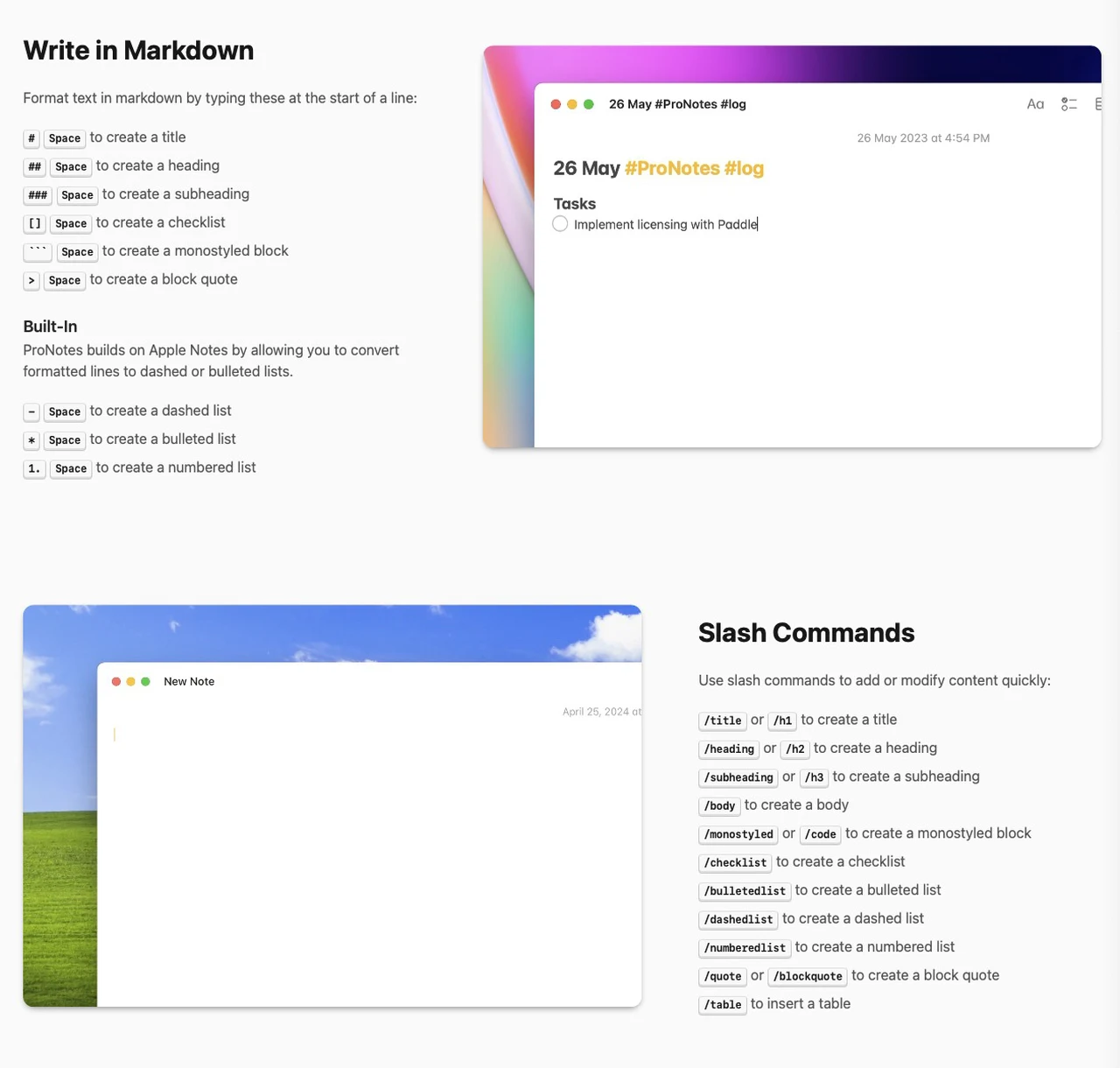
ProNotes introduces a range of Markdown formatting options, making it easier to create organized and professional notes. These features are particularly beneficial for students, professionals, and writers who require structured content for their work. With ProNotes, you can:
- Create titles and subheadings: Use `#` for main titles and `##` for subheadings to organize your notes effectively.
- Build lists: Create bulleted lists with `-` or numbered lists with `1.` for clear and concise content presentation.
- Emphasize text: Apply bold formatting with `**` or italics with `*` to highlight key points.
- Insert checklists: Use `- [ ]` for incomplete tasks and `- [x]` for completed ones to manage tasks efficiently.
These features allow you to focus on your content without being distracted by complex formatting tools. The simplicity of Markdown ensures that your notes are both functional and visually appealing, catering to a variety of personal and professional needs.
How to Write in Markdown in Apple Notes
Dive deeper into Apple Notes with other articles and guides we have written below.
- New Apple Notes 18.2 : Real-Time Transcription & Call Recording
- Discover the New Tools in Apple Notes iOS 18.3 Update
- Use the Zettelkasten Method in Apple Notes for Better Organization
- How to Sync Apple Notes to Notion : 2025 Guide
- How to Use Apple Notes for Quick and Efficient Note-Taking
- Using ChatGPT in Apple Notes: A Complete Guide for Mac Users
- Organize Your Workflow with Apple Notes Tabular Task Lists
- 25 Apple Notes Hacks to Boost Your Productivity & Stay Organized
- 10 Apple Notes Hacks to Boost Your Efficiency in iOS 18
- How to Use Apple Notes for Effortless Daily Organization
Compatibility and System Requirements
ProNotes is exclusively available for macOS 13.0 or later, making it accessible to users with modern Mac devices. However, its functionality is currently limited to Mac desktops, meaning you cannot create Markdown notes directly on iPads or iPhones. Despite this limitation, notes created on your Mac can still be viewed and edited on other Apple devices, thanks to Apple’s robust cross-device synchronization. This ensures that your notes remain accessible and consistent, regardless of the device you use to view them.
Potential Future Updates
While ProNotes already offers significant enhancements to Apple Notes, there is speculation about future updates that could further expand its capabilities. One highly anticipated feature is the ability to export Markdown-formatted notes directly from iOS devices, such as iPhones and iPads. This update would make the tool more versatile, allowing users to create and share Markdown notes across all Apple devices. Additionally, improvements in synchronization and formatting options could further streamline the user experience, making ProNotes an even more powerful tool for note-taking.
Why Use Markdown in Apple Notes?
Integrating Markdown into Apple Notes through ProNotes offers several practical benefits that enhance the overall note-taking experience. These include:
- Streamlined formatting: Markdown simplifies the process of creating structured and professional notes, saving time and effort.
- Cross-device consistency: Notes display uniformly across Apple devices, making sure a seamless and cohesive user experience.
- Enhanced sharing: Formatted notes can be easily shared while preserving their structure and readability, making collaboration more efficient.
By using Markdown, you can create notes that are not only visually appealing but also highly functional. This makes ProNotes an ideal solution for users who value organization, clarity, and ease of use in their note-taking workflow.
Enhancing Your Workflow with ProNotes
ProNotes provides a practical and efficient way to integrate Markdown into Apple Notes, offering a streamlined solution for users who prioritize structured formatting. While its current functionality is limited to macOS, the ability to synchronize notes across Apple devices ensures accessibility and consistency. As Apple’s ecosystem continues to evolve, future updates may further expand Markdown capabilities, making ProNotes an even more versatile tool. For now, it stands as a valuable addition to Apple Notes, allowing users to create and manage notes with greater precision and ease.
Media Credit: Greg Hyatt
Disclosure: Some of our articles include affiliate links. If you buy something through one of these links, Geeky Gadgets may earn an affiliate commission. Learn about our Disclosure Policy.
