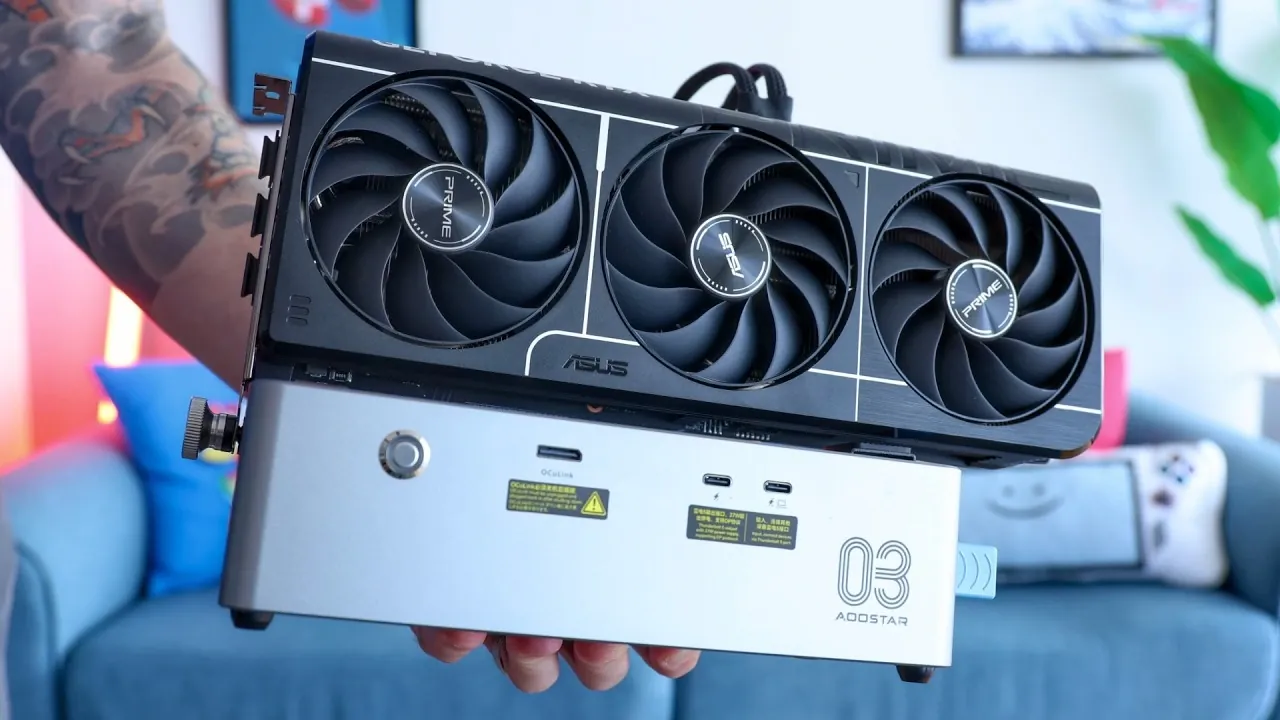
External GPUs (eGPUs) have become an increasingly viable solution for users looking to boost the performance of compact devices like laptops and mini PCs. Retro Game Corps explores this trend by examining the AOOSTAR AG03, a Thunderbolt 5 eGPU enclosure that pairs advanced features with a budget-friendly price point. With its 800W power supply, dual Thunderbolt 5 ports and Oculink connectivity, the AG03 is designed to support high-end GPUs while offering flexibility for a range of setups. However, its open-air design and compatibility limitations with certain systems, such as Linux and handheld gaming devices, highlight the trade-offs users may need to consider.
In this feature, you’ll gain insight into how the AG03 compares to its predecessor, the AG02 and what makes it stand out in the current eGPU market. Explore the performance benefits of Thunderbolt 5 and Oculink for gaming and professional workloads, learn about the practical implications of its design choices and understand the specific challenges users might face during setup. Whether you’re a gamer or a creative professional, this breakdown provides a clear look at the AG03’s capabilities and where it fits in the broader landscape of external GPU technology.
Key Features and Design
TL;DR Key Takeaways :
- The AOOSTAR AG03 is a compact and cost-effective eGPU enclosure featuring advanced Thunderbolt 5 and Oculink connectivity, an 800W power supply, and support for high-end GPUs, offering significant performance improvements over its predecessor.
- Its dual Thunderbolt 5 ports and open-air design enhance versatility and portability, but the exposed PCIe cables may not appeal to users seeking a polished aesthetic.
- The AG03 delivers a noticeable performance boost for gaming and professional tasks like video editing and 3D rendering, particularly when paired with high-end GPUs, thanks to Thunderbolt 5’s increased bandwidth and Oculink’s direct PCIe connection.
- While priced affordably at $260-$270, the AG03 faces compatibility challenges with handheld gaming devices and Linux systems and it does not include an Oculink cable, requiring additional purchases for setup.
- Ideal for gamers and professionals seeking desktop-class performance from portable devices, the AG03 balances affordability, functionality and future-proof design, making it a leading option in the eGPU market.
The AOOSTAR AG03 is engineered with a focus on functionality and adaptability, making sure it remains relevant as technology evolves. Its standout features include:
- 800W Power Supply: This robust power supply is capable of supporting even the most power-hungry GPUs, eliminating the need for external adapters and making sure stable performance.
- Thunderbolt 5 and Oculink Connectivity: These advanced connectivity options provide enhanced bandwidth for faster data transfer, improved GPU performance and compatibility with emerging technology standards.
- Compact, Open-Air Design: The enclosure’s portable and open-air design simplifies installation and makes it an excellent choice for users who frequently move between setups.
The inclusion of dual Thunderbolt 5 ports enhances the AG03’s versatility, allowing users to connect additional devices and transform the enclosure into a multi-functional hub for gaming or professional workstations. However, the open-air design exposes PCIe cables, which may not appeal to users who prefer a more polished and enclosed aesthetic.
Performance: A Noticeable Boost
The AG03 delivers a substantial performance boost when paired with mid-range or high-end GPUs, particularly for devices that rely on integrated graphics. Thunderbolt 5’s increased bandwidth ensures better GPU utilization compared to earlier generations, while Oculink provides an alternative for users seeking even greater performance gains. For high-end GPUs, Oculink’s direct PCIe connection can unlock additional performance, making it a valuable feature for demanding applications. However, for mid-range GPUs, the performance difference between Thunderbolt 4 and Oculink is minimal, which may limit its appeal to certain users.
In real-world scenarios, the AG03 excels in both gaming and professional applications. Users can expect smoother frame rates, faster rendering times and improved responsiveness in tasks such as video editing, 3D rendering and gaming. Compared to its predecessor, the AG02, the performance improvements are significant, making the AG03 a worthwhile upgrade for those seeking enhanced capabilities.
Check out more relevant guides from our extensive collection on external GPU that you might find useful.
- Minisforum DEG2 eGPU Dock Hands On First Look : Thunderbolt 5 Doubles Bandwidth
- eX Core External Graphics Card Transforms Your Laptop Into A Gaming Rig
- iOS 27 Leaks Reveal the End of an Era: Apple’s New Priorities Confirmed
- Is eGPU Gaming Finally Worth Your Money? Performance at 1080p, 1440p and 4K Tested
- Forget Oculink : Mind Graphics 2 Dock Uses RTX 5060 Ti 16GB and a Built-In 350W Power Supply
- Beelink EX Dock external GPU performance tested
- Boost Your Gaming Performance : GMKTec AD-GP1 eGPU with OCuLink and USB4
- How to connect an external GPU to your laptop to increase graphics performance
- Portable eGPU Runs Entirely on Batteries : RDNA3 Power on the Go
Compatibility Challenges
While the AG03 is highly compatible with Windows-based laptops and mini PCs, its support for other devices is more limited. Handheld gaming devices and Linux systems may require additional troubleshooting, particularly when paired with Nvidia GPUs. This limitation could pose a challenge for users who rely on Linux for their workflows or prefer handheld devices for gaming.
Another notable drawback is the absence of an included Oculink cable. Users must purchase this cable separately, adding an extra step to the setup process. While this omission does not detract from the AG03’s overall functionality, it does introduce a minor inconvenience for users expecting a more comprehensive out-of-the-box experience.
Price and Market Position
With a price range of $260 to $270, the AOOSTAR AG03 is one of the most affordable Thunderbolt 5 eGPU enclosures currently available. It undercuts competitors such as the Razer Core X and Minis Forum DEEG2 while offering comparable or superior performance. This affordability makes it an attractive option for users who prioritize graphics performance but are also mindful of their budget.
Despite its competitive pricing, the AG03 does not compromise on build quality or functionality. Its sturdy construction, quiet operation and user-upgradable components make it a reliable and long-term investment. Additionally, its price point positions it as a viable alternative to standalone Thunderbolt 5 docks for users who require enhanced graphics capabilities without the need for a full desktop setup.
Pros and Cons
- Pros: Affordable pricing, future-proof with Thunderbolt 5 connectivity, compact and sturdy design, quiet operation and user-upgradable components.
- Cons: No included Oculink cable, limited compatibility with handheld gaming devices and Linux systems, exposed PCIe cables and a niche use case that may not appeal to all users.
Who Should Consider the AOOSTAR AG03?
The AOOSTAR AG03 is an excellent choice for users seeking desktop-class performance from portable devices. Gamers and professionals alike will appreciate its ability to handle high-end GPUs, making it suitable for demanding tasks such as gaming, video editing and 3D rendering. Its affordability and forward-looking design further enhance its appeal, offering a balance of performance and value that is difficult to match in the current market.
However, the AG03 is best suited for users who prioritize functionality over aesthetics and are comfortable navigating minor compatibility challenges. For these individuals, the AG03 represents a significant step forward in eGPU technology. It combines performance, versatility and cost-effectiveness, solidifying its position as a leading option in the rapidly evolving eGPU market.
Media Credit: Retro Game Corps
Disclosure: Some of our articles include affiliate links. If you buy something through one of these links, Geeky Gadgets may earn an affiliate commission. Learn about our Disclosure Policy.
