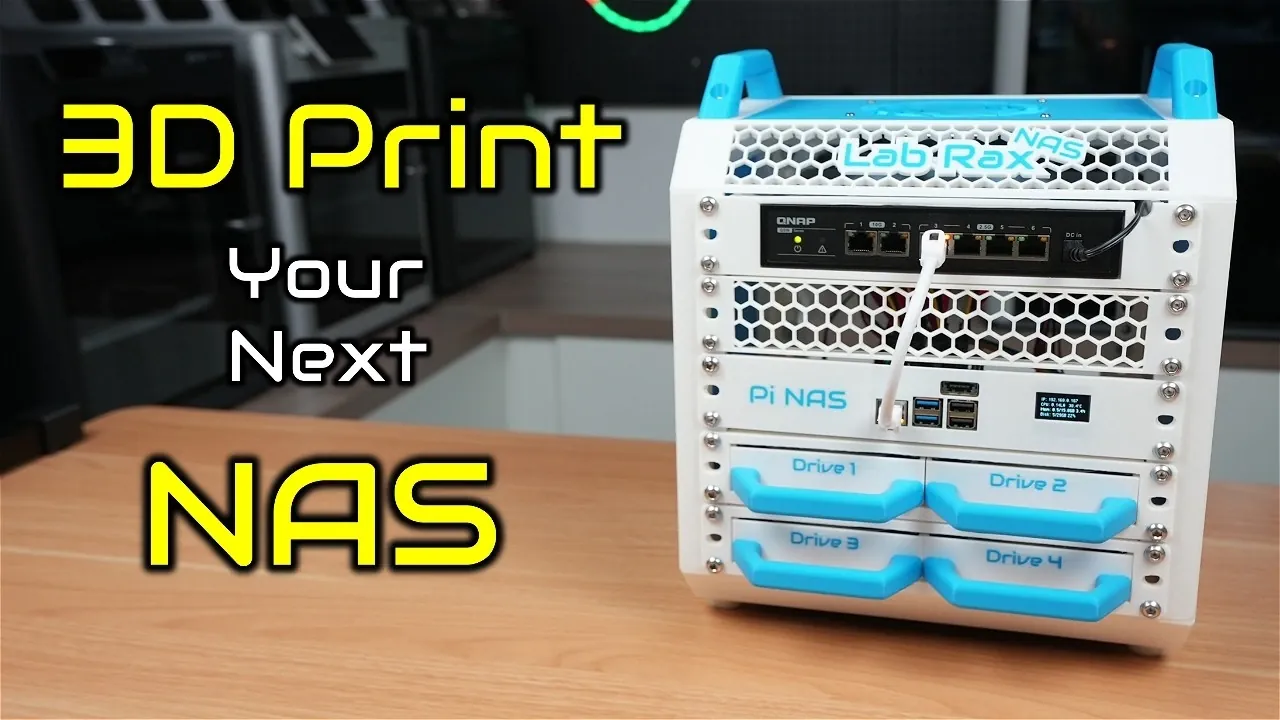
Have you ever wished your home lab could do more than just sit there, taking up space? Imagine transforming that modest 10-inch setup into a fully functional Network Attached Storage (NAS) system, one that’s compact, customizable, and entirely your own. Thanks to the power of 3D printing and modular design, this is no longer a pipe dream. With 3D-printable shelves tailored for single-board computers (SBCs) like the Raspberry Pi 5 or ZimaBoard 2, you can build a storage solution that fits snugly into your existing home lab. This isn’t just about saving space; it’s about creating a system that grows with you, offering flexibility and performance without breaking the bank.
In this guide, Michael Klements explains how to turn your 10-inch lab rack into a scalable NAS using 3D-printed drive and SBC shelves. You’ll discover how these shelves make it easy to integrate storage drives, expand with PCIe SATA cards, and even monitor your system in real-time with optional OLED displays. Whether you’re a seasoned home lab enthusiast or just dipping your toes into DIY tech, this approach offers a unique blend of practicality and innovation. By the end, you’ll see how this modular system can meet your storage needs today while leaving room to evolve tomorrow. After all, why settle for off-the-shelf solutions when you can build something that’s truly your own?
DIY Modular NAS Setup
TL;DR Key Takeaways :
- The modular 10-inch lab rack system offers a compact, adaptable, and scalable solution for building a Network Attached Storage (NAS) system, ideal for home environments with limited space.
- 3D-printable shelves enhance customization, allowing seamless integration of single-board computers (SBCs) like Raspberry Pi 5 or ZimaBoard 2 with storage drives, making it accessible for DIY enthusiasts.
- Popular configurations include Raspberry Pi 5 for smaller-scale NAS needs and ZimaBoard 2 for larger storage demands, offering flexible performance options for various use cases.
- Design features such as minimal 3D printing support requirements, compatibility with standard printer beds, and support for advanced components like OLED displays ensure practicality and expandability.
- The system caters to diverse applications, from personal file storage and media streaming to small business storage and virtual machine hosting, providing cost-effective and future-proof solutions.
Why Modular 10-Inch Lab Racks Are Ideal
The 10-inch lab rack system stands out as a smaller, more adaptable alternative to traditional 19-inch racks. Its modular design allows for compatibility with a wide range of components, making it an excellent choice for compact setups. This flexibility enables you to build your NAS incrementally, scaling it to meet your specific storage and performance requirements. For home lab users, this system strikes a balance between functionality and space efficiency, making it a practical solution for modern storage needs.
Key advantages of 10-inch lab racks include:
- Compact size, ideal for home environments with limited space.
- Modular design, allowing for incremental upgrades and customization.
- Compatibility with a variety of SBCs and storage configurations.
3D-Printable Shelves: Customization Made Simple
The cornerstone of this transformation lies in the 3D-printable shelves, which are designed to maximize efficiency and ease of use. These shelves are accessible to DIY enthusiasts, as they are compatible with most consumer-grade 3D printers. Their modular design ensures seamless integration with the 10-inch lab rack system, allowing you to create a tailored NAS setup.
Available shelf designs include:
- Drive Shelves: Options include a 1U shelf for two 3.5-inch drives (also compatible with 2.5-inch drives) and a 1U shelf for four 2.5-inch drives, perfect for SSDs or smaller mechanical drives. Features like pullout trays and brass inserts simplify drive swapping and ensure secure mounting.
- SBC Shelves: Dedicated shelves for Raspberry Pi 5 and ZimaBoard 2 include support for PCIe SATA expansion cards, Radxa Penta SATA hats, and optional OLED displays for real-time system monitoring.
These shelves are designed to require minimal supports during printing and fit standard 3D printer beds, making them highly accessible for users with basic 3D printing capabilities.
Turn Your Homelab into a NAS : 3D Printable Drive & SBC Shelves
Stay informed about the latest in NAS systems by exploring our other resources and articles.
- UGREEN US3000 NAS UPS Review : Power Outage NAS
- UniFi UNAS 2 Review: Affordable and Compact NAS Solution
- How to Set Up a Synology NAS for Family File & Media
- Synology NAS Drops HEVC Support: What It Means for Users
- Building a NAS using a RISC-V BPI-F3 and OpenMediaVault
- How to build a NAS storage system using a mini PC
- Synology NAS Home vs Homes folders explained
- Mac Mini vs NAS: Which is the Right for Your Storage Needs
- Storaxa open source cloud NAS storage
- How to soft reset your Synology NAS if you are locked out
Customizable Build Configurations
The modular design of the 10-inch lab racks and 3D-printable shelves allows for a variety of NAS configurations. This flexibility ensures that you can tailor your setup to meet your specific storage and performance needs.
Popular configurations include:
- Raspberry Pi 5 Build: This setup is ideal for smaller-scale NAS needs. It typically includes a 1U switch, ventilation panels, and drive shelves, supporting up to five drives in a RAID 5 configuration. With a 2.5Gb network adapter, this build delivers read/write speeds of approximately 240/215 MB/s, making it a cost-effective and straightforward option for home users.
- ZimaBoard 2 Build: Designed for users with larger storage demands, this configuration features dual 2.5Gb network ports and supports up to seven drives. Its more powerful CPU enables faster read/write speeds of around 260/230 MB/s, offering greater expandability and performance for advanced users or small business applications.
These configurations demonstrate the versatility of the system, catering to both entry-level and advanced users with varying storage requirements.
Design Features That Enhance Practicality
The 3D-printable shelves are engineered with practicality and expandability in mind. Their modular structure allows for the seamless addition of components such as PCIe SATA expansion cards, Radxa Penta SATA hats, or ventilation panels. This ensures that your NAS can grow alongside your storage needs, providing a future-proof solution.
Notable design features include:
- Minimal support requirements during 3D printing, reducing material waste and simplifying the process.
- Compatibility with standard 3D printer beds, making sure accessibility for most users.
- Support for advanced components like OLED displays for real-time system monitoring.
These features make the system highly adaptable, making sure that it remains relevant as your storage needs evolve.
Performance and Practical Applications
The performance of your NAS will depend on the chosen configuration, but both the Raspberry Pi 5 and ZimaBoard 2 builds offer reliable and efficient solutions for a range of use cases.
Raspberry Pi 5-Based NAS:
This configuration is perfect for users seeking an affordable and compact storage solution. Its straightforward assembly and reliable performance make it accessible even for beginners. It is well-suited for applications such as personal file storage, media streaming, or small-scale backups.
ZimaBoard 2-Based NAS:
For users with higher performance demands or larger storage requirements, the ZimaBoard 2-based NAS is an excellent choice. Its dual 2.5Gb network ports and support for additional drives make it ideal for more intensive applications, such as hosting a media server, managing small business storage, or running virtual machines.
Both configurations highlight the adaptability of the modular 10-inch lab rack system, making sure that users can find a solution that meets their specific needs while remaining cost-effective and scalable.
Media Credit: Michael Klements
Disclosure: Some of our articles include affiliate links. If you buy something through one of these links, Geeky Gadgets may earn an affiliate commission. Learn about our Disclosure Policy.
