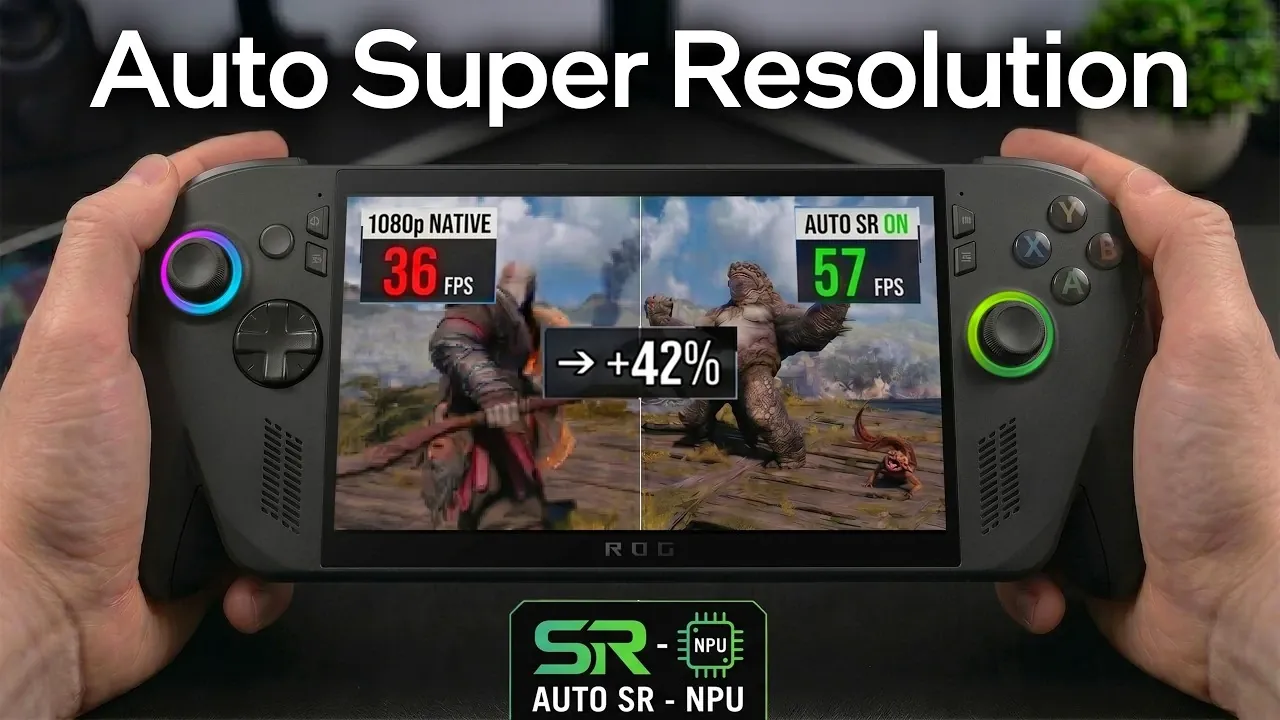
The ROG Xbox Ally X has introduced a new feature for Xbox Insider Preview users: Automatic Super Resolution (Auto SR). This AI-driven upscaling technology utilizes the Neural Processing Unit (NPU) in the Z2 Extreme APU to enhance gaming performance by upscaling 720p visuals to near-1080p resolution. As demonstrated by ETA Prime, this feature not only sharpens graphics but also delivers noticeable frame rate improvements, particularly in demanding games like Cyberpunk 2077 and God of War Ragnarok. However, Auto SR does come with a key limitation, it requires the device to be plugged in when used on the internal screen, which may affect portability for handheld gaming.
Explore how Auto SR optimizes performance across various scenarios, including its impact on external displays and its role in reallocating system resources for smoother gameplay. You’ll also gain insight into the specific frame rate improvements achieved in popular titles and learn how to enable this feature through the Game Bar or display settings. Whether you’re gaming on the go or connecting to a larger screen, this overview provides a clear breakdown of how Auto SR enhances the ROG Xbox Ally X experience.
What is Auto SR?
TL;DR Key Takeaways :
- Auto SR is an AI-driven upscaling feature that enhances 720p games to near-1080p resolution, improving both visuals and frame rates, especially for handheld gaming.
- The feature utilizes the Neural Processing Unit (NPU) in the Z2 Extreme APU and works on both internal and external displays, though internal use requires the device to be plugged in.
- Performance gains include significant FPS improvements in games like Cyberpunk 2077, God of War Ragnarok, and Red Dead Redemption 2, though results vary by title.
- Additional updates include improved docking compatibility with TVs, automatic gaming mode activation, enhanced controller pairing and new resolution adjustment options.
- Auto SR is currently exclusive to Xbox Insider Preview users, offering a glimpse into the potential of AI-driven gaming enhancements despite some limitations like hardware dependency and game-specific performance variability.
Auto SR is an AI-driven upscaling feature designed to enhance the resolution and performance of games running at 720p. By using the NPU within the Z2 Extreme APU, it delivers near-1080p visual quality while simultaneously boosting frame rates. This feature is particularly advantageous for gamers who prioritize a balance between visual fidelity and performance, whether on handheld devices or external monitors.
Key highlights of Auto SR include:
- Compatibility: Works seamlessly with both internal and external displays.
- Availability: Exclusively accessible to Xbox Insider Preview users.
- Power Requirement: Requires the device to be plugged in when used on the internal screen.
This technology is especially appealing to gamers who value smoother gameplay and sharper visuals without compromising performance.
Performance Gains: What to Expect
Auto SR delivers measurable improvements in both frame rates and visual quality across a variety of popular games. By reallocating system resources, it enhances the gaming experience without requiring significant hardware upgrades. Here are some real-world examples of its impact:
- Cyberpunk 2077: Achieves a 12.5% increase in frames per second (FPS) when running at 720p with Auto SR compared to native 1080p.
- God of War Ragnarok: Frame rates improve from 40 FPS to 57 FPS under similar conditions.
- Red Dead Redemption 2: FPS jumps from 52 to 67, showcasing smoother gameplay.
However, the effectiveness of Auto SR can vary depending on the game. For instance, Spider-Man 2 shows only marginal improvements, highlighting that the feature’s performance gains are influenced by the optimization of individual titles. Despite these variations, Auto SR consistently enhances the overall gaming experience for most supported games.

Advance your knowledge of handheld games consoles by reading more of our detailed content.
- New Switch 2 Firmware Adds “Handheld Mode Boost” & More
- Panther Lake Handhelds : Intel’s Push into Portable PC Gaming
- Panther Lake vs Z2 Extreme : FPS Results Benchmarks
- ClockworkPi uConsole Linux handheld PC
- RG56 Pro Max Review & Performance Guide: Is It Worth $65?
- Steam Deck Restock Updates: 512GB and 1TB Models Return at MSRP
- Intel Panther Lake Processors Tranforming Gaming Handhelds
- Insta360 Luna Ultra vs DJI Pocket 4 : Complete Comparison
- Steam Deck OLED Stock Status & What to Expect
- MSI Claw A8 Review: Can It Handle Borderlands 4 on the Go?
How It Works
Auto SR operates by intelligently reallocating power within the device’s thermal design power (TDP) to optimize performance. While this may result in slight reductions in CPU and GPU clock speeds, the trade-off leads to better visuals and higher frame rates. The feature can be enabled through the Game Bar or display settings, making it easily accessible to users. Additionally, resolution settings can be adjusted to further fine-tune the gaming experience based on individual preferences.
This approach ensures that the device maximizes its hardware capabilities without overloading the system, providing a balanced and efficient gaming experience. The integration of AI-driven upscaling demonstrates how modern gaming hardware can adapt to deliver enhanced performance without requiring significant manual adjustments from the user.
Other Enhancements in the Update
The latest update for the ROG Xbox Ally X goes beyond Auto SR, introducing several additional improvements aimed at enhancing the overall gaming experience. These updates include:
- Docking Compatibility: Improved support for Samsung, LG and Vizio TVs ensures seamless integration with external displays, allowing users to enjoy their games on larger screens without compatibility issues.
- Gaming Features Automation: Automatic activation of low latency and game modes on supported TVs optimizes performance for a smoother and more responsive gaming experience.
- Controller Pairing: Faster and more reliable connectivity for controllers enhances usability, reducing delays and improving gameplay responsiveness.
- Resolution Adjustments: New options for fine-tuning display settings enable users to strike the perfect balance between performance and visual quality.
These enhancements collectively aim to make the ROG Xbox Ally X a more versatile and user-friendly gaming device, catering to the needs of both casual and dedicated gamers.
Limitations and Future Potential
While Auto SR is a welcome addition, it does come with certain limitations. The performance and visual improvements, though noticeable, are not universally significant across all games. Some titles benefit more than others and the feature’s reliance on the NPU means its effectiveness is inherently tied to the hardware’s capabilities. Additionally, the requirement for the device to be plugged in when using the internal display may limit its convenience for some users.
Despite these limitations, Auto SR represents a step forward in integrating AI-driven technologies into gaming hardware. As the technology evolves, future updates could refine the feature further, potentially unlocking even greater performance gains. This could include broader compatibility with more games, improved optimization for specific titles and enhanced functionality for both handheld and external display gaming.
Who Can Use Auto SR?
Access to Auto SR is currently limited to Xbox Insider Preview members, making it an exclusive feature for those participating in the program. However, unlike some other updates, this feature does not require an Insider build of Windows, which makes it more accessible to a wider audience within the Xbox Insider community. This accessibility ensures that a significant portion of users can benefit from the feature without additional software requirements.
For gamers who are part of the Xbox Insider Preview program, Auto SR offers a practical way to enhance their gaming experience, particularly for titles that benefit most from AI-driven upscaling and performance optimization.
Media Credit: ETA PRIME
Disclosure: Some of our articles include affiliate links. If you buy something through one of these links, Geeky Gadgets may earn an affiliate commission. Learn about our Disclosure Policy.
