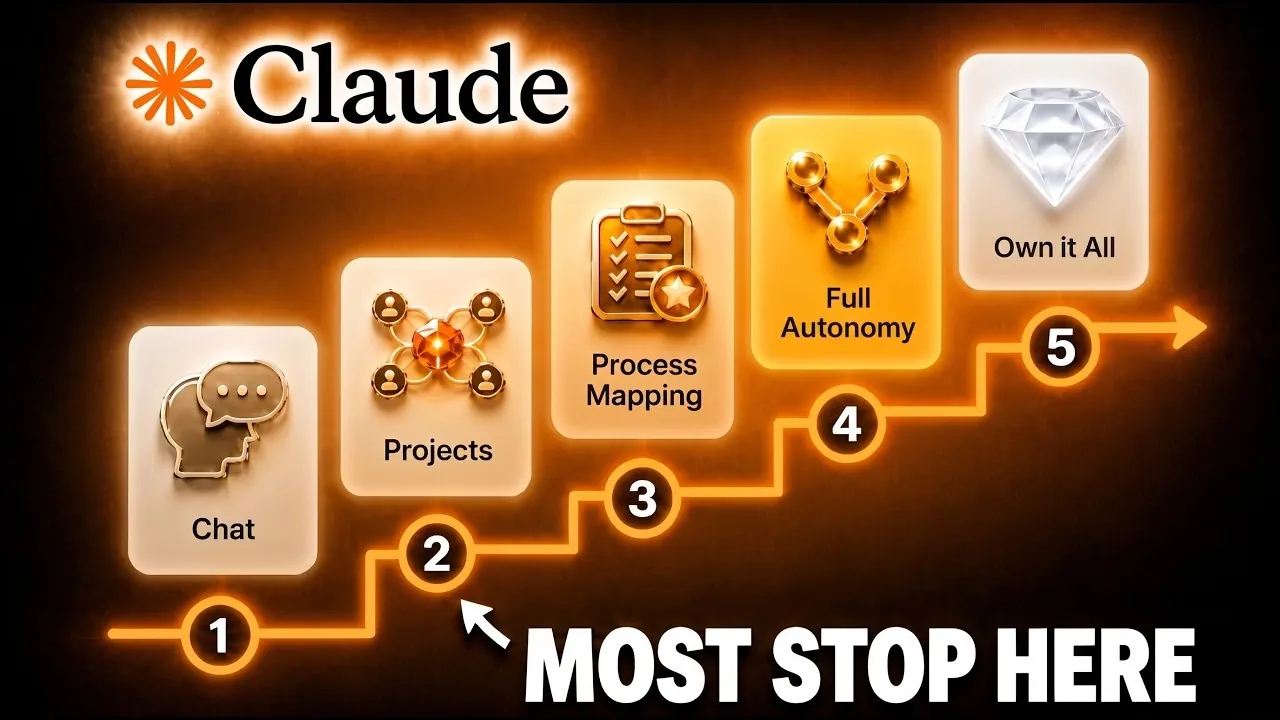
Handing real work to Anthropic Claude comes down to five layers, starting with the chat window most people think they have outgrown. The AI assistant can run cloud tasks while your laptop is closed, so recurring work need not wait for you to start it. Explore how Simon Scrapes breaks down the layers, including how corrections you make to Claude’s output can become reusable instructions, and how keeping business context separate from those instructions lets you reuse a method across projects.
Anthropic Claude: Five Layers From Chat to Autonomy
TL;DR Key Takeaways :
- Anthropic’s guide says Claude performs best when given the whole job upfront, and a complete brief includes context, the desired result, validation, exclusions and guardrails.
- Claude Projects share context across their chats, while connected Google Docs are read fresh and uploaded files remain static copies.
- Skills store job-specific methods across projects, and Anthropic’s skill creator eval function compares results with and without a skill.
- Scheduled tasks can start at a set time, from GitHub events or API calls, and cloud tasks run by default when the laptop is closed.
- An agentic OS is a user-owned folder of portable files that can hold client context, shared skills and memory for use across AI tools.
Anthropic Claude can move from a single chat to scheduled work using the same foundations: a clear goal, context and boundaries. Projects and reusable skills carry that groundwork forward, while scheduled tasks can start a job without you opening a chat each time.
The final layer puts the files that guide the work in a folder you own. It is an organizational approach, not a replacement for the Claude desktop app.
1. Chat: Give Claude the Whole Job
A prompt works best as a brief for the whole job, not just a request for an answer. Every later layer rests on it, so if you get the chat foundations wrong, reaching layer five properly becomes harder. A complete brief has five parts:
- Goal and context: State the task and why it matters.
- Finished result: Describe what the completed work should look like.
- Validation: Tell Claude how to check its work. This is the part most prompts leave out.
- Out of scope: Specify work the task should not include.
- Guardrails: Identify what Claude must not touch.
Earlier advice often favored short prompts that stated only what was wanted, omitted the reasoning and prescribed individual steps. Simon Scrapes argues that each habit now works against you, for three reasons:
- Steps limit the model. Anthropic’s guide says its model does best when you give it the whole job upfront and let it work out the details. Prescribing steps can confine Claude to one way of working.
- The reason guides its assumptions. Explaining why the work matters helps Claude make better calls where it has to assume something.
- Boundaries need stating. Claude 5 models tend to do more than asked unless the prompt makes its limits explicit.
For an AI search task, you could ask Claude to find questions customers search for in ChatGPT that a site’s content does not answer, with the goal of getting cited on Google and in ChatGPT. A validation instruction could require each question to link to a real result that supports it.
2. Projects: Keep Shared Context Together
A Claude project makes context you add once available to chats in that project, so your task prompts can focus on the work at hand. A chat on its own stores no reusable context, so you end up repeating the same information each time.
Project inputs can include files, task instructions, brand voice and visual identity, as well as live data from connected apps through MCP or APIs. Outputs can include drafts, files and live dashboards as artifacts. An SEO project, for example, could combine business files and writing guidance with search data from a service such as DataForSEO or Ahrefs.
With the relevant context already in its files, that project could interpret a short request for the week’s opportunities as a search for pages losing traffic and questions where ChatGPT cites a competitor. Use one project per set of context: jobs that need the same files can share one, while a different client or voice calls for a separate project.
An uploaded file or CSV is a static copy, so changes to the original do not update it, while Claude reads a connected Google Doc fresh when it uses it. A team can update a shared voice brief and use the latest version in conversations, provided its members have permission to edit it.

Here is a selection of other guides from our extensive library of content you may find of interest on mastering Claude Projects and MCP.
- 15 Claude Code Tricks For Persistent Context, Projects, Lower Costs and More
- New Claude Artifacts Let You Manage a Complex Project in One Chat
- Claude Projects Update Adds an AI Coordinator Agent
- Replace Manual Literature Reviews with 5 Claude MCP Tools
3. Skills: Store the Method for a Job
Project context describes you or your business; a skill records how a particular job should or should not be done. Skills stored in Claude are tied to your account, although you can download them as files. This separation lets you use the same skill across projects without putting each client’s background into it.
Start by doing the job without a skill, correcting the output and asking Claude to keep a list of the corrections. Information about the business belongs in project context, while corrections specific to the job can form the skill. The skill should focus on fixes Claude needs rather than serve as a complete instruction manual. A ready-made skill such as Stop Slop may already cover broader writing issues, such as generic opening phrases.
Examples can also help define the method. For AI search, Claude might examine two pages cited in AI answers and help develop rules based on why those pages were cited.
The eval function in Anthropic’s skill creator skill compares the same job and prompts with and without the skill against a set of checks. This comparison matters because an unchecked skill might be doing nothing.
4. Autonomy: Schedule a Bounded Task
A scheduled task adds a trigger to the prompt and skill, allowing Claude to start the job without you opening a chat. Its brief should name the skill, describe where to put the output and set limits on what the task can touch.
For an AI search task, the brief could ask Claude to find the strongest opportunity in the week’s data, draft a page using the skill, save it in a draft folder and not publish it. Claude app tasks and Claude Code routines now sit together in a scheduled tab.
A task can start at a set time, from a GitHub event such as a new pull request or issue, or from an API call. A tool could, for example, start a task when a new lead enters a CRM rather than wait for a timed run.
Cloud tasks run by default even when your laptop is closed. They can use connectors, run scripts, edit files and work from a selected GitHub repository, where the relevant context must be available. Selecting Require this computer gives a task access to local folders, but it runs only while that computer is awake.
Where a person steps in depends on the risk of the job. Simon Scrapes never hands over anything involving money, complaints or legal matters, or anything going out under his name for the first time, and he does not let Claude send most of his emails without his approval.
5. Agentic OS: Keep the Files You Own
With the first four layers, your context sits in a Claude project, your skills in your Claude account and your scheduled tasks in the Claude app. If you later switched to a different model, you would have to rebuild all of it by hand, and working for more than one business means a separate copy of everything for each.
An agentic OS answers that with a folder of files for AI tools to read. It is not an operating system in the technical sense or a new app. In Claude, you can open the code tab and point it at the folder. The same plain Markdown files can be used in Claude Code, Codex and Cursor, so the setup works with any interface, model or tool.
The structure can hold information about how you work, brand voice and positioning, plus a processes folder with a skill, brief and validation checks for each job. Separate client folders can hold each client’s voice, data and rules, while a single shared copy of a skill means a correction reaches every client using it.
A designated memory folder can save information as work proceeds, making decisions and corrections available when you open the folder in another tool. The memory in this setup is kept per client, and you can read and correct the files directly.
Simon Scrapes says people with one business may not need the fifth layer if a few projects cover their work and they are happy to stay inside Claude. Scheduled tasks can still handle work without you starting each run. The choice is whether you need the portable folder structure as well.
In our view, the most useful idea is that a skill should start from corrections you actually made, not from a blank page. That ties the rules to real failures, and a side-by-side check shows whether they earn their place. We would start automation with work where a mistake is cheap and check the first several outputs by hand. Written guardrails lower the risk but do not remove it, so keep a human approval step.
The time you spend correcting a draft can feed into later jobs, turning routine feedback into something more lasting than a better answer in one chat. If you want to hand recurring work to Claude while keeping control of the result, this layered approach is well worth trying.
Media Credit: Simon Scrapes
Disclosure: Some of our articles include affiliate links. If you buy something through one of these links, Geeky Gadgets may earn an affiliate commission. Learn about our Disclosure Policy.
