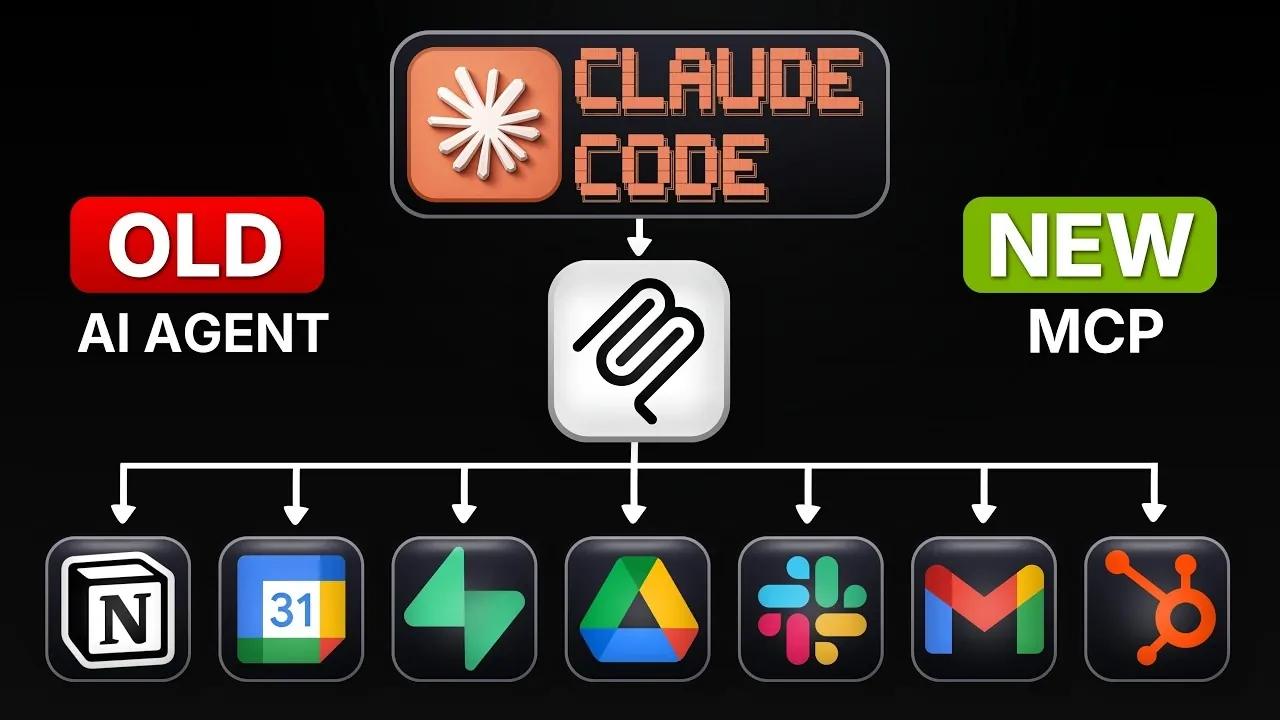
Model Context Protocol (MCPs) plugins extend the functionality of Claude Code by allowing it to interact with external systems and perform specialized tasks. As explained by Michele Torti, MCPs can be configured to handle scenarios like browser automation, database management and API integration. For example, an MCP might use Chrome DevTools to automate repetitive browser actions such as filling out forms or capturing screenshots, reducing manual effort while maintaining accuracy. This capability allows developers to address complex workflows with greater efficiency.
Discover how to configure MCPs by creating and customizing files like `.mcp.json` to define key parameters, including API endpoints and authentication settings. Learn strategies for optimizing token usage to manage costs effectively while maintaining security. Dive into practical examples, such as integrating relational databases with platforms like Superbase or connecting third-party services to streamline development workflows.
Understanding MCPs and Their Capabilities
TL;DR Key Takeaways :
- MCPs (Model Context Protocol) enhance Claude Code by allowing interaction with external tools, supporting tasks like web automation, database management and API integration.
- MCPs act as intermediary servers, simplifying integration with external systems and automating complex workflows such as browser automation and API communication.
- Key differences between MCPs, skills and hooks include MCPs’ ability to extend Claude Code’s capabilities by integrating external functionalities, unlike skills and hooks which focus on internal tasks and security.
- Configuring MCPs involves creating a `.mcp.json` file with parameters like API endpoints and authentication details, with examples including Chrome DevTools for web automation and Superbase for database management.
- To optimize token usage and manage costs, restrict MCPs to essential tasks, convert frequently used MCPs into skills and regularly monitor token consumption for efficiency.
MCPs are specialized plugins designed to extend the functionality of Claude Code, allowing it to interact with external systems and perform complex tasks. Unlike built-in features, MCPs enable automation across a variety of domains, including:
- Browser Automation: Automating tasks such as web scraping, form filling and website testing.
- Database Operations: Managing structured or vector databases for efficient data handling.
- API Communication: Streamlining workflows by integrating with third-party services.
For instance, an MCP can automate repetitive browser tasks or connect to APIs to retrieve and process data, significantly reducing manual effort and enhancing productivity. These plugins are particularly valuable for developers seeking to optimize workflows and tackle complex challenges efficiently.
How MCPs Operate
MCPs function as intermediary servers that assist communication between Claude Code and external applications. By using API documentation, they simplify integration processes, allowing developers to automate tasks without extensive manual coding.
For example, a browser automation MCP might use Chrome DevTools to perform actions such as capturing screenshots, filling out forms, or testing website functionality. This approach minimizes complexity while allowing Claude Code to execute sophisticated operations seamlessly.
Deep dive into the latest in Claude Code by exploring our other resources and articles.
- Anthropic Claude Code Review Preview: Multi-Agent Pull Request Reviews
- The Claude Code Leak Explained: Kyros, Ultra Plan & New Models
- Claude Code Skills 2.0 : Workflow Skills vs Capability Uplift Skills
- Claude Code 2 Feature Update: Automation, Workspace Links and Skill Scoring
- Tired of Claude Code Permission Prompts? Try This New Feature
- Claude Code Leak Reveals Architecture, Commands, Memory & More
- Nested Claude Code System for Parallel Work in Tmux on macOS
- Claude Code 2 Adds Multi-Agent Code Review for Team & Enterprise
- Anthropic Brings Full Desktop Control to Claude Code
- Turn Claude Code Into an AI Workforce With Paperclip
Key Differences: MCPs, Skills and Hooks
To fully harness the potential of MCPs, it’s essential to understand how they differ from other Claude Code features like skills and hooks:
- Skills: Provide step-by-step instructions for specific tasks, such as generating reports or creating database queries.
- Hooks: Serve as security protocols or guardrails, making sure tasks adhere to predefined guidelines and safety standards.
- MCPs: Extend Claude Code’s capabilities by allowing interaction with external tools, such as browsers, databases, or APIs.
While skills and hooks focus on internal task execution and maintaining security, MCPs expand Claude Code’s reach by integrating external functionalities. This makes them particularly useful for automating complex workflows that require interaction with external systems.
Configuring and Deploying MCPs
Setting up MCPs involves creating a configuration file, typically named `.mcp.json`, which defines the plugin’s parameters and integration details. This file includes essential information such as API endpoints, authentication credentials and task-specific parameters.
Examples of commonly used MCPs include:
- Chrome DevTools: Facilitates browser automation tasks like web scraping, testing and capturing screenshots.
- Superbase: Manages relational or vector databases, allowing efficient data storage, retrieval and querying.
The setup process is straightforward but requires thorough testing and refinement to ensure optimal performance. Proper configuration is crucial to achieving seamless integration and reliable operation.
Real-World Applications of MCPs
MCPs offer a wide range of practical applications that can significantly enhance productivity and streamline workflows:
- Web Automation: Automate repetitive tasks such as filling out forms, testing web pages, or capturing screenshots.
- Database Management: Use tools like Superbase to handle structured data or manage vector databases for AI-driven applications.
- API Integration: Connect to external services for tasks like sending emails, retrieving data, or processing payments.
These capabilities make MCPs indispensable for developers aiming to optimize their processes and tackle intricate challenges efficiently. By using MCPs, you can reduce manual effort, improve accuracy and focus on higher-level development tasks.
Optimizing Token Usage and Managing Costs
MCPs consume tokens during operation, which can impact overall costs. To manage token usage effectively and maintain cost efficiency:
- Restrict the number of active MCPs to essential tasks only.
- Convert frequently used MCPs into skills where feasible to reduce token consumption.
- Regularly monitor token usage to identify inefficiencies and optimize configurations.
Balancing the use of MCPs with built-in tools and system prompts ensures that you can achieve cost-effective operation without compromising functionality. Careful planning and monitoring are essential to maximizing the value of MCPs while minimizing expenses.
Best Practices for Effective MCP Utilization
To ensure the reliability and efficiency of MCPs, consider the following best practices:
- Testing: Conduct thorough testing of MCPs in controlled environments before deploying them in production settings.
- Security: Use trusted and vetted MCPs to minimize risks and ensure compliance with security standards.
- Optimization: Regularly review and refine MCP configurations to align with evolving project requirements and objectives.
Adopting a balanced approach that combines internal features with external plugins will help you achieve optimal performance and reliability. By following these practices, you can maximize the potential of MCPs while maintaining a secure and efficient development environment.
Media Credit: Michele Torti
Disclosure: Some of our articles include affiliate links. If you buy something through one of these links, Geeky Gadgets may earn an affiliate commission. Learn about our Disclosure Policy.
