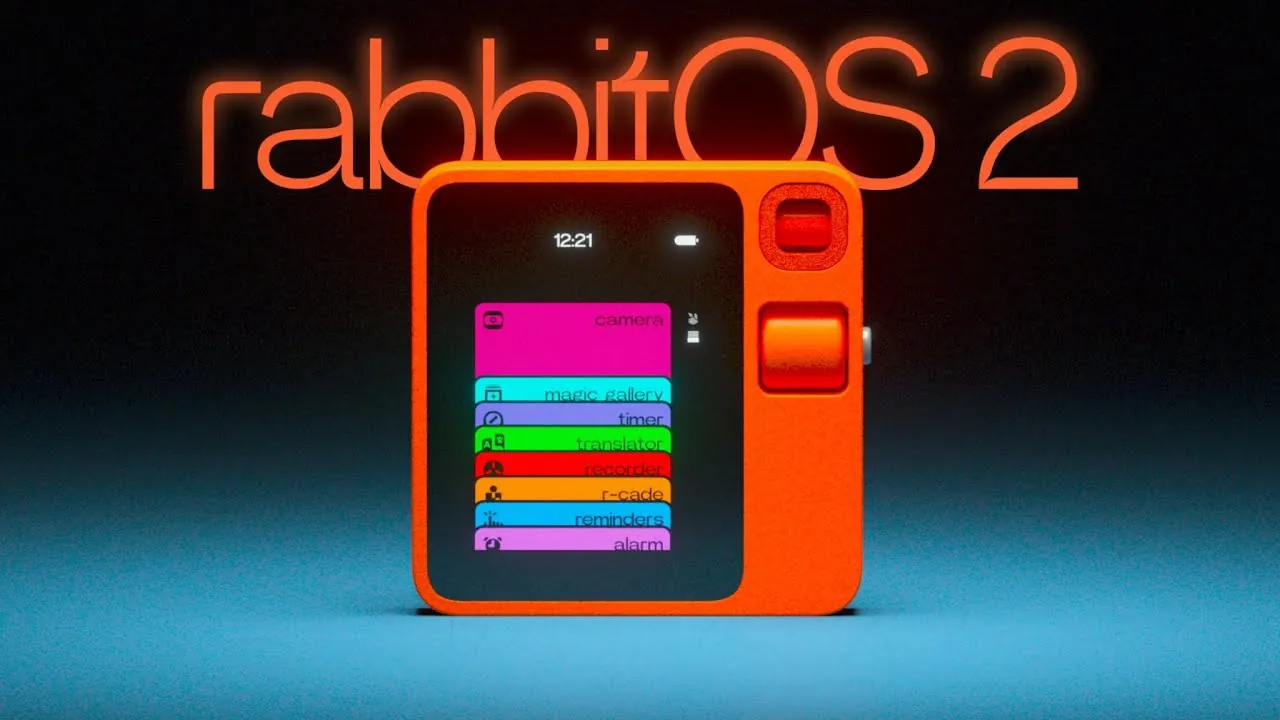
Rabbit has returned from the ashes and release a new second generation wearable AI device equipped with rabbitOS 2. Hopefully correcting many of the mistakes made in the first generation. Packed with updates, rabbitOS 2 has been redesigned to redefine how users interact with the Rabbit R1 AI device, turning it into a platform that prioritizes both creativity and usability.
The development team at Rabbit explain more about how the new rabbitOS 2 introduces new features like the “Creations” tool, which allows you to design apps and experiences through real-time conversations with AI. You’ll also discover how enhanced gesture controls and a reimagined interface make navigating the Rabbit R1 smoother than ever before.
rabbitOS 2 Overview
TL;DR Key Takeaways :
- rabbitOS 2 introduces a redesigned interface with gesture-based controls and a card stack layout, enhancing navigation and usability for a more intuitive experience.
- The update includes improved AI features, such as reimagined conversation flow displays, on-device access to recordings, and AI-generated transcripts for better interaction and productivity.
- The new “Creations” tool enables users to design custom tools, games, and applications through conversational coding, making development accessible even for non-technical users.
- Community-driven development is emphasized with features like QR code sharing for user-generated content, fostering collaboration and innovation among Rabbit R1 users.
- rabbitOS 2 focuses on accessibility and creativity with “vibe coding,” removing traditional barriers to coding and empowering users to experiment and innovate effortlessly.
Enhanced Interface for Effortless Navigation
The updated interface in rabbitOS 2 is designed to prioritize simplicity and efficiency, making sure smoother and more intuitive interactions. Whether you’re adjusting settings or switching between applications, the enhanced touch screen and gesture controls make every action seamless. Key interface improvements include:
- A redesigned card stack layout that provides quicker access to essential features and settings.
- Gesture-based functionality, allowing swift actions through simple swipes, improving both accessibility and responsiveness.
These updates ensure that the Rabbit R1 adapts to your needs, reducing friction in daily use and delivering a more streamlined experience. By focusing on user-centric design, rabbitOS 2 makes navigation intuitive and efficient, allowing you to focus on what matters most.
AI Features Designed for Practical Use
rabbitOS 2 introduces a range of AI-powered features tailored to enhance your daily interactions. The conversation flow display has been reimagined to make AI responses easier to follow and engage with. Additionally, the ability to revisit past interactions has been significantly improved, offering:
- On-device access to recordings for quick reference.
- AI-generated transcripts and playback options for reviewing conversations.
These enhancements make the Rabbit R1 a versatile tool for both casual users and professionals. Whether you’re using it for personal productivity or professional tasks, the device adapts to a wide range of requirements, making sure it remains a valuable part of your daily routine.
Introducing rabbitOS 2 & Creations

Master AI wearable with the help of our in-depth articles and helpful guides.
- Limitless AI wearable pendant assistant $99
- Improve your health with ExerRing AI wearable wellness coach
- Humane AI Pin wearable hands-on reviews round-up
- Google Glasses Android XR and Gemini AI: The Wearable Future
- A closer look at Rabbit R1 and Humane Ai Pin wearables
- Ai Pin by Humane – your new wearable AI assistant
- Rokid Glasses Unveiled: Is the Shift to Applied AI Wearables Finally
- Google Android XR Glasses: Features, Benefits, and Challenges
- New Meta AI Glasses 2025 : Everything You Need to Know
- Dnsys X1 wearable power exoskeleton frame from $499
Unleashing Creativity with the “Creations” Tool
One of the most new features of rabbitOS 2 is “Creations,” a tool that enables you to design custom tools, games, or experiences through real-time conversations with the Rabbit intern agent. This feature uses AI-powered coding to make development accessible, even for users with no technical background. Key highlights of the “Creations” tool include:
- Real-time, conversational coding that simplifies the process of creating custom tools and applications.
- Integration with a growing library of user-generated content, functioning as a dynamic app store for shared innovations.
This feature not only fosters creativity but also builds a sense of community among users. By exploring and sharing user-generated content, you can collaborate with others and discover new ways to use the Rabbit R1. The “Creations” tool transforms the device into a platform for innovation, allowing you to bring your ideas to life with ease.
Community-Driven Development and Collaboration
rabbitOS 2 reflects a strong commitment to community-driven development, incorporating user feedback to shape its evolution. Over the past 16 months, more than 30 software updates have been released, each addressing user suggestions and improving the overall experience. This iterative approach ensures that the Rabbit R1 continues to meet your needs while introducing new possibilities.
To further enhance collaboration, rabbitOS 2 includes QR code sharing for user-generated creations. This feature allows you to easily share your work and discover tools developed by others, fostering a collaborative ecosystem. By emphasizing community engagement, rabbitOS 2 creates a platform where users can connect, innovate, and grow together.
Making Coding Accessible with “Vibe Coding”
Inspired by the “vibe coding” culture, rabbitOS 2 aims to make coding an enjoyable and accessible experience. The platform encourages experimentation and creativity, providing the tools and support you need to bring your ideas to life. Whether you’re developing a simple utility or a complex interactive experience, rabbitOS 2 removes traditional barriers to coding, empowering you to innovate without requiring advanced technical skills.
A Platform Built for the Future
rabbitOS 2 represents a renewed focus on delivering a refined and future-ready experience. By addressing initial software shortcomings and prioritizing user-centric design, the Rabbit R1 evolves into a device that not only meets expectations but exceeds them. Continuous updates ensure that the platform remains relevant and adaptable, keeping pace with your changing needs and preferences.
With features like enhanced gesture controls, an improved interface, and the innovative “Creations” tool, rabbitOS 2 positions the Rabbit R1 as a versatile solution for both personal and professional use, if it works. By embracing community feedback and fostering a culture of creativity, rabbitOS 2 ensures that the Rabbit R1 lives another day.
Media Credit: rabbit
Disclosure: Some of our articles include affiliate links. If you buy something through one of these links, Geeky Gadgets may earn an affiliate commission. Learn about our Disclosure Policy.
