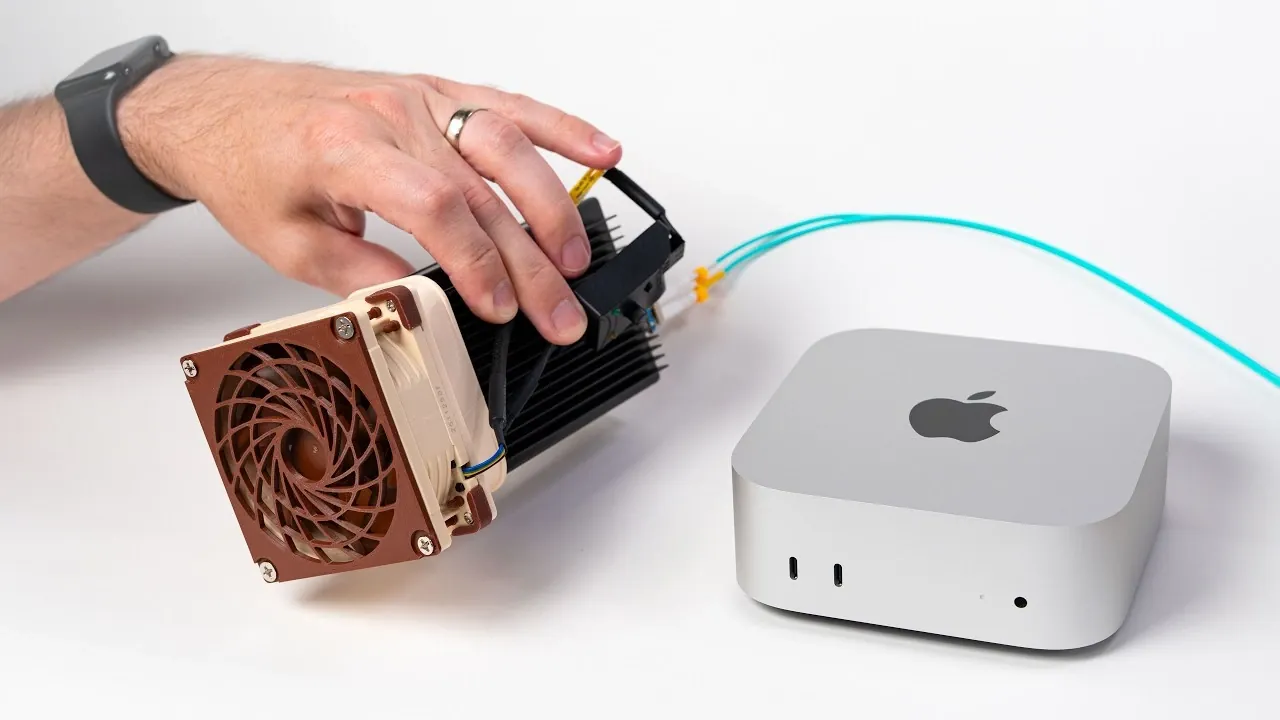
Upgrading a Mac for faster networking, such as moving from 10-gigabit to 25-gigabit Ethernet, can be prohibitively expensive due to the high cost of Thunderbolt adapters. Jeff Geerling highlights a cost-effective alternative by repurposing server pull hardware and using fiber optic cables to achieve similar performance. This method offers a practical way to enhance connectivity without relying on premium-priced accessories.
Discover how to set up 25-gigabit networking on a Mac Studio, including specific hardware modifications and cooling adjustments like integrating a Noctua fan or a custom 3D-printed shroud. Learn how to test and optimize network performance using iPerf3 and explore strategies for managing heat during sustained workloads. This overview provides clear steps to achieve high-speed networking while keeping costs under control.
Why Consider Upgrading Beyond 10-Gigabit Ethernet?
TL;DR Key Takeaways :
- Upgrading from 10-gigabit to 25-gigabit Ethernet on a Mac Studio can be achieved cost-effectively using repurposed server pull hardware and fiber optic cables instead of expensive Thunderbolt adapters.
- Key hardware modifications include using affordable network interface cards (NICs) and addressing heat management with custom cooling solutions like Noctua fans and 3D-printed fan shrouds.
- Proper thermal management is critical to ensure system stability and prevent hardware damage due to increased power consumption and heat output from high-speed networking.
- Optimizing software with tools like iPerf3 enables users to maximize throughput, achieving stable transfer speeds between 20 and 25 gigabits per second despite Thunderbolt 3 limitations.
- The upgrade delivers tangible performance improvements, such as read speeds up to 1.4 GB/s and write speeds around 1 GB/s, offering a practical solution for users needing faster data transfer on a budget.
The increasing demand for faster data transfer speeds has made high-performance networking a necessity for many professionals. Tasks such as video editing, managing large datasets, or operating high-performance servers require robust and efficient networking solutions. While 10-gigabit Ethernet is sufficient for many users, upgrading to 25-gigabit Ethernet offers several distinct advantages:
- Faster file transfers, significantly reducing wait times for large data sets.
- Lower latency, which enhances responsiveness in demanding workflows.
- Future-proofing your setup to accommodate evolving data needs and workloads.
Despite these benefits, the high cost of Thunderbolt-based 25-gigabit adapters remains a significant barrier. Fortunately, alternative approaches exist that can deliver similar results without the steep financial investment.
Affordable Alternatives to High-Cost Adapters
Thunderbolt adapters designed for 25-gigabit networking are often prohibitively expensive. To bypass this cost, consider using more affordable options such as repurposed server pull hardware. These components, typically sourced from decommissioned servers, are both cost-effective and capable of handling the bandwidth required for high-speed networking.
By pairing server pull hardware with fiber optic cables, you can establish a high-speed network connection without relying on expensive proprietary solutions. A budget-friendly Thunderbolt adapter can serve as the bridge between your Mac Studio and the upgraded network. This approach is accessible to users with moderate technical skills and offers a practical way to achieve high-speed connectivity.

Here are more guides from our previous articles and guides related to Mac Studio that you may find helpful.
- Apple’s Fall Mac Lineup: M5 Ultra Mac Studio, iPad Mini, and iPhone Ultra Fold
- Mac Studio M5 Ultra Brings Major Upgrades and Higher Price
- Every New Apple Device Leaked Ahead of WWDC 2026
- Apple’s New M5 Mac Studio Rumored to Start At $2,499
- What to Expect from Apple’s Next-Generation M5 Mac Mini and Studio
- Don’t Wait for WWDC: New Leaks Reveal the M5 Mac Studio is Delayed Until October
- The Real Reason Mac Mini, Apple TV and Mac Studio Were Missing at WWDC
- Apple Studio Display 27-inch 5K Retina monitor with Spatial Audio launches
Key Hardware Modifications for 25-Gigabit Networking
To enable 25-gigabit networking on your Mac Studio, certain hardware modifications are essential. Fiber optic cables play a crucial role, as they are designed to handle the increased data transfer speeds required for this upgrade. Additionally, used network interface cards (NICs) from server pull hardware can be adapted to work seamlessly with your Mac Studio.
However, these modifications come with challenges. One of the most significant is managing the additional heat generated by higher-speed networking. Without proper thermal management, the increased power consumption can lead to instability or even hardware failure. Addressing these issues is critical to making sure stable and reliable performance.
Effective Heat Management with Custom Cooling Solutions
Upgrading to 25-gigabit networking inevitably increases power consumption, which results in higher heat output. Proper cooling solutions are essential to maintain system stability and prevent potential hardware damage. Custom cooling solutions tailored to your setup can effectively address this challenge.
For example:
- Installing a Noctua fan powered directly by the network card can significantly improve airflow and cooling efficiency.
- Using a 3D-printed fan shroud can help direct airflow more effectively while minimizing noise levels.
These DIY cooling solutions are not only cost-effective but also highly efficient, making them an ideal choice for users looking to manage heat without investing in expensive pre-built systems.
Maximizing Performance with iPerf3
Once the hardware modifications are complete, optimizing your software setup is essential to fully use the 25-gigabit bandwidth. iPerf3, a widely recognized network performance testing tool, can be updated for multi-threading to maximize throughput and ensure optimal performance.
Using iPerf3, you can measure transfer speeds, identify potential bottlenecks and fine-tune your setup for maximum efficiency. In testing, this approach has demonstrated stable performance between 20 and 25 gigabits per second, even with the inherent limitations of Thunderbolt 3. This highlights the potential of a well-optimized system to deliver near-maximum performance.
Real-World Performance Improvements
After implementing the necessary modifications and optimizations, the upgraded setup delivers tangible improvements in file transfer speeds.
- Read speeds reached up to 1.4 GB/s.
- Write speeds stabilized at approximately 1 GB/s.
While these results represent a modest improvement over 10-gigabit Ethernet, they demonstrate the feasibility of achieving high-speed networking on a limited budget. For users who require faster performance, this approach offers a practical and cost-effective solution.
Evaluating the Value of the Upgrade
Upgrading to 25-gigabit networking on a Mac Studio is not without its challenges. It requires a combination of time, technical expertise and some investment in hardware. However, for users who need faster data transfer speeds and are willing to put in the effort, the results can be highly rewarding.
By using affordable alternatives such as server pull hardware and addressing heat management with custom cooling solutions, you can achieve significant performance gains without overspending. For those whose current 10-gigabit setup meets their needs, the upgrade may not be necessary.
Ultimately, this project demonstrates that with ingenuity and technical skill, it is possible to overcome the limitations of expensive networking solutions and achieve high-speed performance on a budget.
Media Credit: Jeff Geerling
Disclosure: Some of our articles include affiliate links. If you buy something through one of these links, Geeky Gadgets may earn an affiliate commission. Learn about our Disclosure Policy.
