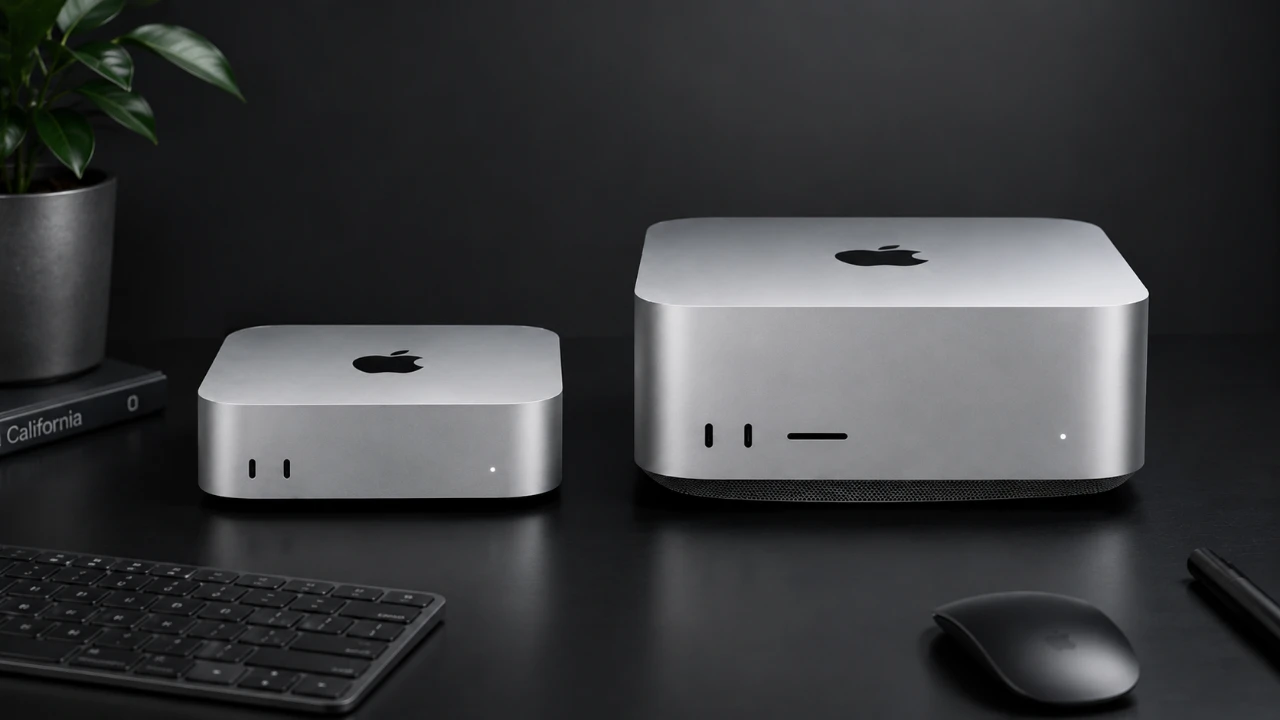
Apple’s latest desktop computers, the M5 Pro Mac Mini and M5 Max Mac Studio, represent significant advancements in the company’s product lineup. Both devices feature sleek designs, innovative connectivity, and powerful hardware, but they cater to different user needs. Whether you’re a creative professional or a general user, understanding the differences between these two systems is essential for making an informed decision. With the M6 generation on the horizon, it’s also worth considering how your choice might fit into Apple’s evolving ecosystem. The video below from GregsGadgets gives us more details on the two new Macs.

Design and Portability: Compact Efficiency vs Professional Power
The design of the Mac Mini and Mac Studio reflects their distinct purposes, balancing portability and performance.
– Mac Mini: Its compact form factor makes it an excellent choice for users with limited desk space or those who need a portable desktop solution. Weighing just 2.6 pounds, it’s easy to transport and fits seamlessly into minimalist setups.
– Mac Studio: Although larger and heavier at 5.9 pounds, it remains compact for a high-performance desktop. Its design prioritizes functionality, offering additional ports and enhanced cooling for sustained performance in demanding workflows.
If portability and space-saving are your top priorities, the Mac Mini is the clear winner. However, if you need a stationary powerhouse with expanded connectivity and thermal efficiency, the Mac Studio is better suited to your needs.
Ports and Connectivity: Versatility for Every Workflow
Both devices are equipped with modern connectivity options, making sure compatibility with the latest peripherals and networks. However, the Mac Studio offers additional ports that cater to professionals with more complex setups.
Shared Features:
- Thunderbolt 5 ports for high-speed data transfer and external display support
- HDMI for connecting to monitors and TVs
- Wi-Fi 7 and Bluetooth 6 for seamless wireless connectivity
- 2.5 Gb Ethernet, with an optional upgrade to 10 Gb Ethernet
Mac Mini: Provides a sufficient range of ports for most users, making it ideal for general tasks and moderate workloads.
Mac Studio: Includes additional Thunderbolt and USB-A ports, as well as an SD card slot, which is particularly useful for photographers, videographers and other creative professionals.
If your workflow involves multiple peripherals or specialized equipment, the Mac Studio’s expanded connectivity may justify its higher price.
Performance: Tailored Power for Different Workloads
The M5 Pro and M5 Max chips deliver impressive performance, but their specifications highlight key differences that cater to specific use cases.
– Mac Mini (M5 Pro):
– 15-core CPU for efficient multitasking
– 16-core GPU for moderate graphics performance
– 24 GB unified memory for smooth operation across various applications
– Base price: $1,700
– Mac Studio (M5 Max):
– 18-core CPU, offering a modest 13% improvement in multi-core tasks compared to the M5 Pro
– 32-core GPU, delivering a 42% boost in graphics performance for demanding tasks like 3D rendering and AI processing
– 32 GB unified memory, expandable for memory-intensive workflows
– Base price: $2,500
While the CPU performance is comparable, the Mac Studio’s superior GPU makes it the better choice for graphics-intensive tasks. If your work involves 3D modeling, video editing, or advanced AI applications, the Mac Studio provides the power you need. For general productivity and lighter workloads, the Mac Mini offers excellent value.
Upgrade Options: Balancing Flexibility and Cost
Both devices allow for customization, but their upgrade paths differ in terms of flexibility and cost.
– Mac Mini:
– Supports up to 64 GB of memory and 8 TB of storage, making it a versatile option for users who need additional capacity without breaking the bank.
– Memory and storage upgrades are more affordable, appealing to budget-conscious buyers.
– Mac Studio:
– Configurable with up to 128 GB of memory, ideal for professionals handling large datasets or running memory-intensive applications.
– Higher memory configurations are tied to specific GPU upgrades, which can significantly increase the overall cost.
For example, upgrading the Mac Studio to 128 GB of memory can bring its price close to the M5 Ultra variant, which offers even greater performance. Carefully evaluate whether the additional cost aligns with your workflow requirements.
Use Cases: Choosing the Right Tool for the Job
The decision between the Mac Mini and Mac Studio ultimately depends on your specific needs and workflow.
– Mac Mini:
– Best suited for general tasks, including video editing, software development and light AI workloads.
– Offers excellent value for users who don’t require extreme performance or extensive memory capacity.
– Mac Studio:
– Designed for professionals working on GPU-intensive tasks such as 3D rendering, local AI testing, or video production.
– Superior GPU and memory options make it ideal for demanding applications that require sustained performance.
If your work involves heavy graphics or memory-intensive processes, the Mac Studio is the better choice. For less demanding tasks, the Mac Mini provides more than enough power at a lower cost.
Pricing: Weighing Cost Against Capability
Price is a critical factor when deciding between these two devices.
– Mac Mini: Starts at $1,700, offering a more affordable entry point for users who need a capable desktop without overspending.
– Mac Studio: Starts at $2,500, reflecting its enhanced performance and expanded features.
However, upgrading the Mac Studio to its maximum memory configuration can push its price close to the M5 Ultra model, which delivers significantly better performance for the cost. For professionals with a flexible budget, the M5 Ultra may be a more logical long-term investment.
Future Outlook: Preparing for the M6 Generation
Apple’s upcoming M6 chip, expected to debut in 2027, promises even greater performance and efficiency thanks to its 2 nm process. If your current needs don’t demand the highest memory or storage configurations, waiting for the M6 generation could be a strategic decision. The anticipated advancements may offer better value and longevity, making it worth considering if your current system can meet your needs in the short term.
By carefully evaluating your workflow requirements and considering the potential benefits of future hardware, you can make a choice that aligns with both your immediate and long-term goals.
Unlock more potential in M5 Pro Mac Mini by reading previous articles we have written.
- Apple Unleashes M6 Mac mini: Huge AI Leap in a Tiny Desktop, but Is It Still a Bargain?
- Apple Mac Mini M5 Leak Reveals New Late 2026 Release Window
- M5 Mac Mini: Release Date Specs and Features Revealed
- Apple Drops M6 & M5 Pro Mac Mini: Desktop-Class Power in a Tiny Box
- Forget the Mac Pro: Apple’s New M5 Ultra Mac Studio Changes Everything
Source & Image Credit: GregsGadgets
Disclosure: Some of our articles include affiliate links. If you buy something through one of these links, Geeky Gadgets may earn an affiliate commission. Learn about our Disclosure Policy.
