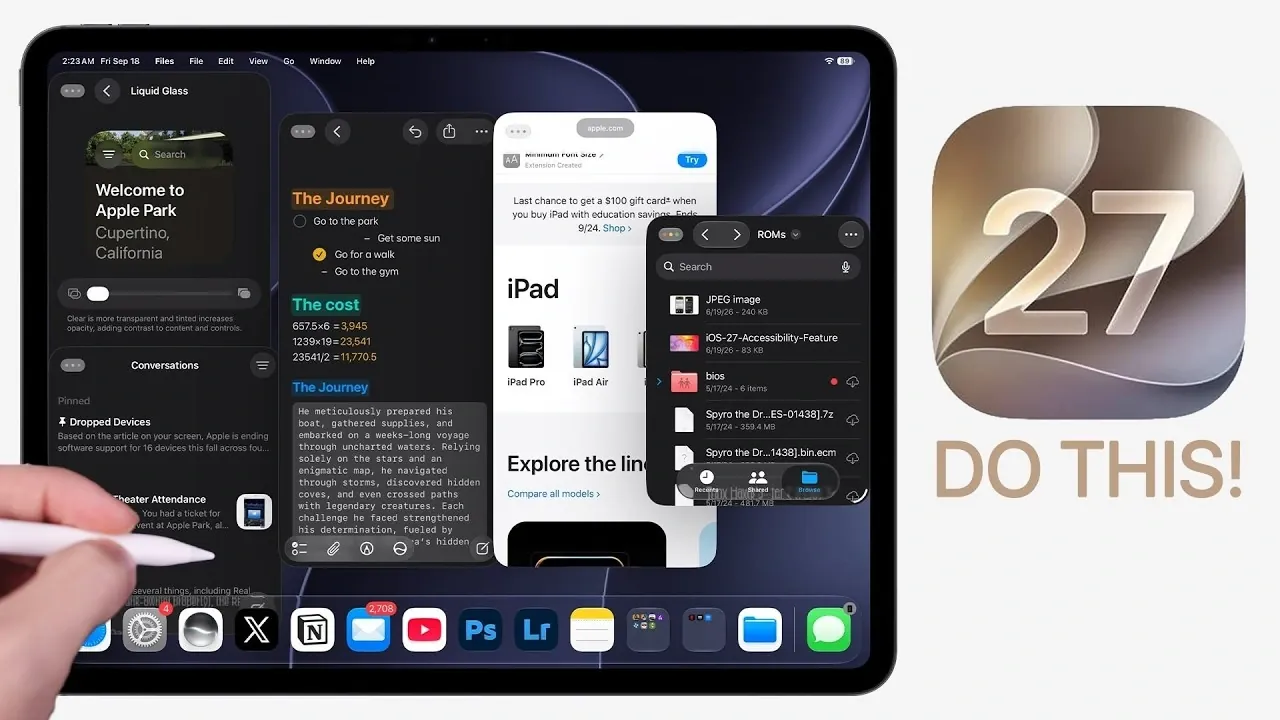
iPadOS 27 brings a host of thoughtful updates designed to enhance productivity, customization, and overall performance. While it builds upon the foundation of iPadOS 26, this version focuses on refining existing features and introducing practical improvements that streamline workflows. Below is a detailed video from Brandon Butch that gives us a look at the most significant updates and how you can use them to optimize your iPad experience.

Enhanced Multitasking for Seamless Productivity
Multitasking in iPadOS 27 has been significantly improved, offering a more intuitive and efficient way to manage multiple tasks simultaneously. Key updates include:
- Improved resizing and movement of windowed apps, allowing for smoother transitions and better control over your workspace.
- Windows now retain their positions when connecting to an external monitor, making sure a seamless workflow across devices.
- Active application names are displayed in multitasking modes, providing greater clarity when switching between tasks.
- The ability to show or hide the menu bar, creating a more desktop-like experience when needed.
These enhancements make multitasking more intuitive, whether you’re managing a complex project or simply juggling everyday tasks. By taking advantage of these features, you can create a more organized and efficient workspace.
Home Screen Customization: More Control at Your Fingertips
iPadOS 27 introduces new tools to help you personalize your home screen and adapt it to your specific needs. Customization options include:
- Extra-large widgets that provide better visibility for at-a-glance information, such as calendar events or weather updates.
- An undo/redo feature for app and widget placement, allowing you to quickly correct or adjust changes without hassle.
These updates empower you to design a home screen that reflects your workflow and preferences, saving time and effort while improving usability.
Faster File Transfers and Smarter Search
The Files app receives significant upgrades in iPadOS 27, making file management faster and more intuitive. Notable improvements include:
- External drive transfers are now up to five times faster, making it easier to handle large files efficiently.
- Natural language search simplifies file retrieval. For example, typing “photos from last month” or “PDFs from yesterday” will instantly display relevant results.
These enhancements are particularly beneficial for users managing complex workflows, making sure that file organization and retrieval are both quick and straightforward.
Automation and Shortcuts: Streamlined Workflows
Automation capabilities in iPadOS 27 have been expanded, offering new ways to optimize your daily tasks. Key updates include:
- Automations can now trigger when connecting or disconnecting a keyboard, allowing seamless transitions between different work modes.
- Multitasking layouts can be automated, allowing specific apps to open in predefined configurations for increased efficiency.
These features allow you to create workflows tailored to your needs, reducing repetitive actions and saving valuable time.
Notes App: Markdown Support and Improved Organization
The Notes app in iPadOS 27 becomes a more versatile tool for both casual and professional use. New features include:
- Markdown support, allowing you to seamlessly copy and paste formatted text for better compatibility with other tools.
- Native dividers and linkable headers that improve note organization and navigation, especially for longer documents.
Whether you’re brainstorming ideas or managing detailed projects, these updates make the Notes app a more powerful and user-friendly tool.
Search and Siri: Smarter and More Context-Aware
Unified search through Siri and Spotlight has been enhanced to deliver more precise and context-aware results. Key improvements include:
- Siri now offers AI-driven capabilities, such as performing in-app actions, recognizing personal context and providing visual intelligence.
- For example, Siri can identify objects, locations, or even nutritional information directly from images, making it a more versatile assistant.
These updates make Siri and Spotlight more effective tools for both everyday tasks and advanced queries, helping you find information faster and more accurately.
Safari: Better Tab Management and New Features
Safari in iPadOS 27 introduces several features aimed at improving browsing efficiency and organization. Highlights include:
- Tabs can now be grouped automatically or manually based on related topics, keeping your browsing sessions organized.
- Natural language-based extension creation simplifies customization, allowing you to tailor Safari to your needs.
- The new “Notify Me” feature tracks price drops or webpage changes, making sure you stay informed about updates that matter to you.
These enhancements make Safari a more powerful and user-friendly browser for both casual users and professionals.
Lock Screen and Generative Wallpaper: Personalization Redefined
iPadOS 27 introduces new ways to customize your device’s appearance, making it both functional and visually appealing. Key features include:
- A compact clock option on the lock screen, freeing up space for other elements like notifications or widgets.
- Generative wallpaper options that allow you to create unique backgrounds tailored to your style.
- Adjustable liquid glass intensity, improving readability without compromising aesthetics.
These updates provide greater flexibility in personalizing your iPad, making sure it reflects your preferences while remaining practical.
Performance Optimizations: A Faster, Smoother Experience
Performance improvements are a cornerstone of iPadOS 27, making sure your device operates efficiently even under demanding conditions. Key optimizations include:
- Faster app loading times and smoother scrolling, enhancing overall responsiveness.
- Quicker AirDrop transfers, making file sharing more efficient and reliable.
These enhancements ensure that your iPad delivers a snappier and more seamless user experience, whether you’re multitasking or running resource-intensive applications.
Unlocking the Potential of iPadOS 27
iPadOS 27 focuses on refining usability, boosting productivity and expanding customization options. From enhanced multitasking to smarter automation and faster file transfers, this update equips you with tools to work more efficiently and personalize your device to suit your needs. By exploring these features, you can unlock the full potential of your iPad and elevate your overall experience.
Expand your understanding of iPadOS 27 with additional resources from our extensive library of articles.
- How iPadOS 27 May Fundamentally Change the iPad Experience
- iPadOS 27 Public Beta: Apple Just Made the iPad Way More Useful
- iPadOS 27 Public Beta is Out to Make iPad Feel Like a Computer
- iPadOS 27 Beta 3 Finally Unlocks the iPad’s Full Multitasking Potential
- iPadOS 27: 7 Hidden Features Apple Barely Mentioned on Stage
Source & Image Credit: Brandon Butch
Disclosure: Some of our articles include affiliate links. If you buy something through one of these links, Geeky Gadgets may earn an affiliate commission. Learn about our Disclosure Policy.
