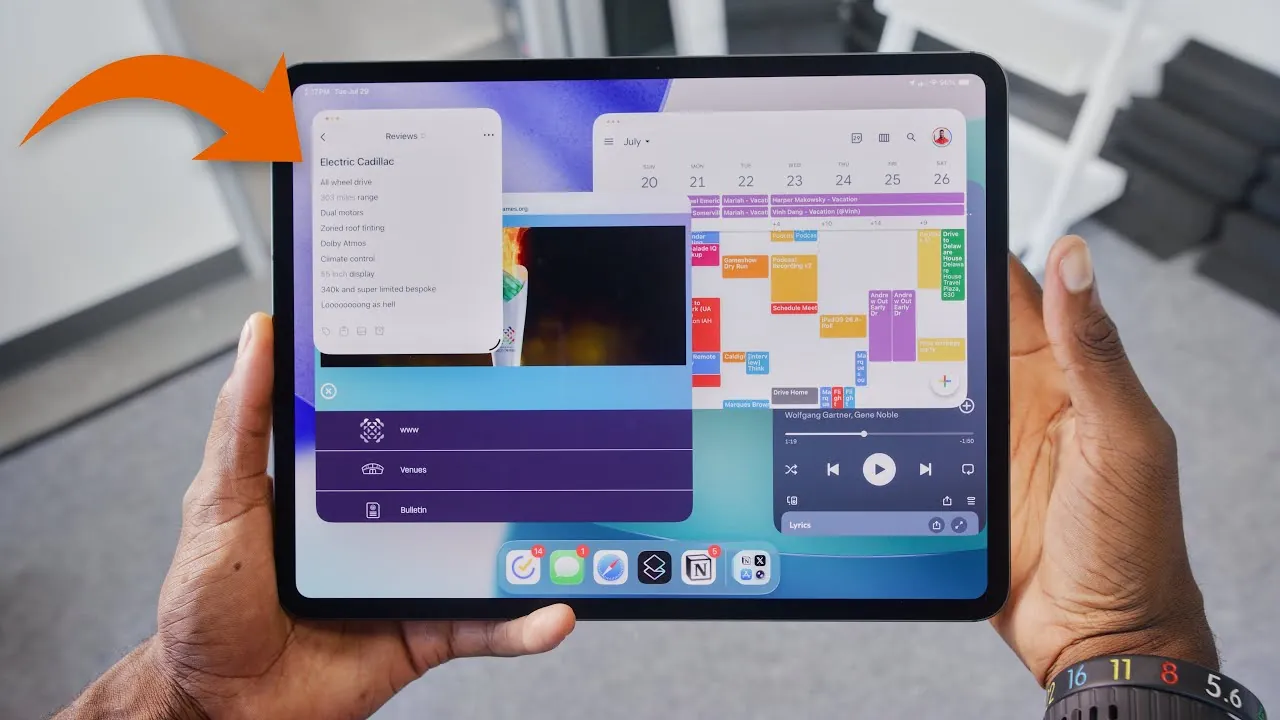
Apple’s iPadOS 26 introduces a comprehensive suite of features designed to bridge the gap between tablets and laptops. With significant advancements in multitasking, file management, and overall usability, the update enhances the iPad’s appeal to a broader audience, including casual users and professionals. While these improvements bring the iPad closer to functioning as a laptop alternative, it retains its distinct identity as a touchscreen-first device. Whether the iPad can fully replace a laptop ultimately depends on your specific needs, workflows, and priorities. The video below from Marques Brownlee gives us a detailed look at the new iPadOS 26 and its range of features.

Advanced Multitasking and Window Management
iPadOS 26 delivers a major overhaul to multitasking, offering a more refined and desktop-like experience. The new window management system introduces the ability to resize, overlap, and manage up to eight active windows simultaneously, providing users with greater control over their workspace. This functionality mirrors traditional computer setups, making the iPad more versatile for productivity tasks.
Key enhancements include:
- Resizable windows that allow for better screen utilization and flexibility.
- Mac-like controls, such as menu bars and drag-to-resize functionality, for a familiar user experience.
- Streamlined navigation that simplifies multitasking for users accustomed to desktop environments.
These features are particularly valuable for professionals who need to juggle multiple tasks, such as editing documents while referencing emails or managing spreadsheets during video calls. By allowing a more efficient workflow, the improved multitasking tools position the iPad as a viable option for productivity-focused users.
Upgraded File Management
The Files app in iPadOS 26 addresses several longstanding limitations, making the iPad more practical for professional use. With enhanced support for external storage devices and server connections, the update allows users to manage files with greater precision and efficiency.
Notable improvements include:
- Advanced organization tools for renaming, sorting, and sharing files directly within the app.
- Seamless integration with popular cloud storage platforms, making sure easy access to files across devices.
- Improved compatibility with external drives and network servers, expanding the iPad’s functionality.
Despite these advancements, minor issues persist, such as the inconsistent placement of AirDropped files, which can occasionally disrupt workflows. However, the overall improvements to file management significantly enhance the iPad’s usability for professionals who rely on external storage or cloud-based solutions.
Where the iPad Excels
The iPad’s core strengths lie in its portability, versatility, and unique touchscreen-first interface, making it an excellent choice for users who prioritize mobility and adaptability. Its lightweight design, high-resolution display, and intuitive functionality cater to a wide range of use cases, from creative tasks to casual entertainment.
Key advantages include:
- Stylus support allows precision tasks such as drawing, note-taking, and design work.
- Cellular connectivity ensures productivity on the go without relying on Wi-Fi.
- Media versatility makes the iPad ideal for streaming, reading, or casual gaming.
For creative professionals, the iPad offers unique benefits, such as seamless integration with design apps and the ability to function as a digital notepad or artist’s canvas. These features set it apart from traditional laptops, particularly for users in fields like graphic design, illustration, and content creation.
Challenges and Limitations
Despite its advancements, the iPad still faces several challenges that may prevent it from fully replacing a laptop for certain users. While iPadOS 26 introduces features that enhance productivity, some workflows remain less intuitive or require additional accessories, which can detract from the device’s portability and convenience.
Key challenges include:
- Reliance on accessories such as external drives, adapters, and keyboard cases can reduce the iPad’s portability.
- Limited support for complex workflows that demand high-performance hardware, such as video editing or software development.
- Occasional software inconsistencies, such as app crashes or limited multitasking capabilities, disrupt productivity.
Additionally, while keyboard cases improve typing ergonomics, they lack the stability and tactile feedback of traditional laptop keyboards. These limitations highlight the gap between the iPad and a full-fledged laptop, particularly for users who require robust computing power and flexibility.
Evaluating the iPad’s Role in Your Workflow
iPadOS 26 represents a significant step forward in enhancing the iPad’s ability to handle laptop-like tasks while preserving its unique identity as a versatile tablet. For users who value portability, touchscreen functionality, and creative tools, the iPad offers a compelling option that caters to a wide range of needs. Its lightweight design and intuitive interface make it particularly appealing for students, creative professionals, and casual users.
However, if your workflow demands the stability, power, and flexibility of a traditional laptop, the iPad may not fully meet your expectations. Tasks that require advanced multitasking, high-performance hardware, or extensive file management may still be better suited to a laptop.
Ultimately, the decision to use an iPad as a laptop replacement depends on your individual priorities and how the device fits into your daily routine. Whether you’re a professional seeking a portable creative tool, a student looking for a versatile device, or a casual user exploring new possibilities, iPadOS 26 ensures the iPad remains a powerful and adaptable solution for a variety of tasks.
Explore further guides and articles from our vast library that you may find relevant to your interests in iPadOS 26.
- iPadOS 26: The Massive Update That Changes Everything
- Discover the New Features in iPadOS 26 Beta 4
- How iPadOS 26 Redefines Multitasking and Productivity
- iPadOS 26 Beta 3 Features and Changes: A Complete Breakdown
- Why iPadOS 26 Makes the iPad Pro the Best Laptop Replacement
Source & Image Credit: Marques Brownlee
Disclosure: Some of our articles include affiliate links. If you buy something through one of these links, Geeky Gadgets may earn an affiliate commission. Learn about our Disclosure Policy.
