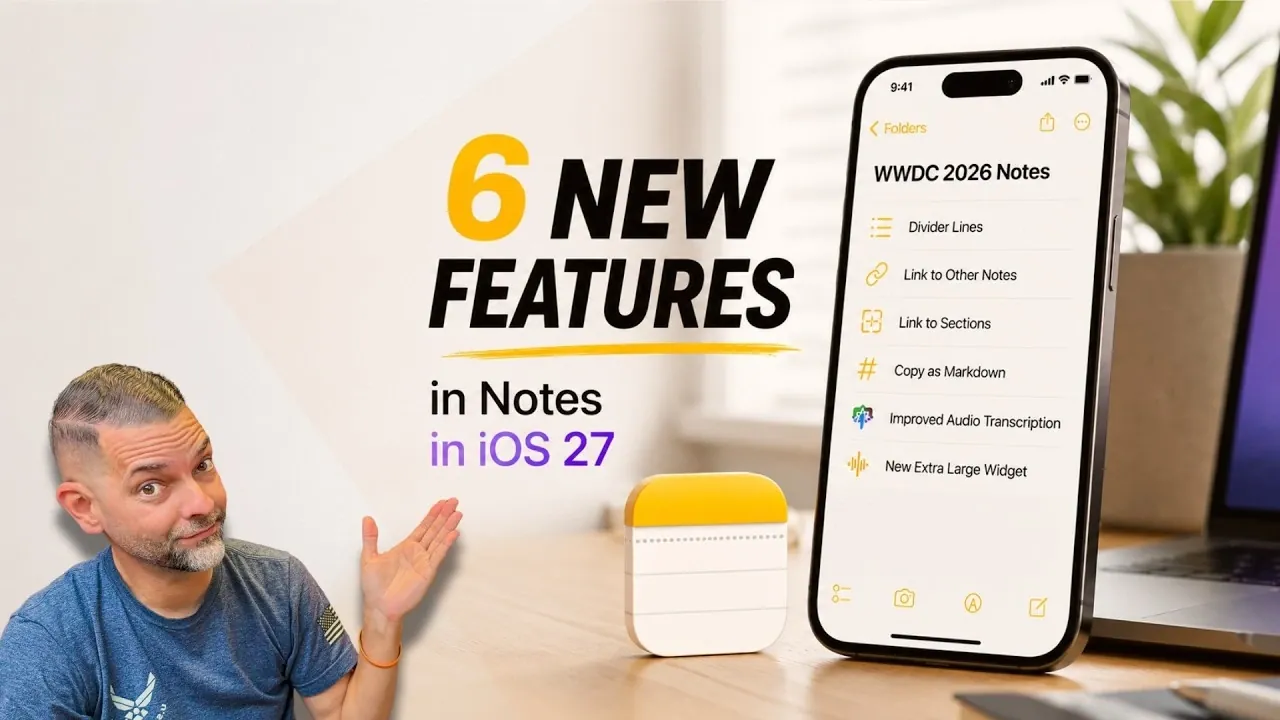
Apple Notes has introduced several updates with iOS 27, currently in beta for developers, that refine how users manage and organize their notes. Dan Rodriguez highlights the addition of note linking, which enables users to create hyperlinks between notes, making it easier to connect related information. This feature is particularly helpful for tasks like organizing research or managing multi-step projects. Another improvement is the inclusion of divider lines, which allow users to visually separate sections within a note for better readability and structure.
Discover how these updates expand functionality with features like Markdown support for simplified formatting and extra-large widgets that bring key notes to your home screen. Gain insight into the enhanced audio transcription, which converts voice recordings into searchable text, improving accessibility and usability.
iOS 27 Apple Notes Features and Enhancements
TL;DR Key Takeaways :
- Apple Notes in iOS 27 introduces extra-large widgets for quick access to frequently used notes directly from the home screen.
- Divider lines enhance note organization by visually separating sections for better clarity and readability.
- Note linking allows seamless navigation between notes, with the added ability to link to specific sections for precision access.
- Markdown support simplifies text formatting and ensures compatibility when transferring content across platforms.
- Enhanced audio transcription provides accurate, searchable text from recordings, improving efficiency for capturing spoken content.
The iOS 27 update introduces several noteworthy improvements to Apple Notes, including:
- Extra-large widgets for quick and convenient access
- Divider lines for improved organization
- Note linking for seamless navigation
- Markdown support for simplified formatting
- Enhanced audio transcription for accurate text capture
These features are designed to save time, improve organization and make managing your notes more intuitive than ever before.
Extra-Large Widgets: Instant Access to Key Notes
One of the most visible changes in iOS 27 is the introduction of extra-large widgets. These widgets allow you to view and interact with your notes directly from the home screen, eliminating the need to open the app. This feature is particularly beneficial for frequently accessed notes, such as:
- Daily to-do lists
- Meeting agendas
- Project outlines
By offering a broader view of your content, these widgets ensure that essential information is always within reach. This not only saves time but also enhances your ability to stay organized and focused on your priorities.

Discover other guides from our vast content that could be of interest on Apple Notes.
- 6 Massive Upgrades Coming to Apple Notes in iOS 27
- How to Create Apple Notes Templates You Can Reuse to Save Hours
- Apple Notes is Now a Professional Powerhouse—If You Know These 10 Tips
- Stay Organizied in 2026 With Apple Notes : Simplify Everyday Planning & Productivity
- 40 Hidden iPad Apple Notes Features You’re Probably Not Using
- Apple Notes Vertical Kanban System : Simplify Task Management Without Extra Apps
- Apple Notes vs Notion : Why Apple Notes Might Be the Simpler, Smarter Choice Over Notion
- How to Sync Apple Notes to Notion in Minutes with These Easy Methods
- Combine Apple Notes & Claude : Creates Contextual Tasks from Meeting Scribbles
- Apple Notes Features You Didn’t Know About to Improve Your Productivity
Divider Lines: Structuring Notes with Clarity
The addition of divider lines in Apple Notes provides a simple yet effective way to structure your notes. These lines visually separate sections, making it easier to distinguish between topics or ideas. For example, you can use divider lines to organize a meeting summary into:
- Key agenda items
- Actionable tasks
- Follow-up points
This feature enhances readability and ensures that your notes remain clear and well-organized, even when dealing with complex or lengthy content.
Note Linking: Effortless Navigation
The new note-linking feature allows you to create hyperlinks within a note that connect to other notes in your library. This functionality is particularly valuable for managing intricate projects or research, where cross-referencing information is essential. For instance, you can link a project overview note to individual task notes, allowing seamless navigation and reducing the time spent searching for related content.
Linking to Specific Sections: Precision Access
Building on the linking functionality, iOS 27 introduces the ability to link directly to specific sections within a note. This granular approach allows you to pinpoint and access precise details without scrolling through lengthy content. For example, you can link directly to a section outlining key deliverables in a project note, making sure quick access to critical information when you need it most.
Markdown Support: Streamlined Formatting
Apple Notes now supports Markdown, a lightweight markup language that simplifies text formatting. This feature is especially useful for users who frequently transfer content between Apple Notes and other platforms. With Markdown, formatting such as headings, lists and emphasis is preserved when copying and pasting notes. This improvement not only streamlines workflows but also ensures a polished and professional appearance across applications.
Enhanced Audio Transcription: Accurate and Searchable
Audio transcription in Apple Notes has been significantly upgraded in iOS 27, using Apple’s advanced machine learning technology. This feature automatically converts audio recordings into text, making it easier to capture and review spoken content. Whether you’re recording a lecture, meeting, or brainstorming session, the improved transcription ensures greater accuracy and eliminates the need for manual note-taking. Additionally, the transcribed text is fully searchable, allowing you to quickly locate specific information within your notes.
Why These Updates Are Important
The updates introduced in iOS 27 highlight Apple’s commitment to enhancing productivity and usability within its Notes app. By integrating features such as extra-large widgets, divider lines, note linking, Markdown support and advanced transcription, Apple Notes is evolving into a more versatile tool for users across various fields. These enhancements not only save time but also empower you to organize and access your information more effectively, making the app a valuable asset for both casual and professional use.
The Future of Apple Notes
As iOS 27 nears its public release, the new features in Apple Notes are poised to redefine how you manage your digital notes. Whether you’re a student, professional, or creative, these updates provide tools to simplify your workflow and boost productivity. With the beta already available for developers, it’s only a matter of time before these enhancements become accessible to all users, further solidifying Apple Notes as a leading platform for note-taking and organization.
Media Credit: Dan Rodriguez
Disclosure: Some of our articles include affiliate links. If you buy something through one of these links, Geeky Gadgets may earn an affiliate commission. Learn about our Disclosure Policy.
