Apple’s iOS 26.4 introduces a host of new features and enhancements designed to elevate your iPhone experience. From improved task management to enhanced media options and accessibility tools, this update caters to a wide range of user needs. Whether you’re looking to streamline daily tasks, enjoy richer media experiences, or customize your device further, iOS 26.4 delivers meaningful improvements. Here’s a closer look at the most notable updates and how they can benefit you in a new video from iReviews.

Enhanced Task Management with “Urgent Reminders”
The Reminders app now includes a powerful new feature called “Urgent Reminders,” which helps you focus on high-priority tasks. This section automatically highlights critical items, making sure they remain visible and actionable. You can create reminders directly within this section, with urgency settings pre-applied to save time. Whether you’re managing work deadlines, personal errands, or important events, this feature simplifies task prioritization and keeps you organized. By emphasizing what matters most, “Urgent Reminders” ensures nothing important slips through the cracks.
Video Podcasts and Smarter Media Management
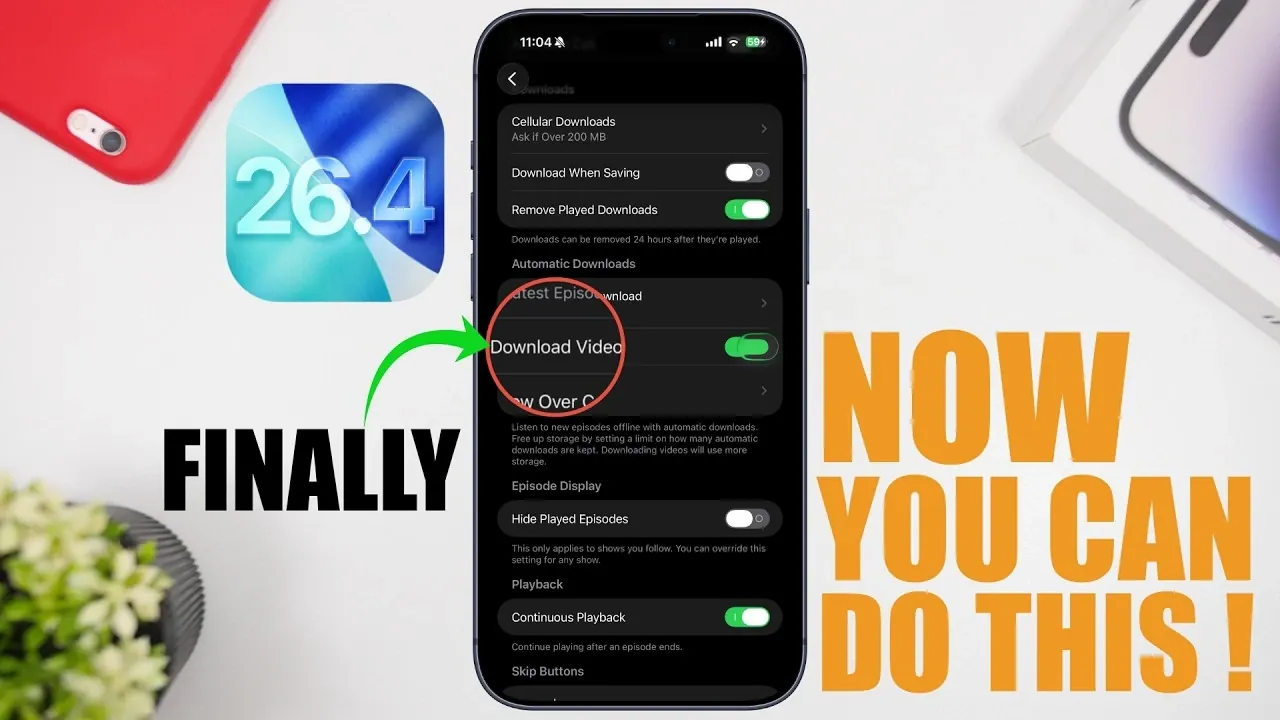
For podcast enthusiasts, iOS 26.4 introduces support for video episodes in the Podcasts app. You can now watch video podcasts directly within the app and even download them for offline viewing. This feature is ideal for users who want uninterrupted access to their favorite shows, whether at home or on the go. Additionally, new settings allow you to control automatic downloads for both video and audio content, giving you greater flexibility in managing storage and data usage. These updates make the Podcasts app more versatile and user-friendly, catering to a broader range of content preferences.
Creative Playlist Tools in the Music App
The Music app receives a creative upgrade with the introduction of the “Playlist Playground” feature. This tool allows you to build playlists based on prompts, specific songs, or themes, offering a more dynamic and interactive way to curate your music library. You can also fine-tune playlists by adding or removing artists, rearranging tracks, or placing a single song into multiple playlists simultaneously. These enhancements make it easier than ever to organize and personalize your music collection, making sure your playlists reflect your unique tastes and moods.
Accessibility Enhancements with “Reduce Bright Effects”
iOS 26.4 continues Apple’s commitment to inclusivity with the addition of the “Reduce Bright Effects” feature in Accessibility settings. This option minimizes reflections and bright highlights from the liquid glass interface, creating a more comfortable viewing experience for users sensitive to intense visuals. By addressing these specific needs, Apple ensures that the iPhone remains adaptable and user-friendly for individuals with diverse preferences and requirements. This thoughtful update underscores the company’s dedication to making technology accessible to everyone.
Streamlined Contact Poster Management
Managing your contact list is now more intuitive with updates to the Contacts app. You can remove contact posters directly from the edit menu, simplifying the process of updating or decluttering your phonebook. This small but impactful change saves time and effort, making it easier to keep your contacts organized and up to date. Whether you’re refreshing your list or removing outdated information, this feature streamlines an everyday task.
Convenient Ambient Music Widget
Music lovers will appreciate the new ambient music widget, which provides quick access to sounds or playlists directly from the home screen. This widget eliminates the need to open the Music app, allowing you to start playback with a single tap. You can customize the widget’s content to match your preferences, making it a convenient and personalized addition to your iPhone. Whether you’re setting the mood with ambient sounds or jumping into your favorite playlist, this feature enhances your listening experience.
Cleaner Settings Interface with Hidden Build Number
The Settings app now features a cleaner and more streamlined interface, thanks to the decision to hide the build number under the iOS version by default. This change reduces visual clutter while maintaining access to technical details for those who need them. If you require the build number, you can still find it by tapping on the version number. This subtle yet effective update balances simplicity with functionality, catering to both casual users and tech-savvy individuals.
Key Highlights of iOS 26.4
iOS 26.4 introduces a range of updates designed to enhance usability, personalization and accessibility. Key highlights include:
- The “Urgent Reminders” feature for prioritizing important tasks.
- Support for video podcasts in the Podcasts app, with offline viewing options.
- Dynamic playlist customization through the “Playlist Playground” tool.
- Accessibility improvements like the “Reduce Bright Effects” setting.
- Streamlined contact poster management in the Contacts app.
- A new ambient music widget for quick and easy playback.
- A cleaner Settings interface with the hidden build number.
These updates reflect Apple’s ongoing efforts to refine the iPhone experience, making sure it evolves alongside your needs and preferences. Whether you’re a casual user or a tech enthusiast, iOS 26.4 offers practical enhancements that make your device more intuitive, versatile and enjoyable to use.
Uncover more insights about iOS 26.4 in previous articles we have written.
- Everything New in iOS 26.4 Beta 4: CarPlay, AI, and More
- iOS 26.4 Release Date, Features, and Performance Details
- When Will iOS 26.4 Be Released? Full Details Inside
- Apple iOS 26.4 Update: New Features and Improvements
- iOS 26.4 Update: Top Features You’ll Love
- iOS 26.4 Beta 1 Features: Everything You Need to Know
Source & Image Credit: iReviews
Disclosure: Some of our articles include affiliate links. If you buy something through one of these links, Geeky Gadgets may earn an affiliate commission. Learn about our Disclosure Policy.
