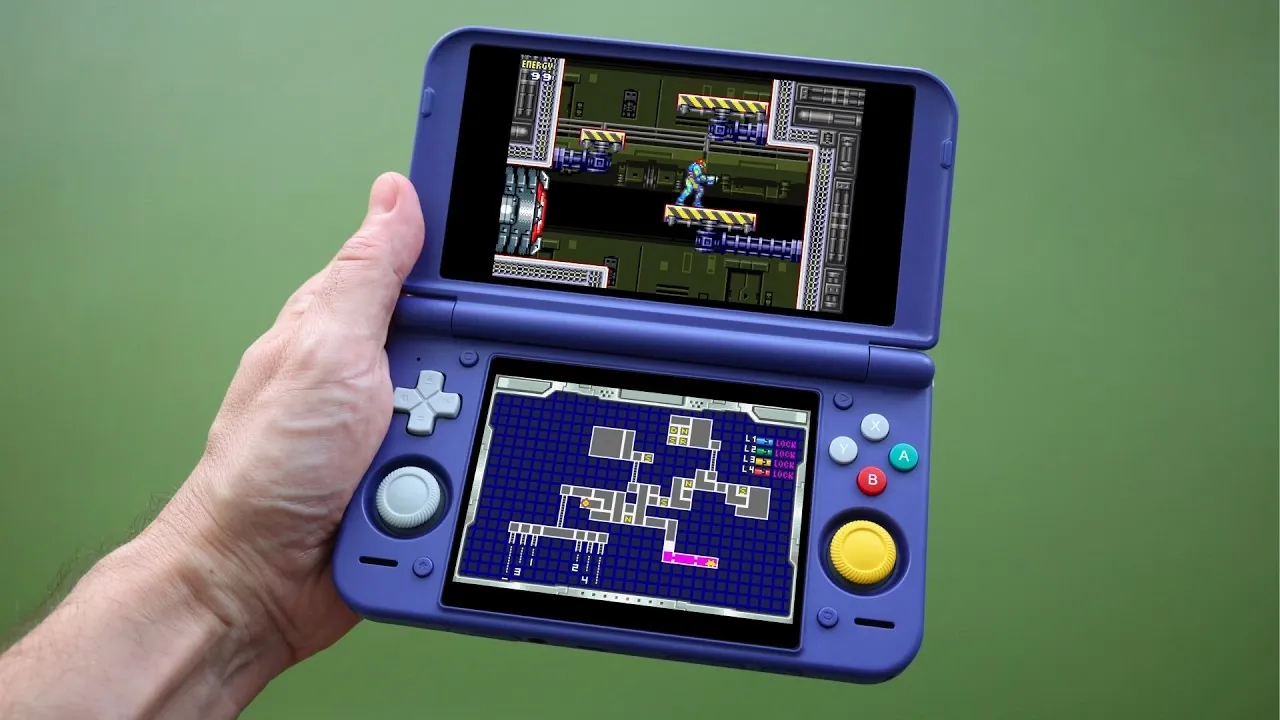
Pausing for maps interrupts GBA games; kyannon’s new GBA DS emulator puts those maps beside the action on a second screen. It can also show you twice as much of the table in Pokémon Pinball: Ruby & Sapphire. Retro Game Corps has the details on how the emulator usually runs a second, silent copy of your game to keep menus visible while you play. Discover how the extra views work and how you can set up screens, controls and saves for supported games.
GBA DS: A Second Screen for GBA Games
- GBA DS is a free, open source emulator that adds a second-screen view to GBA games.
- It supports dual-screen Android handhelds and compatible Linux devices running ROCKNIX or BananaOS.
- A second, silent game instance normally keeps menus visible and synchronizes with the active game about once per second.
- The supported-games list stood at 77 on November 26, 2026, up from just under 60 a week earlier.
- Pokémon Pinball: Ruby & Sapphire uses two additional emulator instances to show twice as much of the table across both screens.
GBA DS gives single-screen games an additional view, such as a persistent map or a party menu. The free, open source emulator builds on mGBA, one of the emulators available in RetroArch. Independent developer kyannon released it on October 13, 2026, drawing inspiration from the persistent maps in the Nintendo DS Castlevania games. The developer discloses that almost all of the app’s code is written with AI, on top of the human-written mGBA engine.
You can use the app on dual-screen Android handhelds such as the AYN Thor and Retroid Pocket Duo, as well as compatible Linux devices such as the Anbernic RG DS Plus. The Linux build supports ROCKNIX and BananaOS.
A Background Game Keeps Menus Visible
GBA DS usually runs a second, silent instance of the same game alongside the one you control. It opens the relevant menu in that background instance and sends the image to the second screen, without interrupting your active game.
The secondary instance typically synchronizes with the active game about once per second, while a map can also refresh immediately when you move between rooms. GBA DS captures sequences of map frames to preserve animated position indicators, then uses game-memory information and visual checks to distinguish maps from unsuitable images, such as cutscenes. If it finds an unsuitable image, it can continue showing the last valid map.
In supported titles, the app can also separate on-screen information from gameplay. Depending on the game, your second display might show a full map, a party menu or a smaller set of statistics.

Explore further guides and articles from our vast library that you may find relevant to your interests in dual-screen retro gaming handhelds.
- Retroid Pocket Duo Review: Beats Ambernic RGDS Plus with Dual OLEDs
- Retroid Pocket Duo vs AYN Thor: Snapdragon 865 Takes on Q7790
- Anbernic RG DS Plus Brings Dual 4.3-Inch IPS Screens For $95
- 3 Custom OS Options Upgrade the $95 Anbernic RG DS Plus
- Skip the Retroid Pocket Duo for the $95 Anbernic RGDS Plus
Install GBA DS and Set Up Screens
The GitHub releases page provides an Android APK and a Linux zip file, along with an installation guide. On first launch, GBA DS asks you to select a ROMs folder, which you can change later in system settings. The app lists supported games from that folder, and a supported button toggles the display of all games; those without a dedicated second-screen view run on a single screen.
Listings show save-state images or “no save states,” while tile view displays game icons. GBA DS can use existing saves from a RetroArch save folder in the home directory and has an SRM file setting for saves, as SRM is a RetroArch-compatible save format.
Saving on quit and loading on reopen are both enabled by default, so the app creates a save-state image when you quit and resumes the game when you return. Tap either screen to open a quick menu with per-game or global settings and options to restart, save state or close a game. A Select-and-Start hotkey closes both the game and the app, which suits frontends such as EmulationStation Desktop Edition.
The main settings are:
- Display: Pixel-perfect integer scaling is the default, but you can set both screens to full width. Shaders, color correction and LCD ghosting are available, and the LCD grid default appeared to be 30%, though you can reduce it to 10%.
- Screens: You can put gameplay on either display, including the wider top screen on the Retroid Pocket Duo. Overlays and bezel logos, including “GBA DS” labels, are enabled by default.
- Controls: You can adjust individual buttons, and the “swapped” setting corrects the Duo’s swapped ABXY buttons. Back is the default hotkey button.
- Speed and sound: An optional FPS display appears at the top, and fast-forward defaults to 3× but can run unrestricted.
- Second screen and system: Second-screen settings control map refresh frequency, while system settings include update checks and RetroAchievements sign-in.
Maps Stay Beside the Action
In Castlevania: Aria of Sorrow, GBA DS places the game above a persistent map, and both other Castlevania games have the same map function. The regular controls still work: pressing Start opens the menu on the gameplay screen, while Select displays another copy of the map there.
The app offers map views in other games, including:
- Metroid Fusion and Metroid: Zero Mission: Maps appear beneath gameplay.
- Castlevania: Circle of the Moon: The exploration map appears with the completion percentage.
- The Legend of Zelda: A Link to the Past: World and dungeon maps appear on the second screen.
- The Legend of Zelda: The Minish Cap: The second screen shows maps of Hyrule and its dungeons.
- Final Fantasy I & II: Dawn of Souls: The pause-menu map appears alongside the regular screen.
In the Castlevania, Golden Sun and Metroid games you would normally have to pause to see the map. Several supported F-Zero games also show a map beneath gameplay. In Metroid Fusion, the lower-screen map marks the target with a small blinking light; the pause-menu map highlights it more prominently. In Dawn of Souls, party statistics also appear on the lower screen during battles, although they remain visible on the main screen.
Other Games Move Stats or Extend Views
GBA DS shows selected character statistics in Fire Emblem when you hover over a character. In Golden Sun, it shows party information and menus beneath gameplay. In Mario Kart: Super Circuit, it moves racing information and the course map to the second screen and displays the map at twice its former size.
Mario & Luigi: Superstar Saga moves hit points and an A-button confirmation prompt below gameplay, while Mario vs. Donkey Kong moves on-screen assets to the lower screen. Mario Advance games show information such as the current world; Super Mario World: Super Mario Advance 2 shows islands outside levels and only a few stats inside them.
Some layouts have less to show. Sonic Advance 2 puts the current zone, ring count, score, time and remaining lives on the lower screen, while Tony Hawk’s Pro Skater 2 displays the objectives for the current run.
Pokémon Pinball: Ruby & Sapphire uses two additional emulator instances to extend the table across both screens, showing twice as much of it at once. Pokémon FireRed, LeafGreen, Ruby, Sapphire and Emerald now have dedicated second-screen views for party information and regional maps as well.
The supported-games list is growing quickly. It held just under 60 games when Retro Game Corps tested the app and stood at 77 on November 26, 2026.
In our view, the real appeal is less the trick itself than what it saves you. In map-heavy games, a map that is always visible replaces constant trips into a pause menu, which is a practical gain rather than a gimmick. Before pointing it at your RetroArch saves, we would back them up, since the app is new and the developer says AI helped build it. Save-on-quit is also enabled by default. Also check that your favorite games are on the supported list first.
Retro Game Corps treats GBA DS as an occasional alternative for selected games, not a replacement for RetroArch and its broader options. Players exploring supported Castlevania, Golden Sun and Metroid games can keep their bearings without repeatedly opening a pause-menu map. The change is smaller in titles that simply move statistics, while Pokémon Pinball extends the playfield itself across both screens.
Media Credit: Retro Game Corps
Disclosure: Some of our articles include affiliate links. If you buy something through one of these links, Geeky Gadgets may earn an affiliate commission. Learn about our Disclosure Policy.
