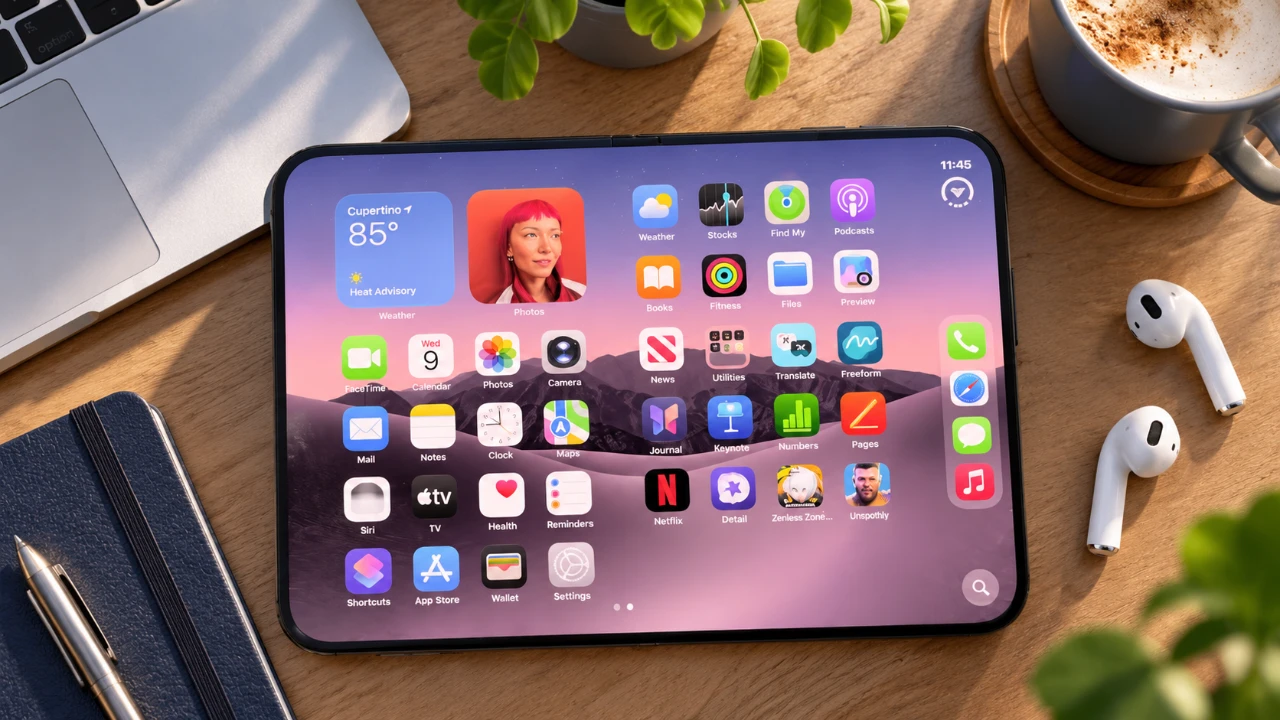
Roughly $400 more than buying an iPhone 17 and an OLED iPad mini together gets you the Apple iPhone Duo, Apple’s first foldable smartphone priced around $2,000. While its unfolding 7.6-inch inner screen handles reading and video comfortably, anyone hoping it can replace a work tablet runs into real boundaries—including no external display extension and missing iPad apps like Final Cut Pro and Pixelmator Pro. As SlatePad demonstrates in a one-month follow-up video below, keyboard shortcuts, multitasking limits, and app compatibility determine how much work you can actually get done on Apple’s foldable.
TL;DR Key Takeaways :
- Daily usage split: During a month of testing, the iPhone Duo stayed closed roughly 75% of the time on its 5.4-inch cover screen.
- Battery endurance: Even on heavier days, battery levels ended around 20% to 30% with the charge limit capped at 80%.
- iOS vs. iPadOS: Unfolding the 7.6-inch inner display keeps you in iOS rather than iPadOS, missing Slide Over and floating keyboard tools.
- Productivity gaps: The Duo does not support extended external monitors and cannot run iPad apps such as Final Cut Pro or Pixelmator Pro.
- Value math: Pairing an iPhone 17 with an OLED iPad mini costs roughly $400 less than the ~$2,000 iPhone Duo.
Apple officially unveiled the iPhone Duo on September 9, 2026, ahead of its October 23 store arrival, marking the company’s debut in book-style folding phones. Powered by the A20 Pro chip with 12GB of RAM, dual 48MP rear cameras, and an IP68 rating, the device aims to bridge the gap between a pocketable iPhone and a compact tablet.
To test how well it pulls double duty, SlatePad spent just over a month using the iPhone Duo in place of both an iPhone Air and an 11-inch iPad Pro.
The Cover Screen Works Best With Two Hands
Closed, the iPhone Duo behaves like a wide, compact smartphone suited to quick checks—handling addresses, emails, music, and podcasts without needing to unfold the hinge. Over 30 days of real-world use, the device stayed folded roughly 75% of the time and open about 25%, with open-screen usage dropping further once an OLED iPad mini entered the rotation. Because the 5.4-inch outer display feels less immersive, quick phone interactions naturally stayed brief.
- Outer display: 5.4-inch Super Retina XDR OLED (1–120 Hz ProMotion).
- Inner display: 7.6-inch folding Super Retina XDR OLED with nano-texture finish.
- Folded thickness: 11.3 mm (unfolding to 5.2 mm).
- Weight: 254 grams across a titanium frame.
Its 254-gram heft and 11.3 mm folded profile feel noticeable at first before blending into daily carry over a month. Carrying it in a shoulder bag eases pocket weight, though one-handed operation still feels awkward—especially in a case. Apple positioned the physical controls on the right side to aid reachability, yet for a right-handed user holding the phone mostly in their left hand, two-handed handling proved far more secure.

Sound and Battery Life Hold Up
Audio quality stands out as one of the Duo’s strongest hardware traits. Its stereo speakers deliver rich, full-bodied sound across music and YouTube videos—earning praise in SlatePad’s testing as the best speakers heard on a smartphone.
Battery longevity also impressed thanks to Apple’s dual-battery architecture and heavy reliance on the smaller cover display. Even with the charging cap set to 80% to preserve long-term battery health, heavier days consistently wrapped up with 20% to 30% remaining.
Because the Duo swaps Face ID for Touch ID integrated into the side button, unlocking feels effortless when closed—your finger naturally meets the sensor as you pick the phone up—though locating the button takes a moment longer when unfolded.
| Workflow Area | Apple iPhone Duo (iOS) | iPad / iPad mini (iPadOS) |
|---|---|---|
| Multitasking | Two-app Split View; no Slide Over | Split View, Slide Over, multi-window switching |
| On-Screen Keyboard | Wide split layout; no key flicks or floating keyboard | Key-flick numbers/symbols and floating keyboard |
| External Monitor | Mirroring only; no extended desktop workspace | Extended display support on M-series iPads |
| Pro Creative Apps | No Final Cut Pro or Pixelmator Pro on iOS yet | Full iPad versions of Final Cut Pro & Pixelmator Pro |
| Stylus Support | Apple Pencil (USB-C); no Hover or Pro gestures | Full Apple Pencil Pro Hover, squeeze & double-tap |
The Inner Screen Misses iPad Keyboard and Multitasking Tools
Unfolding the iPhone Duo gives you a 7.6-inch canvas, yet it continues running iOS rather than iPadOS. Even after a full month, the wide split keyboard on the inner screen felt awkward to type on, and reaching up for the number row disrupted typing flow.
On iPadOS, flicking downward on keys enters numbers and punctuation without switching views, and a floating one-handed keyboard makes thumb typing easy—neither option exists on the Duo. Likewise, while Split View is straightforward to trigger, the absence of Slide Over means checking an incoming message forces a full context switch rather than sliding Messages in and swiping it away.
Missing Apps and Display Support Limit Work
For anyone trying to consolidate devices, the biggest limitation is the lack of extended display support. Unlike an iPad that plugs into a desktop monitor, keyboard, and mouse as a secondary workspace and detaches for tablet use, the Duo cannot extend its interface onto an external screen.
Third-party app optimization remains uneven too. Around three regularly used apps in SlatePad’s daily rotation had still not received proper Duo layout updates—a friction point echoed by some early buyers who returned the phone over unadapted apps—even as other apps like a credit union client worked smoothly. Meanwhile, daily creative staples like Final Cut Pro and Pixelmator Pro remain unavailable on the Duo today, though Apple is expected to bring versions to iPhone eventually.
Accessories Fall Short of an iPad Setup
Stylus and desk accessories further separate the Duo from an iPad. While it works with Apple Pencil (USB-C), it lacks Apple Pencil Hover as well as the Apple Pencil Pro’s squeeze and double-tap shortcuts. You can prop the hinge in a laptop-style posture, but pairing a separate Bluetooth keyboard, mouse, and stand quickly loses the convenience of an iPad Pro with Magic Keyboard.
Software defines a tablet far more than screen dimensions alone. Even with a 7.6-inch folding OLED display, running iOS without key-flick typing, Slide Over, pro tablet apps, or extended monitor output keeps the iPhone Duo firmly in big-phone territory rather than turning it into an iPad substitute.
SlatePad’s month-long takeaway is clear: the iPhone Duo works nicely as a single pocketable device for reading, browsing, and watching video, yet buying an iPhone 17 alongside an OLED iPad mini saves roughly $400 while delivering far stronger tablet productivity. Your choice comes down to whether you value having one foldable screen everywhere or need genuine iPad workflows at your desk.
Here are more guides from our previous articles and guides related to Apple iPhone Duo that you may find helpful.
- iPhone Duo: 5 Features That Make It Worth the Price
- iPhone Duo: What Apple Got Right (and What Could Go Wrong)
- iPhone Duo vs. Galaxy Z Fold 8: Did Apple Just Catch Samsung?
- iPhone Duo: Key Details Apple Barely Mentioned on Stage
- iPhone Duo First Look: Did Apple Finally Perfect the Foldable?
Source & Image Credit: SlatePad
Disclosure: Some of our articles include affiliate links. If you buy something through one of these links, Geeky Gadgets may earn an affiliate commission. Learn about our Disclosure Policy.
