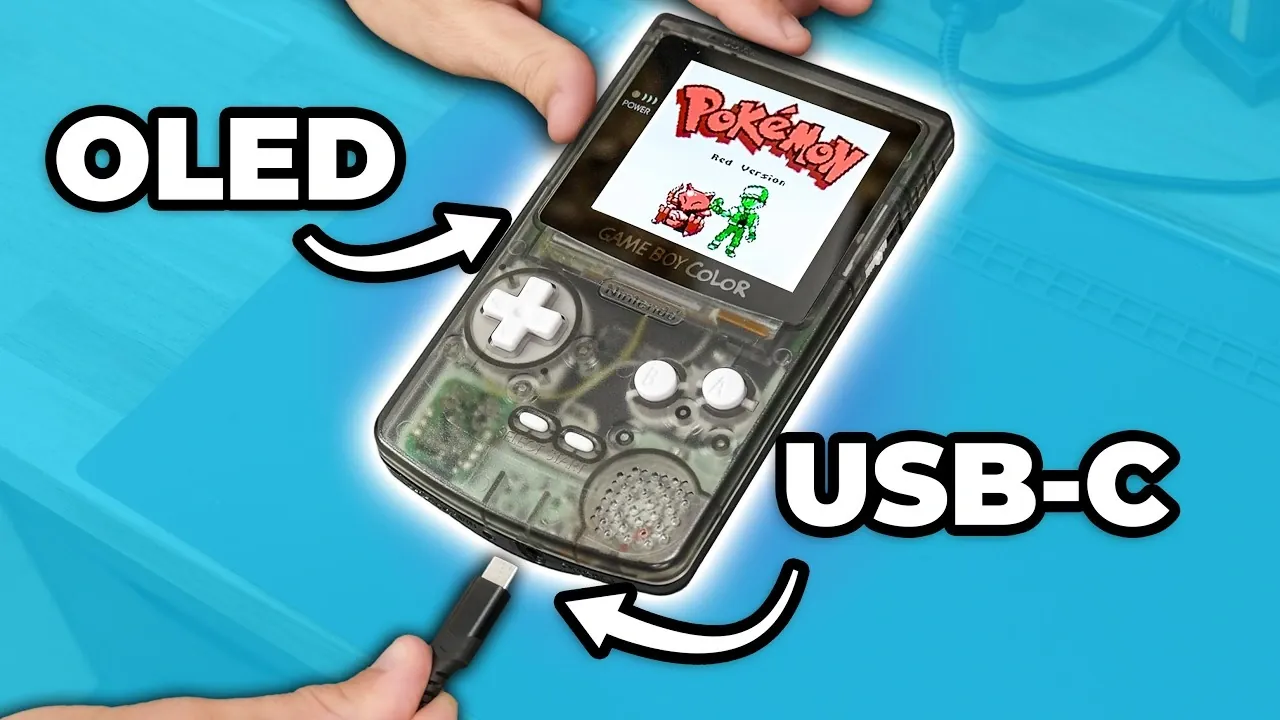
Zac Builds modernizes the Game Boy Color by combining its nostalgic design with updated features for improved performance. A key enhancement is the integration of an OLED screen, which significantly improves brightness, contrast and color accuracy over the original display. This process involves specific steps, such as installing a pre-cut transparent shell and using an adapter board to ensure compatibility with the console’s existing hardware.
Explore how to replace the original AA batteries with a rechargeable lithium-ion pack that includes USB-C charging. Learn the process of upgrading the audio system with a modern speaker and amplifier for better sound quality. Gain insight into advanced modifications, such as overclocking and using a flash cartridge to expand the range of playable games.
Screen Upgrade: Elevating Visuals with OLED Technology
TL;DR Key Takeaways :
- Upgrading the Game Boy Color with an OLED screen significantly enhances brightness, contrast and color accuracy, offering a more immersive gaming experience while modernizing its aesthetics.
- Audio improvements, including a modern speaker and miniature amplifier, deliver clearer and louder sound, complemented by a power regulator to eliminate noise issues.
- Replacing AA batteries with a rechargeable lithium-ion battery and USB-C charging modernizes the power system, adding convenience and sustainability.
- Button enhancements and RGB backlighting improve tactile feedback, usability and aesthetics, blending retro charm with modern functionality.
- Additional upgrades like the EZ Flash Jr. cartridge expand the game library, while overclocking and other mods offer performance boosts, albeit with technical challenges for advanced users.
Replacing the original screen with an OLED display is one of the most impactful upgrades for the Game Boy Color. The OLED screen delivers superior brightness, contrast and color accuracy, making classic games appear more vibrant and immersive. This enhancement transforms the gaming experience, allowing you to appreciate the intricate details of retro titles like never before.
To install the OLED screen, you’ll need a pre-cut transparent shell to accommodate its dimensions and a secondary adapter board to ensure compatibility with the console’s hardware. These components are essential for a seamless integration. The result is a visually stunning display that not only enhances gameplay but also modernizes the console’s overall aesthetic. This upgrade is particularly appealing for gamers who value both performance and style.
Audio Overhaul: Enhancing Sound Clarity and Volume
The original mono speaker of the Game Boy Color, while functional, lacks the clarity and volume expected by today’s standards. Upgrading to a modern transparent speaker significantly improves audio quality, delivering clearer and louder sound. To further enhance the audio experience, a miniature amplifier can be installed, boosting the output and creating a richer, more dynamic sound profile.
However, this modification introduces a potential challenge: power-related hissing. This issue can be resolved by installing a modern power regulator, which stabilizes the power supply and eliminates unwanted noise. Together, these upgrades ensure that the audio quality complements the improved visuals, creating a more immersive gaming experience.
Power System Upgrade: Modern Convenience with Lithium-Ion Batteries
Replacing the traditional AA batteries with a rechargeable lithium-ion battery pack is a practical and sustainable upgrade. This modification not only eliminates the need for disposable batteries but also introduces modern conveniences such as USB-C charging. For those seeking additional flexibility, wireless charging can also be integrated.
To support the increased power demands of the upgraded components, a new power regulator is installed. This ensures stable performance and prevents power-related issues. The combination of a lithium-ion battery and USB-C charging modernizes the console’s power system, making it more user-friendly and environmentally conscious.

Check out more relevant guides from our extensive collection on handheld that you might find useful.
- Valve Confirms Steam Deck 2 with Unreal Engine 5 Support
- Sony’s PlayStation 6 Details Leaks: First Look at the Next-Gen Console
- RG56 Pro Max First Look & Performance Guide: What Runs Well & What Struggles
- ASUS Releases Ally X Driver 26.6.1 for Forza Horizon 6
- Pricing for Acer Predator Atlas 8 Starts at £999 in the UK
- Intel Panther Lake Handheld PCs Expected at $599 To $799
- Ambernick Win600 Delivers X86 Handheld Gaming for Just $99
- Install Armada OS on Android Handhelds to Create a Steam Deck in Under 5 Minutes
- MSI Claw 8EX Ai+ Costs $1800 but Hits 70 FPS in Cyberpunk 2077
- Xbox Project Helix Confirmed for a November 2027 Launch
Button Enhancements and RGB Backlighting: Aesthetic and Functional Improvements
Upgrading the buttons of the Game Boy Color enhances both the tactile feel and usability of the console. By replacing the original silicone membranes with new ones, you can achieve a more responsive and satisfying button press, improving gameplay precision.
Additionally, installing an RGB backlighting kit adds a modern touch to the console. The illuminated buttons and shell not only enhance usability in low-light conditions but also provide a customizable aesthetic. These upgrades maintain the console’s retro appeal while introducing features that cater to modern gaming preferences.
Performance Boost: Overclocking with a Variable Clock Speed Generator
For those looking to push the limits of the Game Boy Color, installing a variable clock speed generator allows for overclocking the CPU. This modification reduces lag in certain games by allowing you to adjust the processor speed. However, it’s important to note that overclocking can introduce compatibility issues, particularly with the OLED screen, when exceeding the stock speed.
While this upgrade offers potential performance benefits, it requires careful planning and testing to avoid unintended consequences. Overclocking is best suited for experienced modders who are comfortable navigating the technical challenges involved.
Expanding the Game Library with the EZ Flash Jr. Cartridge
The EZ Flash Jr. cartridge is a valuable addition for modernizing the Game Boy Color. This flash cartridge allows you to store and play all Game Boy and Game Boy Color titles from a single device, eliminating the need for physical cartridges. Setting up the EZ Flash Jr. involves installing firmware and transferring ROM files, a straightforward process for most users.
This upgrade streamlines the gaming experience, providing easy access to a vast library of titles. For gamers who appreciate convenience and versatility, the EZ Flash Jr. is an essential enhancement.
Technical Challenges and Considerations
While these upgrades significantly enhance the Game Boy Color, they come with technical challenges that require careful consideration. The increased power demands of the new components necessitate the installation of a reliable power regulator to ensure stable performance. Compatibility issues, such as those between the OLED screen and overclocking mod, highlight the importance of thorough planning and testing.
Some modifications, such as soldering the amplifier or clock generator, demand advanced technical skills. These challenges make certain upgrades less accessible to beginners, emphasizing the need for patience and precision during the modification process.
A Modernized Classic: The Ultimate Retro Gaming Experience
By combining retro charm with modern functionality, these upgrades transform the Game Boy Color into a unique device that bridges the past and present. The OLED screen enhances visuals, the improved audio system delivers richer sound and the rechargeable battery modernizes the power system. Features like RGB backlighting and the EZ Flash Jr. cartridge add convenience and style, creating a console that caters to both nostalgia and contemporary gaming preferences.
While challenges such as overclocking limitations and technical complexities remain, the overall project is a rewarding endeavor for enthusiasts. Modernizing your Game Boy Color allows you to celebrate gaming history while embracing the possibilities of modern technology, resulting in a one-of-a-kind console tailored to your preferences.
Media Credit: Zac Builds
Disclosure: Some of our articles include affiliate links. If you buy something through one of these links, Geeky Gadgets may earn an affiliate commission. Learn about our Disclosure Policy.
