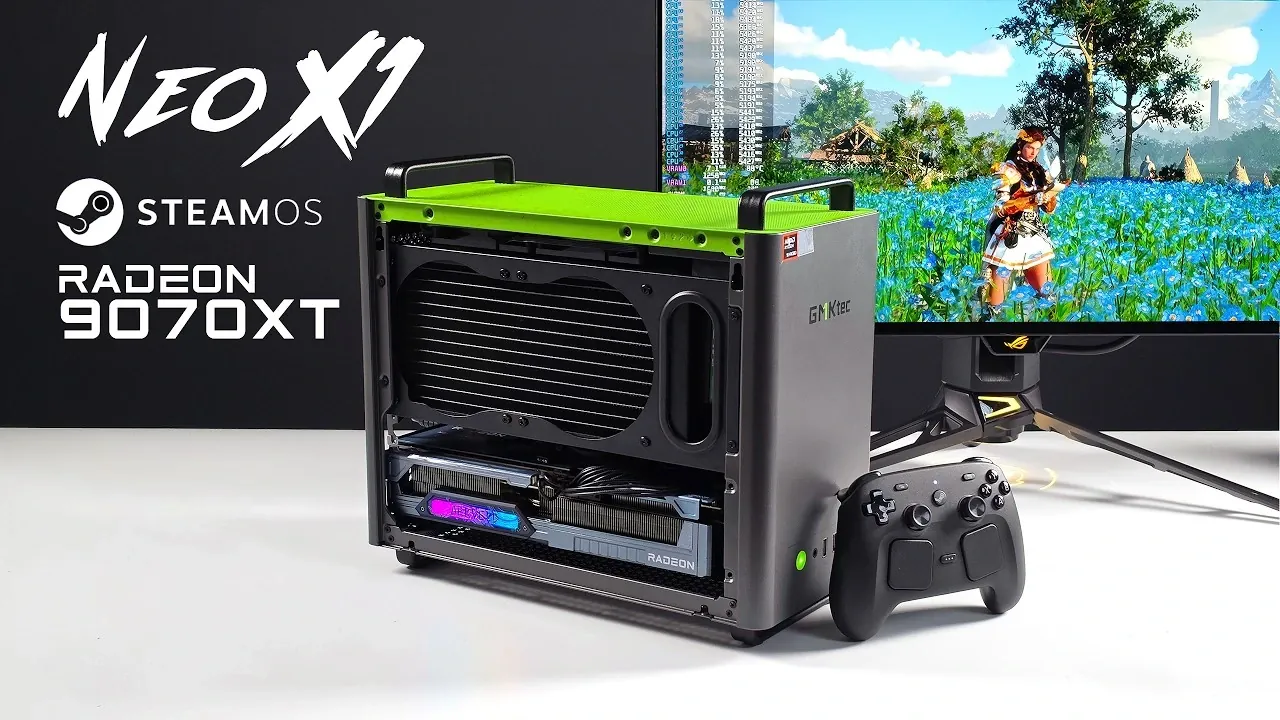
ETA Prime recently explored customising the GMK Tech Neo X1, showcasing its reconfiguration into an all-AMD gaming system. The original setup, which included an NVIDIA RTX 5070 GPU and Windows, was replaced with an ASRock Radeon RX 7900 XT GPU and Steam OS. To maintain performance during extended gaming sessions, the Ryzen 9 7945HX3D processor was paired with a 120 mm liquid cooler. Additional modifications, such as removing a bottom fan and using the vented side panel, improved airflow and ensured stable cooling for the GPU under heavy workloads.
Discover how this setup performed in demanding titles like Cyberpunk 2077 and Red Dead Redemption 2, with detailed benchmarks and resolution comparisons. Learn how FidelityFX Super Resolution (FSR) enhanced gameplay at higher resolutions and why 1440p emerged as an optimal choice for this configuration. Gain insight into the dual-boot system that retained Windows functionality alongside Steam OS, offering versatility for gaming and other applications.
Hardware Modifications and Setup
TL;DR Key Takeaways :
- The GMK Tech Neo X1 was modified by ETA Prime into an all-AMD gaming PC by replacing the factory-installed NVIDIA RTX 5070 GPU with an ASRock Monster Hunter Wilds Radeon RX970 XT and installing Steam OS, resulting in strong 1440p gaming performance.
- The Neo X1’s Ryzen 9 9955HX3D processor, paired with a 120 mm liquid cooler, maintained boost clocks near 5.5 GHz, while the Radeon RX970 XT’s cooling setup, including a vented side panel, ensured effective airflow even with the bottom fan removed.
- Steam OS was installed alongside Windows in a dual-boot configuration, with Wi-Fi, Bluetooth, and Steam controller functionality working without additional setup, though Steam OS lacks TDP or TGP adjustment options for fine-tuning.
- Gaming performance on Steam OS was strong at 1440p across various titles, with FidelityFX Super Resolution (FSR) 4.1 improving 4K frame rates in games like “Red Dead Redemption 2” and “Cyberpunk 2077,” though 1440p remained the optimal resolution for most games.
- ETA Prime concluded that the Neo X1, with its all-AMD configuration, showcased impressive gaming capabilities, particularly at 1440p, and highlighted its versatility as a compact, Linux-based gaming PC with effective cooling and strong performance across demanding titles.
The Neo X1 is powered by a Ryzen 9 9955HX3D processor, a 16-core, 32-thread mobile CPU soldered to the motherboard. Typically found in laptops with air cooling, this chip benefits from the Neo X1’s 120 mm all-in-one liquid cooler, maintaining boost clocks near 5.5 GHz over extended periods. The system also includes 64 GB of SODIMM RAM.
To achieve the all-AMD configuration, the factory-installed RTX 5070 GPU was replaced with the ASRock Monster Hunter Wilds Radeon RX970 XT. This RDNA4 GPU, equipped with 16 GB of VRAM, uses two 8-pin PCIe power connectors, supported by a 12-volt high-output to dual 8-pin PCIe cable. The Neo X1’s vented side panel and GPU bracket were used to improve airflow, while a 120 mm fan at the bottom of the case was removed as unnecessary. The GPU draws cool air from the bottom and exhausts it out the side, maintaining effective cooling. Additionally, the RX970 XT’s RGB lighting can be disabled via a switch on the card.
Steam OS was installed using the Steam Deck recovery image, flashed onto a USB drive. The system was set up for dual-booting, retaining Windows alongside Steam OS. Wi-Fi and Bluetooth worked without additional configuration, and the Steam controller functioned fully when its dongle was connected to a rear USB port.
Gaming Performance on Steam OS
With the Radeon RX970 XT and Steam OS 3.9.5, the Neo X1 delivered strong gaming performance across various titles. At 1440p, the system performed well without requiring FidelityFX Super Resolution (FSR) scaling, while 4K gaming often benefited from FSR to maintain playable frame rates. Proton GE was used to enable FSR 4.1 for supported games. However, Steam OS lacks options for adjusting TDP or TGP settings, which may limit fine-tuning for some users.
- Red Dead Redemption 2: At 4K Ultra settings with FSR set to quality, the game averaged mid-90s FPS. Without FSR, performance dropped to around 58 FPS. At 1440p Ultra settings with no FSR, frame rates climbed to the high 90s.
- Crimson Desert: At 1440p native resolution with the cinematic preset and ray tracing enabled, the game averaged over 80 FPS. At 4K with FSR 4.1 set to quality, frame rates were lower, making 1440p the preferred resolution.
- Doom: The Dark Ages: At 1440p Ultra Nightmare settings with path tracing off, the game averaged up to 98 FPS. Enabling path tracing caused a significant drop to around 28 FPS.
- Forza Horizon 6: At 1440p Ultra RT settings with no FSR, performance was stable. Extreme RT settings reduced frame rates to the high 40s. At 4K with FSR set to quality, the game performed well.
- Spider-Man 2: At 1440p Very High settings with ray tracing off and no scaling, the game ran smoothly.
- Cyberpunk 2077: At 1440p Ultra settings with no FSR, performance was solid. Ray tracing set to Ultra required FSR to exceed 60 FPS, and path tracing necessitated FSR frame generation on the RX970 XT.

Deep dive into the latest in Steam Machine by exploring our other resources and articles.
- Testing Steam Machine: GTA V Holds 60 FPS with Ray Tracing
- FSR 4.1 Pushes Crimson Desert to 70+ FPS on Steam Machine
- Compact Steam Machine Alternative : Built for 1440p Gaming
- Steam Machine Display Settings Enable 4K and 120 Hz Refresh
- Upgrading Valve’s Steam Machine to 64GB RAM and 4TB Storage
- Steam Machine Guide: How to Get Maximum Performance Out of the 6-Inch Cube
- DIY SteamOS PC Blasts Past Valve’s Steam Machine Speeds
- Play PlayStation 3 and Nintendo Switch Games on a Steam Machine
- Steam Machine Settings to Hits 70fps in the Witcher 3: Wild Hunt via FSR
- Unreleased Piston V Mini PC Packs Ryzen AI 9365 but Lacks Maker
Findings and Observations
The Neo X1 demonstrated impressive gaming capabilities with Steam OS, exceeding expectations for a Linux-based system. FSR significantly improved 4K performance, as seen in Red Dead Redemption 2, where frame rates rose from 58 FPS without FSR to mid-90s FPS with FSR set to quality. At 1440p, the system consistently delivered high frame rates across multiple titles without upscaling. FSR 4.1, supported by the RDNA4 GPU, further enhanced 4K Ultra settings, though it required Proton GE to function with the stable release of Steam OS.
The Neo X1’s cooling system allowed the Ryzen 9 9955HX3D to sustain high boost clocks. The vented side panel and GPU placement ensured sufficient airflow for the Radeon RX970 XT, even with the bottom fan removed. Despite its compact size, the system handled demanding games like Crimson Desert and Cyberpunk 2077 effectively, particularly at 1440p.
While the Radeon RX970 XT is not a top-tier 4K card without scaling, it delivered excellent performance at 1440p, making it a strong choice for gamers prioritizing frame rates over ultra-high resolutions. The dual-boot setup also retained the flexibility of Windows for tasks or games less suited to Linux.
As you have learned the GMK Tech Neo X1, modified with an ASRock Monster Hunter Wilds Radeon RX970 XT and Steam OS, to be a powerful gaming machine, particularly at 1440p. The system’s effective cooling, FSR support, and strong performance across demanding titles highlight its potential as a compact, Linux-based gaming PC. While the factory RTX 5070 configuration is already a great performer, the all-AMD setup showcases the Neo X1’s versatility and capability.
Media Credit: ETA PRIME
Disclosure: Some of our articles include affiliate links. If you buy something through one of these links, Geeky Gadgets may earn an affiliate commission. Learn about our Disclosure Policy.
