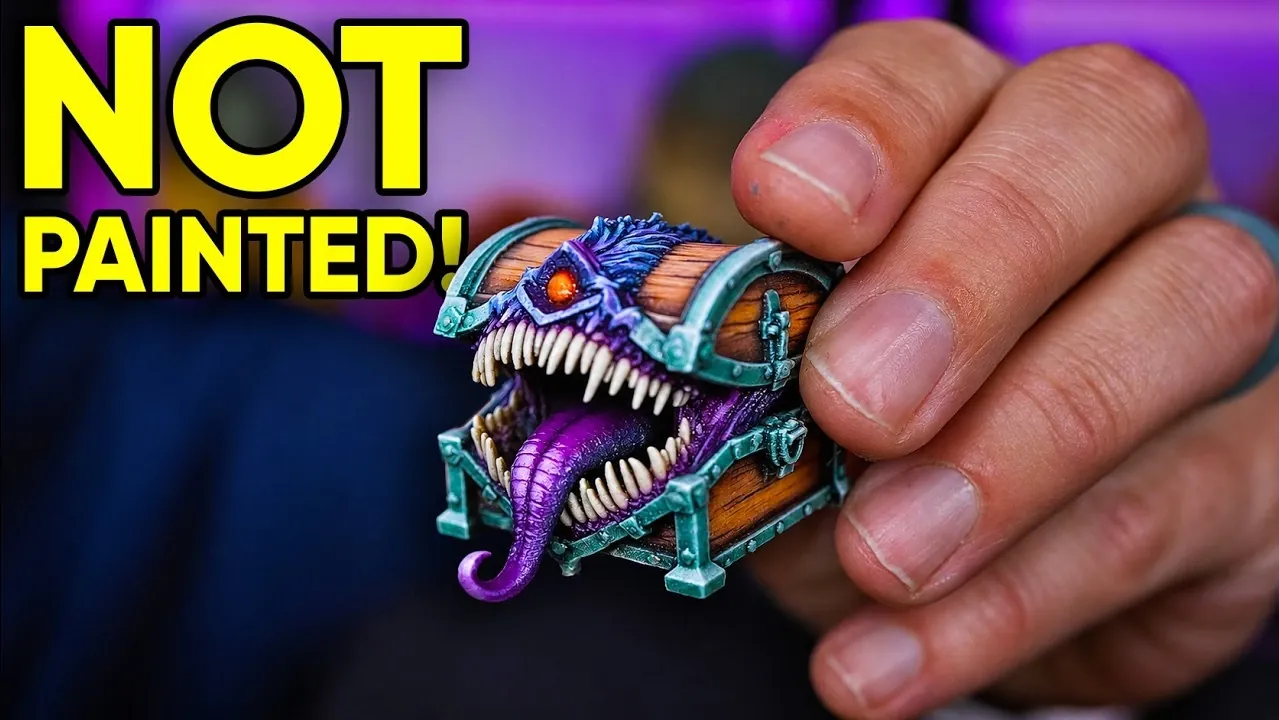
Can you print full-color 3D models without painting them by hand? The new Flashforge CJ270 does just that, and is currently on offer at $3,999 in the United States and £3,499 in the United Kingdom. It’s a desktop resin printer that builds color and detail into each layer, while its water-soluble supports hold complex shapes in place during printing. Flashforge says it can produce more than 10 million color combinations, although the finished models can be brittle. Find out how the printing and cleanup work, as well as what Uncle Jessy found when using the CJ270.
Flashforge CJ270: Full-Color Resin Printing on a Desktop
TL;DR Key Takeaways :
- The Flashforge CJ270 is on offer at $3,999 in the United States (regular price $4,499) and £3,499 in the United Kingdom (regular price £3,999).
- Flashforge says the printer can produce more than 10 million color combinations using MultiJet Printing.
- Its build volume is 180 × 120 × 100 mm, with a layer thickness of 7 micrometers.
- Flashforge says models under 10 cm may print in less than 10 hours, depending on their dimensions and orientation.
- Prints can be brittle, and parts of a Skull Kid model snapped after a drop of about one foot.
The Flashforge CJ270 is a desktop 3D printer that uses inkjet-style printing rather than a single vat of resin. Flashforge announced it in September 2026 and says it can produce more than 10 million color combinations.
Unlike UV printers that produce flat or raised-surface images, the CJ270 makes three-dimensional objects. It is currently priced under $4,000 in the United States, while Flashforge puts the price of traditional industrial full-color 3D printers at approximately $150,000. Some competitors cost roughly $50,000 to $100,000 or more.
Seven Materials Build Color Into Each Layer
The CJ270 uses MultiJet Printing to deposit droplets of photosensitive resin, then cures them with ultraviolet light. Seven printheads handle cyan, magenta, yellow, black, white, clear and support materials, while a roller levels each layer before curing.
Color, structure and supports are built together. Depending on the settings, the printer can use color on an object’s exterior and white for its solid interior. Clear resin can replace white infill for a translucent appearance, although colors were harder to see on a mimic chest printed that way.
A textured magnetic PEI build plate and automatic leveling are included, and prints made so far required no ink calibration. The CJ270’s build volume is only slightly smaller than that of a larger Mimaki printer. Its main specifications are:
- Build volume: 180 × 120 × 100 mm.
- Layer thickness: 7 micrometers.
- Printer dimensions: 697 × 410 × 405 mm.
- Weight: 33.5 kg.
- Operating noise: rated at no more than 55 dB.
Flashforge claims traditional industrial full-color printers use layers of approximately 20-30 micrometers and that the CJ270 occupies less than one-twentieth of their size. Its noise is comparable to that of typical FDM printers: it is audible in the same room but not noticeably audible from another room. An activated-carbon air filter is included, and a fan runs whenever the printer is powered on, including while idle.

Here are additional guides from our expansive article library that you may find useful on 3D printing.
- Manufacturing: FibreSeek Opens Global Pre-Sale for only 500 Units, Bringing Continuous Fiber 3D Printing to the Desktop
- ELEGOO Jupiter 2 Delivers 16K Prints in a Massive Build Volume
- ELEGOO OrangeStorm Giga large volume 3D printer
- $309 Creality SPARKX I8 is a Top 3D Printer for Beginners
- All New Next Generation 3D Printers Need this Feature
Printed Color Reduces the Need for Painting
A CJ270 model included colors, shading and small details directly in the print, without hand painting. A small goblin head also captured color variations and details, though its metallic areas did not stand out as strongly.
Water-soluble supports hold overhangs and complex shapes and can fully encase a model. A multicolored Skull Kid model had many overhangs, while a mimic model combined recessed areas and overhangs that would have been difficult to prepare for hand painting with an FDM or resin printer. Comparable resin printing could also leave many support scars to clean up.
Prints can be brittle, depending on their size and thickness. A thin shovel piece broke repeatedly, and parts of the Skull Kid print snapped after a drop of about a foot. Flashforge does not recommend CJ270 models for load-bearing parts or functional prototypes under significant mechanical stress.
A print job containing an Aztec dragon partially failed, although the dragon itself was cleaned up. Another mimic print failed and affected nearby models on the build plate.
ColorPrint Prepares Models and Estimates Print Time
Flashforge ColorPrint lets you arrange, rotate and scale models, manage supports and layouts, and control the cyan, magenta, yellow, black, white and clear material channels independently. It estimates jobs before slicing and shows ink usage. Time estimates are reportedly close but not exact, and sending a job to the printer can take time depending on model complexity.
A library of downloadable full-color models is included. Finding full-color files elsewhere was the biggest challenge with the printer, and most models imported in the GLB format needed rescaling.
ColorPrint supports CJP, CJM, STL, OBJ, 3MF, STEP, STP, PLY, FBX, GLB, GLTF and WRL files. Version 1.6.1 is available for 64-bit Windows, Intel macOS and Apple Silicon macOS; Flashforge also lists CJ270 firmware version 2.8.4.
Flashforge says models under 10 cm may print in less than 10 hours, depending on their dimensions and orientation. Adding models may increase print time only slightly if they remain within similar X, Y and Z constraints. Flashforge estimates about 15 hours or more for models around 10 cm and 25 hours or more for those around 15 cm.
Wired Transfers Come Before Planned Wi-Fi Support
Print files can reach the CJ270 over a wired local network or by USB drive. Wi-Fi is not currently supported, although Flashforge says support is planned for later in 2026.
For a wired connection, the touchscreen displays the printer’s IP address and DNS information for computer configuration. The USB port and touchscreen are on the front left, the RFID reader is opposite, and the Ethernet port, power cable and switch are on the back. The one-time setup was complicated, and a Mac without an Ethernet port also needs an adapter.
After a print finishes, the touchscreen does not display the actual time taken. Flashforge is reportedly working on an update for that display.
Load Dedicated Resin With Single-Use Cards
The CJ270 currently accepts only Flashforge’s dedicated materials, sold in 100 g pouches individually or in combinations, with bulk ink pricing also available. When scanned, a single-activation RFID card transfers the authorized material balance to the printer. Resin can be added during a print without pausing it.
A card failed to scan on a rare occasion in Uncle Jessy’s use. The printer also purges ink into a waste tank during printing, preparation and cleaning, so the tank needs periodic attention; it is opposite the ink-loading panel.
Unopened resin has a stated shelf life of 18 months, and Flashforge recommends using it within two months of opening. The company advises wearing nitrile gloves when handling resin and keeping products out of children’s reach. Uncle Jessy recommends ventilation while the printer is operating, even though no strong odor was noticed in the workshop or while the printer was idle.
Wash Away Supports and Maintain the Printheads
Finished objects can be lifted from the build plate and soaked in water to remove supports. Flush cutters are useful for removing excess support first, and water agitation helps with removal. Excess residue can be scraped off the build plate before another print. Flashforge says no separate post-curing step is needed; sanding, polishing and gloss coating are optional.
Prints are porous and can absorb considerable clear-coat spray, so they may need multiple coats depending on the desired finish. Matte, gloss and semigloss clear coats can be used, and a small wire brush can remove flashing.
An ultrasonic cleaner can assist with support removal, which Flashforge claims it can reduce from around 10 hours to one to two hours. For the models tested, cleanup with an ultrasonic cleaner or resin wash station took roughly one to two hours, depending on size and recessed areas. The amount of support also affected cleanup time, and no major print-quality difference was noticed between the methods for those models.
Cleaning tanks can accumulate slight residue at the bottom. Uncle Jessy recommends collecting dirty wash water rather than pouring it down the drain; disposal rules may vary by location.
The touchscreen prompts users to clean the printheads and roller and empty the waste tank before, during or after print jobs. Each printhead can be replaced individually. Flashforge claims a service life of up to 2,000 operating hours and estimates that printheads may last up to a year with proper maintenance, depending on usage.
Flashforge provides maintenance guides and videos for part replacement and machine jobs. The printer carries a 12-month limited warranty, while the printheads have a three-month warranty.
What stands out to us is the color itself. Shading, gradients and fine detail come out of the machine already in the model, which removes hand painting from the process altogether, and until recently that kind of printing belonged to industrial systems costing many times more. Uncle Jessy’s prints show what that looks like in practice better than a specification sheet can. The caution is in the running of it: the CJ270 only accepts Flashforge’s own resin, loaded with single-use cards, so the cost of ownership will depend on how much you print.
At the time of writing, the CJ270 is on offer at $3,999 in the United States and £3,499 in the United Kingdom, down from regular prices of $4,499 and £3,999. Flashforge sells it through both countries’ online stores and says new and remaining orders are scheduled to ship by air in the next batch at the end of November 2026. Printing requires the dedicated resin and ColorPrint software.
Full color on a desk for under $4,000 is a fraction of the price of the industrial machines that came before it. If you want finished-looking models without picking up a paintbrush, the CJ270 is well worth a look, as long as you can live with fragile prints and a wired connection for now.
Media Credit: Uncle Jessy“
Disclosure: Some of our articles include affiliate links. If you buy something through one of these links, Geeky Gadgets may earn an affiliate commission. Learn about our Disclosure Policy.
