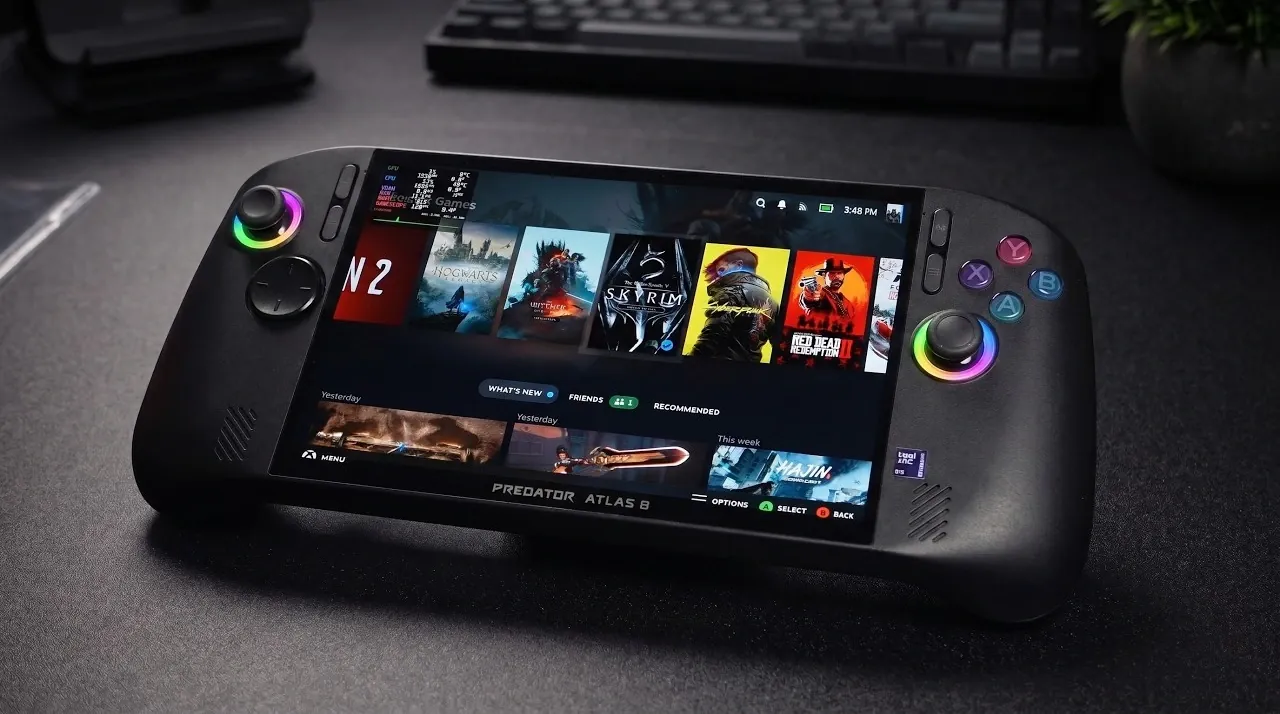
SteamOS has been successfully installed on the Acer Predator Atlas 8, a handheld gaming device known for its balance of affordability and capable hardware. ETA Prime highlights how this pairing takes advantage of the Atlas 8’s 8-inch IPS display, which features a 120Hz refresh rate and Variable Refresh Rate (VRR) technology. The use of a modified XESS XMX driver further enhances the experience by allowing frame generation and upscaling, improving performance in graphically intensive titles like Cyberpunk 2077 and The Witcher 3. Despite these strengths, the device’s 30W Thermal Design Power (TDP) limit and occasional graphical inconsistencies present some challenges.
Explore how VRR technology helps reduce screen tearing for smoother gameplay and learn how the modified XESS XMX driver contributes to sharper visuals in demanding games. Gain insight into optimizing the Atlas 8’s performance by managing TDP settings with third-party plugins and other practical adjustments. This feature provides a clear look at the strengths and limitations of combining SteamOS with the Atlas 8 for handheld gaming.
SteamOS Running on Acer Handheld
TL;DR Key Takeaways :
- The Acer Predator Atlas 8 is a budget-friendly handheld gaming device featuring an 8-inch IPS display with a 120Hz refresh rate, Intel G3 Extreme CPU, 24GB RAM (17GB as VRAM), and an 80Wh battery for extended gaming sessions.
- SteamOS integration, combined with a modified XESS XMX driver, enhances gaming performance with advanced features like upscaling, frame generation and multi-frame generation, making it a cost-effective alternative to premium handhelds.
- Performance highlights include smoother frame rates, VRR technology to eliminate screen tearing and optimized visuals for demanding games like Cyberpunk 2077 and The Witcher 3.
- Challenges include a 30W TDP cap limiting maximum performance, occasional graphical glitches in certain games and stability issues when pushing the device to its limits.
- Future updates and refinements to drivers and software could address current limitations, making the Atlas 8 an even more appealing option for affordable, high-performance handheld gaming.
Built for Modern Gaming Needs
The Acer Atlas 8 is engineered to meet the expectations of today’s gamers, offering a robust set of features that cater to both performance and portability. Its standout specifications include:
- An 8-inch IPS display with a 120Hz refresh rate and Variable Refresh Rate (VRR) technology, making sure smooth and tear-free visuals for an immersive gaming experience.
- A powerful Intel G3 Extreme CPU paired with a B390 integrated graphics processor (iGPU), delivering reliable performance for demanding games.
- 24GB of RAM, with 17GB allocated as VRAM, providing ample memory for resource-intensive gaming tasks.
- An 80Wh battery, offering extended playtime for uninterrupted gaming on the go.
These specifications create a strong foundation for integrating SteamOS, a Linux-based operating system specifically optimized for gaming, making the Atlas 8 a versatile device for modern gamers.
SteamOS Integration: Enhancing Gaming Capabilities
SteamOS significantly enhances the gaming experience on the Atlas 8 by introducing features tailored for handheld gaming. The Bazi update ensures seamless compatibility with the device’s built-in controls, simplifying navigation and gameplay. Additionally, the integration of the modified XESS XMX driver enables the full utilization of XMX engines, unlocking advanced features such as:
- Upscaling technology that sharpens visuals without compromising performance.
- Frame generation for smoother and more fluid gameplay.
- Multi-frame generation, enhancing visual fidelity for a more immersive experience.
These features transform the Atlas 8 into a cost-effective alternative to premium handheld gaming systems, offering a balance of affordability and performance that appeals to a wide range of gamers.

Here are additional guides from our expansive article library that you may find useful on SteamOS.
- Valve Restructures SteamOS with Distinct X86 and ARM Builds
- ONEXPLAYER X2 Mini Pro Runs SteamOS with Ryzen AI Max Plus 388
- SteamOS Beta Update Fixes CPU Degradation and Wi-Fi Bugs
- Valve’s Free SteamOS Runs Arch Linux for Daily Desktop Use
- ROG Ally X20 SteamOS Gaming Benchmarks and Battery Performance Tested
- Install Armada OS on Android Handhelds to Create a Steam Deck in Under 5 Minutes
- SteamOS Update Adds Big Art Mode to the Game Library
- SteamOS Update Adds Seamless Account Switching During Gameplay
- Valve Adds Initial NVIDIA GPU Driver Support to SteamOS
- Droid Deck Brings SteamOS to Android Phones Without a Root
Performance Highlights: Delivering Exceptional Gaming Experiences
The combination of SteamOS and the modified XESS XMX driver improves the Atlas 8’s gaming performance to impressive levels. Key performance highlights include:
- Smoother frame rates and enhanced visual quality in popular titles such as Cyberpunk 2077, The Witcher 3, and Skyrim Remastered.
- VRR technology, which eliminates screen tearing and stuttering, making sure a seamless gaming experience.
- Optimized upscaling and frame generation, allowing demanding games to run efficiently on the device without sacrificing visual quality.
These enhancements position the Atlas 8 as a strong contender in the handheld gaming market, particularly for gamers seeking high performance at a more accessible price point.
Challenges and Limitations
While the pairing of SteamOS with the Acer Atlas 8 delivers impressive results, there are some limitations that users should be aware of:
- The device’s Thermal Design Power (TDP) is capped at 30W, which restricts its maximum performance. Although third-party plugins can adjust this cap, they may introduce additional complexities for users.
- Graphical glitches have been observed in certain games, such as Crimson Desert, indicating that the modified XESS XMX driver is still in its developmental stages.
- Occasional stability issues may arise, particularly when pushing the device to its performance limits.
These challenges highlight areas where future updates and refinements could significantly enhance the overall user experience, making the device even more appealing to gamers.
Tips for Optimizing Your Gaming Setup
For those planning to install SteamOS on the Acer Atlas 8, the following recommendations can help you get the most out of your gaming experience:
- Use the modified XESS XMX driver for improved performance, but remain aware of potential minor issues such as graphical glitches or TDP limitations.
- Carefully monitor third-party plugins if you choose to adjust the TDP cap, as these tools can introduce additional complexities and risks.
- Stay updated on official driver releases, as future updates may address current limitations and improve overall compatibility and stability.
By following these tips, you can enjoy a smoother and more optimized gaming experience, maximizing the potential of the Atlas 8 and SteamOS combination.
A Look at the Future of Affordable Handheld Gaming
The Acer Predator Atlas 8, when paired with SteamOS and the modified XESS XMX driver, demonstrates the potential of affordable handheld gaming devices. Its high-quality display, robust hardware and advanced gaming features make it a compelling choice for gamers who prioritize performance without exceeding their budget. While some limitations remain, the promise of future updates suggests that this combination could become even more refined over time. For now, the Atlas 8 offers a glimpse into the possibilities of accessible, high-performance handheld gaming, making it an exciting option for gamers looking to explore new horizons.
Media Credit: ETA PRIME
Disclosure: Some of our articles include affiliate links. If you buy something through one of these links, Geeky Gadgets may earn an affiliate commission. Learn about our Disclosure Policy.
