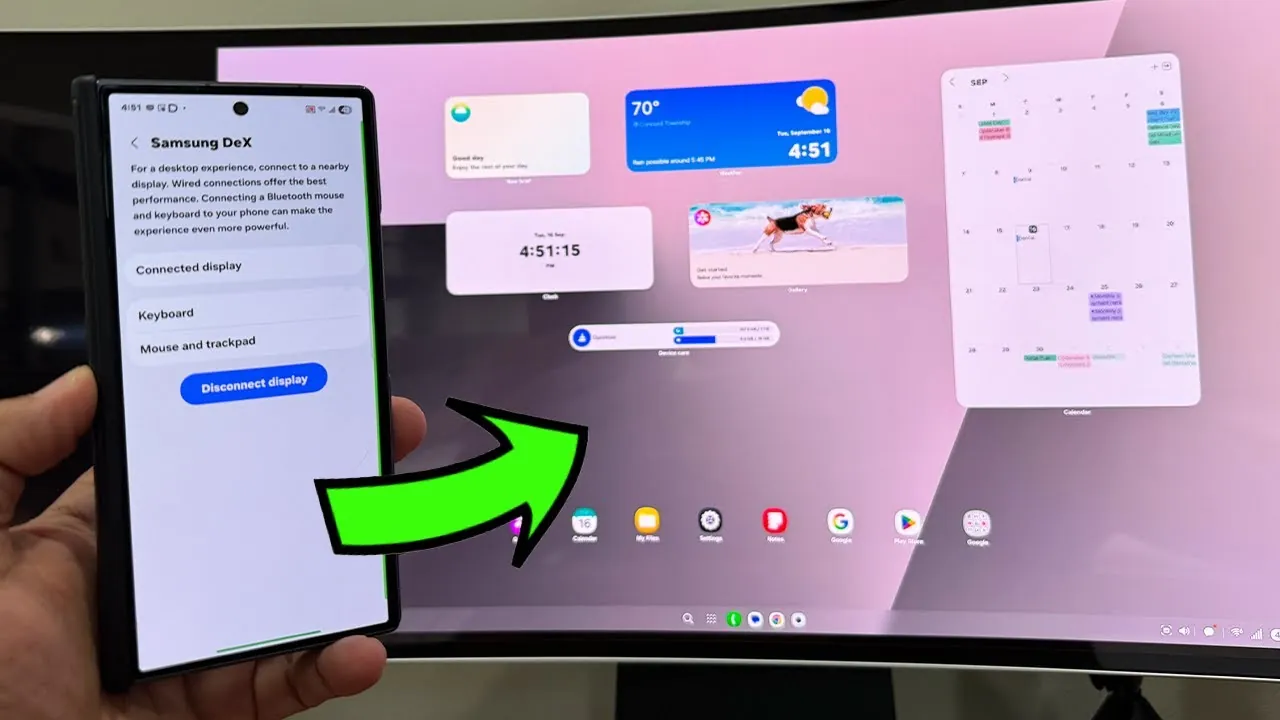
Samsung DeX has undergone a noteworthy update, bringing widget support to its platform. This enhancement significantly improves its functionality and customization capabilities, aligning it with the intuitive and flexible interfaces users expect from modern devices. Initially available on One UI 8 devices, starting with the Galaxy Z Fold 7, this update is poised to redefine how you interact with Samsung DeX, offering a more personalized and efficient workspace. The video below from Sakitech gives us more details.

Why Widget Integration Matters
The integration of widgets into Samsung DeX marks a pivotal step forward for the platform. This feature allows you to personalize your workspace by adding, resizing, and repositioning widgets directly on the DeX home screen. By mirroring the customization options familiar from smartphones and tablets, the transition to DeX becomes seamless and intuitive.
Widgets provide instant access to essential tools and information without the need to open full applications. For example:
- A Google Drive widget can display your most recent files, allowing quick access to important documents.
- A ChatGPT widget offers instant AI assistance directly from your home screen, streamlining workflows.
- A Chrome widget provides shortcuts to frequently visited websites, saving time during browsing.
These integrations are designed to enhance productivity by reducing the steps required to access critical information, making your workspace more efficient and user-friendly.
Customization for a Personalized Workspace
Samsung DeX’s widget functionality offers extensive customization options, empowering you to design a workspace tailored to your preferences. Widgets can be resized to fit your screen layout, repositioned for optimal accessibility, and adjusted to match your aesthetic or functional needs. Features such as light and dark mode or background transparency further enhance the visual appeal and usability of your workspace.
This level of control ensures that DeX adapts to your workflow rather than forcing you to conform to a rigid interface. Whether you prefer a minimalist design or a feature-rich dashboard, the flexibility of widget customization allows you to create a workspace that aligns with your specific requirements. This adaptability makes Samsung DeX a versatile tool for both personal and professional use.
Boosting Multitasking and Efficiency
The addition of widgets significantly enhances multitasking capabilities on Samsung DeX. By placing essential tools and information directly on your home screen, you can access them instantly without disrupting your workflow. For instance:
- A device care widget enables you to monitor system performance and optimize it with a single tap, making sure your device runs smoothly.
- A calendar widget provides an at-a-glance view of your schedule, helping you stay organized and manage your time effectively.
This feature is particularly beneficial for professionals who rely on DeX for productivity. By reducing the need to switch between applications, widgets help you maintain focus and streamline complex tasks. The result is a more efficient and organized workspace that supports your goals.
Compatibility and Rollout Timeline
Currently, widget support is available on devices running One UI 8, with the Galaxy Z Fold 7 being the first to receive the update. Samsung has announced plans to extend this feature to additional One UI 8 devices and potentially select One UI 7 devices in the future. This phased rollout ensures that a growing number of users will benefit from the enhanced functionality over time.
Seamless Performance with Wireless DeX
The update also includes optimizations for wireless DeX, making sure a smooth and reliable experience. A stable Wi-Fi connection is essential for uninterrupted performance, allowing you to fully use the benefits of widget integration without delays or disruptions. This wireless capability adds an extra layer of convenience, allowing you to set up your DeX workspace anywhere without the need for cables or additional hardware.
Transforming Samsung DeX into a Productivity Powerhouse
The introduction of widget support represents a significant evolution for Samsung DeX, making it more versatile and user-friendly. By combining advanced customization options with improved multitasking and seamless integration, this update enhances the platform’s potential as a productivity tool. Whether you’re managing tasks, optimizing performance, or personalizing your workspace, the new widget functionality ensures that Samsung DeX adapts to your needs, offering a tailored and efficient experience. With these improvements, Samsung DeX continues to solidify its position as a powerful solution for both personal and professional use.
Browse through more resources below from our in-depth content covering more areas on Samsung DeX widget support.
- Apple iOS 18.2 vs. Samsung One UI 7: The ULTIMATE Showdown
- The Ultimate Guide to Samsung Galaxy Z Flip 7
- One UI 8 Beta: Everything You Need to Know
- Samsung Galaxy Z Flip7: Specs, Camera, and Performance
- 15 Samsung Galaxy Z Flip 6 Features Revealed
Source & Image Credit: sakitech
Disclosure: Some of our articles include affiliate links. If you buy something through one of these links, Geeky Gadgets may earn an affiliate commission. Learn about our Disclosure Policy.
