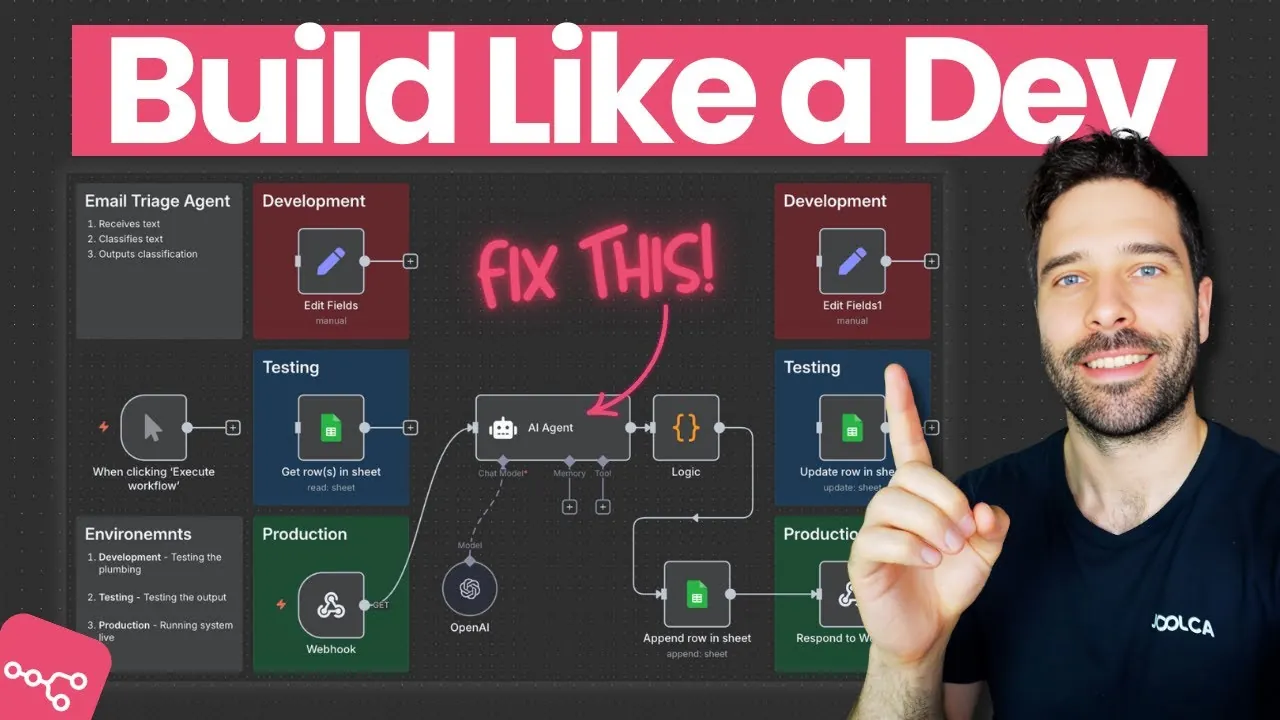
What if you could transform complex, repetitive tasks into seamless, automated processes with just a few clicks? For developers, the challenge often lies in building workflows that are not only functional but also scalable and reliable. Enter n8n, a powerful, open source automation tool that enables developers to create workflows tailored to their unique needs. Whether you’re orchestrating data pipelines, integrating APIs, or automating business processes, n8n provides the flexibility to build solutions that grow with your requirements. But here’s the catch: crafting workflows that truly deliver requires more than just dragging and dropping nodes, it demands a structured, thoughtful approach.
Bart Slodyczka explains the framework developers rely on to build workflows in n8n, breaking down the essential steps that ensure accuracy and scalability at every stage. From setting up a robust development environment to testing workflows under real-world conditions, you’ll uncover best practices that minimize errors and maximize efficiency. Along the way, we’ll highlight strategies like iterative testing, stakeholder collaboration, and validation workflows that can elevate your automation game. By the end, you’ll not only understand the “how” but also the “why” behind workflow design, leaving you equipped to tackle even the most complex automation challenges with confidence. Because when workflows are done right, they don’t just save time, they transform how you work.
n8n Workflow Development Guide
TL;DR Key Takeaways :
- Development environments are crucial for workflow creation, with distinct stages (local, testing, staging, production) to isolate changes, test functionality, and protect live systems.
- Iterative development and testing ensure workflows are refined incrementally, addressing issues early and aligning with technical and business objectives.
- Testing strategies like batch testing and validation workflows are essential for making sure reliability, especially when integrating AI models or handling large data volumes.
- Staging environments allow workflows to be tested with real-world data before production, while logging and monitoring in production ensure performance, scalability, and adaptability.
- Best practices include iterative testing, stakeholder collaboration, robust logging, AI model validation, and real-world data testing to build reliable and scalable workflows in n8n.
Why Development Environments Are Essential
A well-defined development environment is the cornerstone of successful workflow creation. By separating your work into distinct environments, you can isolate changes, identify issues early, and protect live systems from unintended disruptions. These environments typically include:
- Local Development: The initial stage where workflows are built and tested using mock data and variables. This environment allows you to focus on core logic and functionality without external dependencies.
- Testing Environment: A controlled setting where workflows are validated against predefined datasets. This ensures workflows handle expected inputs and outputs effectively.
- Staging Environment: A non-production space where workflows are tested with real-world data. This simulates live conditions without impacting actual systems, helping to identify potential issues before deployment.
- Production Environment: The final stage where workflows are deployed for live use. Logging and monitoring are critical here to track performance, detect anomalies, and ensure reliability.
By working within these environments, you can refine individual components without compromising the integrity of the entire system. This separation also enables smoother transitions between development stages and reduces the risk of errors in production.
Step-by-Step Workflow Development
The development process in n8n begins with local development, where the focus is on building the core logic of the workflow. At this stage, mock data is used to test basic functionality, allowing you to identify and resolve issues early. This foundational work ensures that subsequent stages of development are built on a solid base.
Once the core logic is functional, the next step is to integrate external systems and collaborate with stakeholders. Stakeholder input is particularly valuable during this phase, as it helps align expectations regarding data formats, outputs, and potential edge cases. Addressing these considerations early minimizes the risk of costly revisions later in the process.
As workflows evolve, iterative testing becomes crucial. This involves revisiting and refining the workflow to address new requirements or resolve emerging issues. By adopting this iterative approach, you can ensure that the workflow remains aligned with both technical and business objectives.
The Framework Developers Use To Build AI Workflows

Dive deeper into n8n development workflows with other articles and guides we have written below.
- Free n8n Installation and Update Guide for Private Automations
- How to Build an Automated AI Research Agents with n8n
- How to Use Claude AI to Copy & Replicate n8n Workflows Instantly
- How to use Perplexity AI Inside n8n (No Code)
- 8 Powerful AI Agent Use Cases to Boost Automation with n8n
- How to Use n8n’s Dynamic AI Integrations for Smarter Workflows
- n8n Tutorial: No-Code Workflow Automation with AI Integration
- How to Build an AI Assistant with n8n: A No-Code Guide
- How to Connect Slack to n8n for Workflow Automation
- Ultimate Guide to n8n AI Nodes to Boost Your Automation Skills
Testing and Validation: Making sure Workflow Reliability
Testing is a critical component of workflow development, as it ensures workflows perform reliably under real-world conditions. Two key testing strategies are particularly effective:
- Batch Testing: This involves evaluating how workflows handle large volumes of data. It helps ensure that workflows remain efficient and reliable, even under heavy loads.
- Validation Workflows: These are used to compare outputs, such as those generated by AI models, with human-classified data. This process assesses accuracy and performance, providing insights for further refinement.
For example, if your workflow incorporates an AI model, validation workflows can help measure its performance against predefined benchmarks. This iterative testing process not only improves the model’s reliability but also enhances the overall workflow’s effectiveness.
From Staging to Production: Finalizing Workflows
Before deploying workflows to production, they must be thoroughly tested in a staging environment. This step allows you to evaluate performance using real-world data without affecting live systems. It also provides an opportunity to identify and resolve any remaining issues, making sure a smooth transition to production.
Once workflows are live in the production environment, logging and monitoring become essential. These tools enable you to:
- Track events and outputs: Detect anomalies and identify potential issues before they escalate.
- Measure performance metrics: Ensure workflows meet predefined expectations and remain efficient over time.
- Gather data for optimization: Use insights from logs to refine workflows and adapt to changing requirements.
This continuous monitoring ensures that workflows remain reliable, scalable, and adaptable, even as business needs evolve.
Best Practices for Building Workflows in n8n
To create effective workflows in n8n, it is essential to follow best practices that enhance reliability and scalability. These include:
- Iterative Testing: Continuously test and refine workflows to address issues as they arise, making sure long-term reliability.
- AI Model Validation: Use validation workflows to improve the accuracy and reliability of AI-driven processes, aligning them with real-world requirements.
- Stakeholder Collaboration: Engage stakeholders early in the development process to align on data formats, outputs, and expectations, reducing the risk of misalignment.
- Robust Logging and Monitoring: Implement comprehensive logging to track performance, detect anomalies, and identify areas for improvement.
- Real-World Data Testing: Test workflows with real-world data in the staging environment to ensure they perform as expected in production.
By adhering to these best practices, you can build workflows that are not only functional but also resilient and adaptable to changing requirements. This approach ensures that workflows remain aligned with both technical and business goals, delivering consistent value over time.
Media Credit: Bart Slodyczka
Disclosure: Some of our articles include affiliate links. If you buy something through one of these links, Geeky Gadgets may earn an affiliate commission. Learn about our Disclosure Policy.
