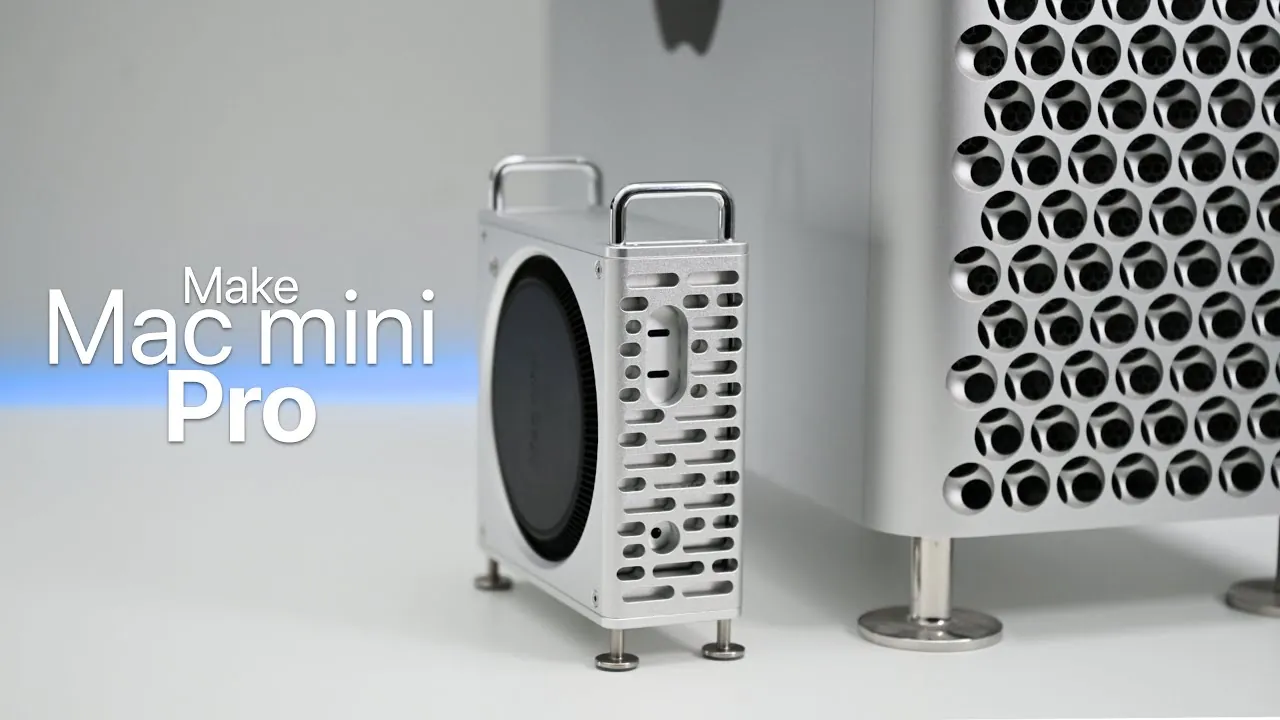
Have you ever wanted your Mac Mini to exude the same professional elegance as the Mac Pro? A custom aluminum chassis upgrade could be the perfect solution. This modification not only enhances the aesthetic appeal of your Mac Mini but also ensures its functionality and performance remain intact. Featuring a sleek space gray finish and a design inspired by Apple’s premium Mac Pro, this upgrade offers a sophisticated look at an accessible price point. The video below from Zollotech shows us how this can be done.

Why the Aluminum Chassis Stands Out
The aluminum chassis upgrade is more than just a cosmetic enhancement—it’s a thoughtful redesign that combines style with practicality. Its space gray finish lends a modern, professional appearance, while its functional features ensure durability and usability. Here are the standout elements of this design:
- Enhanced Stability and Protection: Rubberized feet provide a stable base on any surface, while padded interiors safeguard your Mac Mini from scratches during installation and everyday use.
- Seamless Design Integration: The machined aluminum power button blends seamlessly with the chassis, maintaining a cohesive and polished look.
- Uncompromised Port Accessibility: The chassis is precisely engineered to accommodate all essential ports, including USB-C, Thunderbolt, and the headphone jack, making sure full functionality.
- Improved Airflow: Strategically placed ventilation openings optimize airflow, preventing overheating even during demanding tasks or prolonged use.
This meticulous attention to detail ensures that the upgrade is not only visually appealing but also enhances the overall usability of your Mac Mini.
Step-by-Step Installation Guide
Installing the aluminum chassis is a straightforward process that requires minimal technical expertise. Follow these steps to upgrade your Mac Mini:
- Step 1: Begin by carefully removing the existing casing of your Mac Mini. Take care to avoid damaging any internal components during this process.
- Step 2: Align the new aluminum chassis with your Mac Mini, making sure that all ports and openings are perfectly matched.
- Step 3: Secure the chassis by fastening the screws at the designated points. This ensures a snug and secure fit for the device.
- Step 4: Pay close attention to the alignment of the power button, which is designed to integrate seamlessly with the internal components of the Mac Mini.
Once installed, the new chassis provides easy access to all ports and maintains the device’s sleek and functional design.
Performance Considerations
A common concern with any hardware modification is whether it might impact the device’s performance. Fortunately, this aluminum chassis upgrade is designed to preserve the Mac Mini’s functionality while adding a premium touch. Here’s how it performs:
- Efficient Cooling: The ventilation openings are strategically placed to optimize airflow, making sure the device remains cool even during intensive tasks.
- Uninterrupted Wireless Connectivity: Wi-Fi and Bluetooth signals remain strong and reliable, allowing seamless wireless performance.
- Full Port Functionality: High-speed connections through Thunderbolt and USB-C ports are unaffected, allowing you to connect external displays and accessories without any compromise.
This upgrade ensures that your Mac Mini retains its performance capabilities while benefiting from a more robust and visually appealing design.
A Premium Look at an Affordable Price
Once upgraded, your Mac Mini will feel like an entirely new device. The aluminum chassis adds a premium touch, making it look and feel as robust as Apple’s professional-grade products. For users who prioritize both design and functionality, this modification strikes the perfect balance.
What makes this upgrade even more appealing is its affordability. Priced between $35 and $40, the aluminum chassis offers a cost-effective way to personalize and enhance your Mac Mini without exceeding your budget. It’s an excellent option for those who want to elevate their workspace aesthetics or simply enjoy a more polished and durable device.
Whether you’re a tech enthusiast or a design-conscious user, this upgrade delivers a blend of style and practicality. It’s a simple yet impactful way to transform your Mac Mini into a device that stands out in both form and function.
Browse through more resources below from our in-depth content covering more areas on Mac Mini modification.
- Cool Mods – The Mac Mini Pro Mod
- Awesome portable Macintosh Mini project
- Expand Your Mac mini Storage with ORICO MiniMate SSD
- 2011 Mac Mini Gets Taken Apart
- Apple Modular SSDs in M4 Pro Mac Mini: What It Means for Macs
Source & Image Credit: zollotech
Disclosure: Some of our articles include affiliate links. If you buy something through one of these links, Geeky Gadgets may earn an affiliate commission. Learn about our Disclosure Policy.
