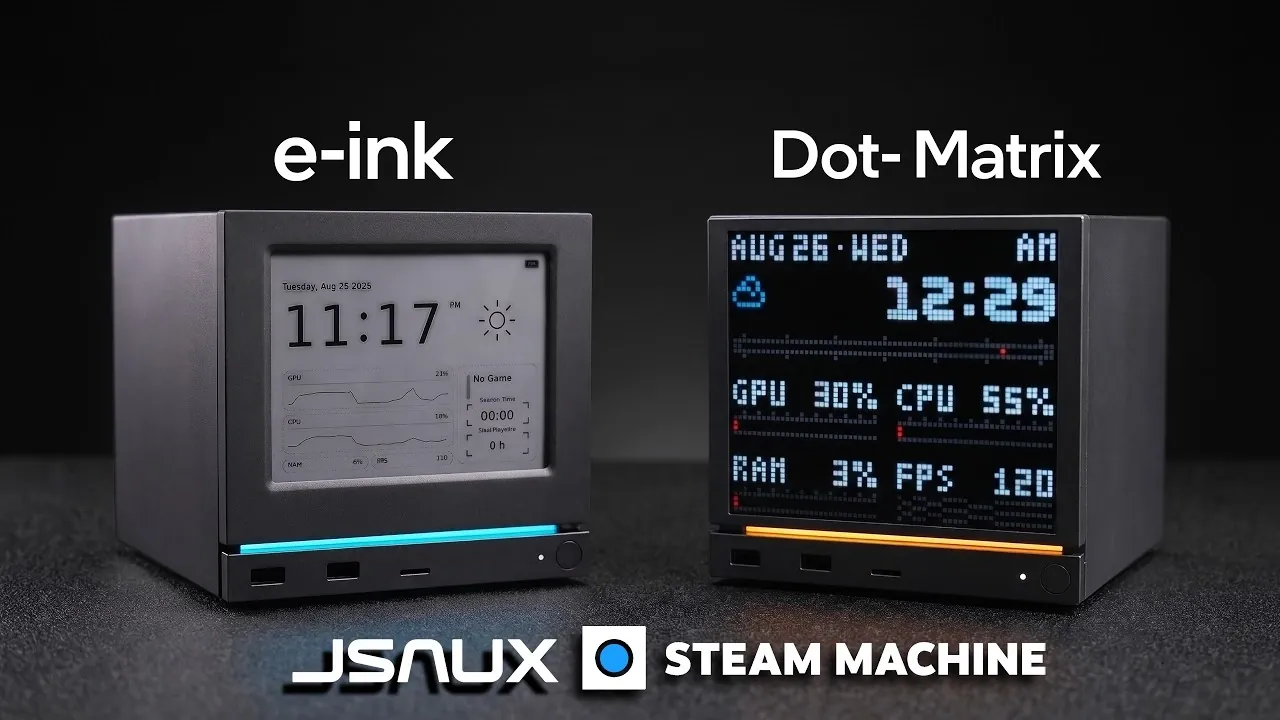
ETA Prime examines the integration of JSAUX E-Ink and Pixel Matrix displays with a Steam Machine, highlighting their distinct features and practical applications. The E-Ink display prioritizes energy efficiency, featuring a 500mAh battery capable of lasting up to 22 days on a single charge. Its magnetic attachment and Bluetooth connectivity simplify setup, while its static display is well-suited for showing information like time, weather, or system performance. In contrast, the Pixel Matrix display offers a 64×64 pixel resolution, allowing animations, GIFs and dynamic system metrics for a more visually engaging experience.
Dive into the installation process, including the use of Decki Loader and Steam OS plugins to configure both displays effectively. Discover how to customize visuals, from uploading personalized graphics to arranging layouts for specific data. Additionally, understand the technical constraints of each display, such as the E-Ink’s slower refresh rate and the Pixel Matrix’s dependence on a USB-C connection, while considering how future updates might address these limitations.
JSAUX Steam Machine Displays
TL;DR Key Takeaways :
- JSAUX introduced two customizable faceplate options for the Steam Machine: the energy-efficient E-Ink display and the dynamic Pixel Matrix display.
- The E-Ink display offers up to 22 days of battery life, supports static data like time and weather and features magnetic attachment and Bluetooth connectivity for easy installation.
- The Pixel Matrix display provides a vibrant 64×64 resolution, supports animations and GIFs and displays real-time system metrics via a USB-C connection.
- Both displays are highly customizable, with options to upload custom visuals, configure modular layouts and adapt to user preferences through Steam OS plugins.
- While the E-Ink display has a slow refresh rate and the Pixel Matrix requires a wired connection, future software updates and community-developed plugins promise to enhance their functionality further.
E-Ink Display: A Blend of Simplicity and Efficiency
The E-Ink display is designed for users who prioritize energy efficiency and extended battery life. With its 500mAh battery, this display can operate for up to 22 days on a single charge, making it an excellent choice for those who value long-lasting performance. Its magnetic attachment ensures a hassle-free installation process, while Bluetooth connectivity eliminates the need for cumbersome wires. Key features of the E-Ink display include:
- Minimal energy consumption, allowing prolonged usage without frequent recharging.
- Static information display, ideal for showing time, weather updates and system performance metrics.
- Support for uploading custom images to personalize the screen.
However, the E-Ink display is not without its limitations. Its slow refresh rate makes it unsuitable for dynamic content, such as real-time FPS tracking. The display is managed through a dedicated software suite integrated with Steam OS, offering an intuitive interface for customization and control. This makes it a practical choice for users seeking a simple yet effective way to monitor essential data.
Pixel Matrix Display: Vibrant and Interactive
For those who prefer a more dynamic and visually engaging option, the Pixel Matrix display is an excellent choice. With a 64×64 pixel resolution, it supports animations, GIFs and custom visuals, bringing a lively aesthetic to your gaming setup. Unlike the E-Ink display, it connects via USB-C, making sure faster data transfer and real-time updates. Notable features of the Pixel Matrix display include:
- Real-time system metrics, such as CPU, GPU and RAM usage, displayed in an engaging format.
- Support for animations and GIFs, allowing users to showcase unique visuals.
- Brightness control and modular layouts for displaying multiple data points simultaneously.
While the Pixel Matrix display is already highly functional, future software updates may introduce features like real-time FPS tracking, further enhancing its capabilities. This display is ideal for users who want a visually appealing and interactive way to monitor their system’s performance.
Become an expert in Steam Machine with the help of our in-depth articles and helpful guides.
- Custom Mini-ITX Steam Machine Outperforms Valve’s by 81% for $200 Less
- Why Valve Raised the Price of the Steam Machine
- Why SteamOS 3.8 is More Important Than the Steam Machine Hardware
- GeekCube DIY Steam Machine : Custom SFF SteamOS 3.8 Gaming Console
- Upgrading Valve’s Steam Machine to 64GB RAM and 4TB Storage
- High End Emulation on the Steam Machine Tested
- Compact Steam Machine Alternative : Built for 1440p Gaming
- Why Valve Refuses to Subsidize Its New Steam Machines
- Steam Machine Guide: How to Get Maximum Performance Out of the 6-Inch Cube
- Valve Hits 760,000 Yearly Steam Machine Sales Amid RAM Shortage
Installation and Setup: Simple and User-Friendly
Installing either display is a straightforward process, designed to be as user-friendly as possible. To get started, it is recommended to perform the setup in Steam OS desktop mode before switching to game mode. Follow these steps for a seamless installation:
- Download and install Decki Loader, a plugin manager for Steam OS.
- Install the required plugins: Mono Inc. for the E-Ink display and Pixel for the Pixel Matrix display.
- Follow the on-screen instructions provided by the software to configure and customize your display.
Once installed, the software offers extensive customization options. For example, users can upload custom images or animations for the Pixel Matrix display, while the E-Ink display allows for composite mode, which combines multiple data points like time and weather into a single, efficient layout.
Customization: Designed for Your Preferences
Both displays are highly customizable, allowing users to adapt them to their specific needs and preferences. For the E-Ink display:
- Focus on static information to maximize energy efficiency.
- Use composite mode to display multiple data points simultaneously, such as time, weather and system performance.
For the Pixel Matrix display:
- Showcase animations, GIFs and custom visuals to create a unique and engaging aesthetic.
- Display live system metrics with modular layouts for enhanced functionality.
These customization options ensure that both displays can cater to a wide range of user preferences, whether you prioritize practicality, visual appeal, or a combination of both.
Limitations and Future Potential
While the JSAUX E-Ink and Pixel Matrix displays offer significant enhancements, they are not without their limitations:
- The E-Ink display’s slow refresh rate restricts its ability to handle dynamic content, such as real-time FPS tracking.
- The Pixel Matrix display requires a wired USB-C connection, which may not appeal to users seeking a completely wireless setup.
Despite these limitations, the potential for future updates is promising. The Pixel Matrix display, in particular, could benefit from advanced features like real-time FPS tracking through software updates. Additionally, the growing community of developers is likely to create new plugins, further expanding the functionality of both displays and making sure they remain relevant and versatile over time.
A New Standard for Steam Machine Customization
The JSAUX E-Ink and Pixel Matrix displays represent a significant step forward in Steam Machine customization. The E-Ink display is perfect for users who value energy efficiency and static information, while the Pixel Matrix display offers a dynamic and visually engaging experience. Both options provide a unique way to personalize your gaming setup, catering to a variety of preferences and needs.
As software evolves and the community continues to contribute innovative plugins, these displays are poised to become even more powerful tools for gamers. Whether you prioritize functionality, aesthetics, or a balance of both, these faceplates offer an exciting opportunity to elevate your Steam Machine experience to new heights.
Media Credit: ETA PRIME
Disclosure: Some of our articles include affiliate links. If you buy something through one of these links, Geeky Gadgets may earn an affiliate commission. Learn about our Disclosure Policy.
