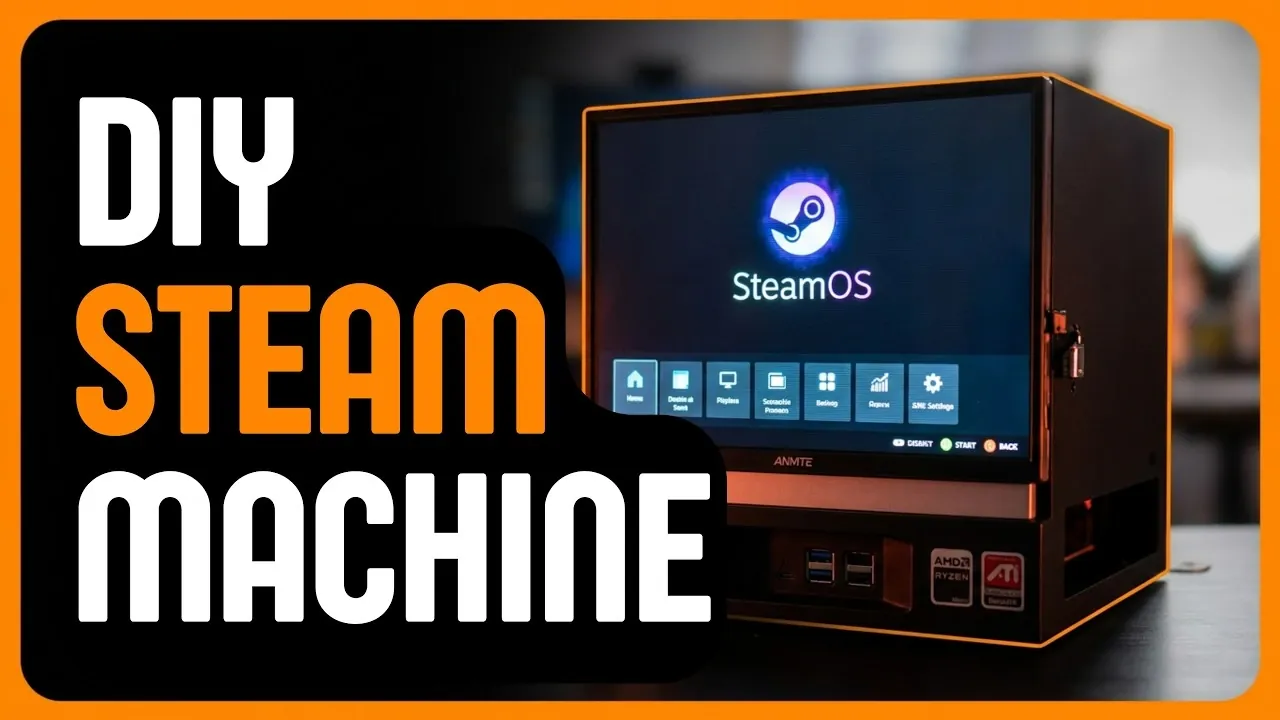
The GeekCube, a compact DIY Steam Machine created by Reddit user TheGeekno72, merges retro-inspired design with modern gaming capabilities. Built over six months with significant input from online communities, this cube-shaped system runs on SteamOS, a Linux-based operating system optimized for gaming. Notable features include a 10.5-inch built-in display with a 1920×1280 resolution, 32GB of RAM and a 1.5TB storage drive, all housed in a custom chassis designed using CAD software. SavvyNik explores how the GeekCube balances portability, performance and customizability, offering a unique alternative to traditional gaming PCs.
Dive into this breakdown to uncover how the GeekCube achieves energy efficiency with its 200W thermal design power, supports extensive hardware modifications and integrates advanced cooling solutions for sustained performance. You’ll also gain insight into the collaborative process behind its development, from overcoming high RAM costs with SO-DIMM adapters to refining cable management for a cleaner build. Whether you’re a casual gamer or a DIY enthusiast, this guide provides a detailed look at the challenges, solutions and future possibilities of this community-driven project.
What Sets the GeekCube Apart?
TL;DR Key Takeaways :
- The GeekCube is a compact, customizable DIY Steam Machine designed for portability and high performance, featuring a retro-inspired aesthetic and built-in display.
- Powered by SteamOS, it offers 32GB RAM, 16GB VRAM, a 1.5TB drive and a 10.5-inch screen, balancing energy efficiency with gaming power.
- Community-driven design and feedback played a key role in its development, showcasing the creativity of the DIY and gaming communities.
- Innovative features include enhanced connectivity, advanced cooling and storage expansion, making it versatile for various gaming needs.
- The GeekCube promotes Linux-based gaming, inspires DIY enthusiasts and provides a cost-effective alternative to traditional gaming PCs.
The GeekCube distinguishes itself as a community-driven innovation that redefines the concept of gaming PCs. Its compact, cube-shaped design and integrated display make it highly portable, catering to gamers who prioritize mobility without sacrificing performance. Unlike pre-built systems, the GeekCube offers a customizable experience tailored to the needs of both casual players and tech-savvy enthusiasts. Feedback from the DIY and gaming communities played a pivotal role in shaping its design, making sure it meets the diverse demands of modern gamers.
Key Features That Make the GeekCube Unique:
- Portability: A lightweight, compact design with a built-in screen for gaming on the go.
- Customizability: Open to hardware and software modifications, allowing users to tailor the system to their preferences.
- Community Collaboration: Developed with input from online forums, reflecting the collective creativity of the DIY community.
These features position the GeekCube as a versatile and innovative solution for gamers seeking a personalized and portable gaming experience.
High-Performance Hardware for Modern Gaming
The GeekCube is powered by SteamOS, a Linux-based operating system that integrates seamlessly with the Steam gaming platform. Its hardware is carefully selected to deliver a smooth and efficient gaming experience, even for demanding titles. The specifications are designed to balance performance and energy efficiency, making it a practical choice for both casual and hardcore gamers.
Hardware Highlights:
- Memory: 32GB of RAM and 16GB of VRAM ensure seamless multitasking and support for graphically intensive games.
- Storage: A 1.5TB drive provides ample space for extensive game libraries and multimedia files.
- Display: A 10.5-inch built-in screen with a 1920×1280 resolution and a 3:2 aspect ratio enhances usability and portability.
- Power Efficiency: A 200W thermal design power (TDP) optimizes GPU performance while minimizing energy consumption.
These specifications ensure the GeekCube delivers a high-quality gaming experience in a compact and energy-efficient form factor.

Here is a selection of other guides from our extensive library of content you may find of interest on DIY Steam Machine.
- Don’t Wait for Valve: Build Your Own Steam Machine in 2026
- DIY Steam Machine : Why This Corsair Mini PC is the Ultimate Blueprint
- The Secret to Getting the Ultimate Steam Machine? Build It Yourself
- DIY Steam Machine Build : Skip the Mini PC, This Linux Steam Build Hits 1440p with Headroom
- Guide to Building Your Own Steam Machine : Zac Builds
- Why Building a DIY Steam Machine Beats Buying a Console
- Why This 9-Liter DIY Steam Machine is the Ultimate Linux Gaming Console
- How to Build a Console-Killing Steam Machine for Just $450
- How to Recreate Valve’s Delayed Steam Machine at Home Today
- DIY Steam Machines : Valve Drops SteamOS 3.8 with Expanded AMD Hardware Support
Retro Aesthetic with Modern Functionality
The GeekCube’s design is a blend of nostalgic retro elements and innovative functionality. Its custom chassis, created using CAD software, is both visually appealing and practical. The design prioritizes usability and versatility, making it suitable for a wide range of gaming scenarios.
Notable Design Features:
- Enhanced Connectivity: Multiple I/O ports, including USB, HDMI and audio options, provide flexibility for various peripherals.
- Storage Expansion: Dedicated compartments allow users to add extra drives and accessories as needed.
- Advanced Cooling: Innovative cooling solutions ensure optimal performance during extended gaming sessions.
- Integrated Display: A built-in screen and headphone jack enable gaming without the need for external monitors or speakers.
This thoughtful combination of retro design and modern functionality makes the GeekCube a versatile choice for gamers who value both style and substance.
Innovation Through Challenges
The development of the GeekCube was not without obstacles, but creative problem-solving and community input helped overcome these challenges. Each hurdle was met with innovative solutions, resulting in a polished and functional final product.
Challenges and Solutions:
- High RAM Costs: SO-DIMM adapters were used to incorporate laptop memory modules, reducing overall expenses.
- Cable Management: An iterative design process refined the internal layout, making sure a clean and organized build.
- HDMI CEC Optimization: Compatibility with external displays and devices was improved for seamless integration.
- Software Performance: SteamOS and other Linux-based applications were optimized for smooth and efficient operation.
These solutions underscore the project’s commitment to delivering a high-quality gaming system while addressing technical and budgetary constraints.
Influence on the DIY and Gaming Communities
The GeekCube has made a significant impact on the DIY and Linux gaming communities, inspiring others to explore custom builds and experiment with open source software. By demonstrating the potential of Linux-based systems, it encourages gamers to consider alternatives to traditional Windows-based PCs. Additionally, the GeekCube offers a cost-effective solution for budget-conscious gamers, proving that high-performance gaming doesn’t have to come at a premium price.
Key Contributions to the Community:
- Inspiration: Encourages DIY enthusiasts to explore creative and innovative gaming solutions.
- Accessibility: Provides a more affordable alternative to pre-built gaming PCs.
- Collaboration: Highlights the value of community input in shaping successful projects.
The GeekCube serves as a testament to the power of collaboration and the potential of open source technology in gaming.
Future Developments for the GeekCube
As an evolving project, the GeekCube is poised for further enhancements to keep pace with advancements in gaming technology. Planned updates aim to improve performance, expand compatibility and enhance user accessibility.
Planned Enhancements:
- Cooling Improvements: Refinements to thermal management for even better performance during intensive gaming sessions.
- Software Expansion: Broader support for a wider range of games and applications.
- Hardware Upgrades: Increased compatibility with new components and configurations.
- Accessibility Features: Enhancements to make the system more user-friendly for gamers of all skill levels.
These updates aim to ensure the GeekCube remains a relevant and competitive option in the rapidly evolving gaming landscape.
Media Credit: Reddit : SavvyNik
Disclosure: Some of our articles include affiliate links. If you buy something through one of these links, Geeky Gadgets may earn an affiliate commission. Learn about our Disclosure Policy.
