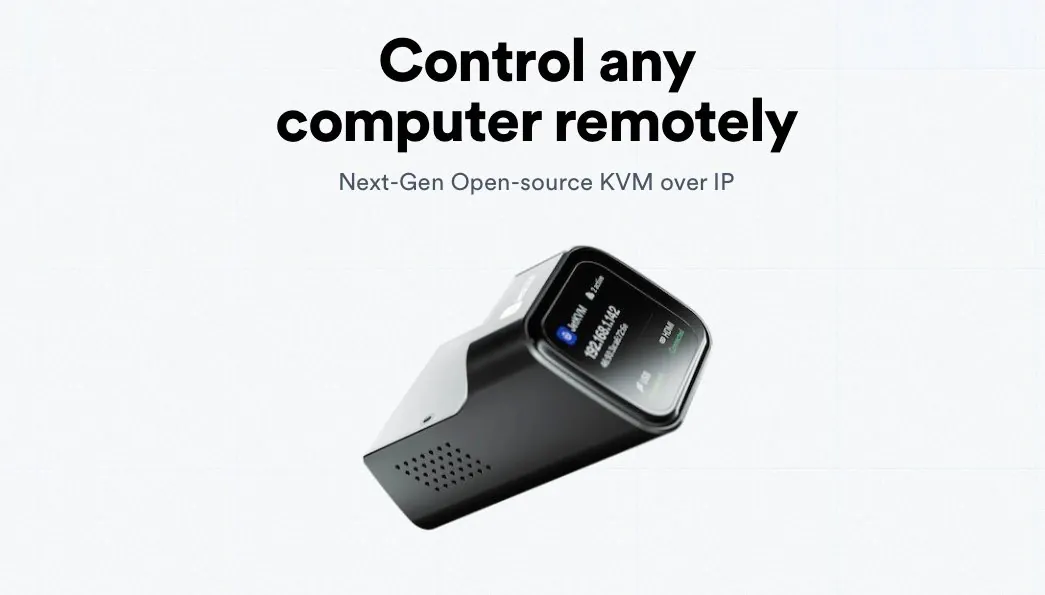
The JetKVM is a hardware-based KVM over IP device designed to provide remote access to computers at the hardware level, even when they are powered off or experiencing system failures. Unlike software-based solutions, it operates independently of the target system’s operating state, making it particularly useful for IT professionals, system administrators and home lab enthusiasts. In a detailed breakdown by TV Box Stop, the JetKVM’s ability to handle tasks like BIOS troubleshooting, operating system installations and full system control is highlighted, showcasing its reliability and versatility for managing remote systems.
Dive into this guide to understand how to set up and maximize the JetKVM’s features. You’ll explore its web interface for live system control, learn how to use virtual USB and ISO mounting for remote installations and discover practical tips for addressing common limitations, such as handling multiple monitor setups. Whether you’re managing a small office network or troubleshooting personal hardware remotely, this guide offers actionable insights to help you get the most out of the JetKVM.
What is a KVM Device?
TL;DR Key Takeaways :
- The JetKVM is a hardware-based KVM over IP device that provides reliable remote control of computers, even when powered off or experiencing OS failures.
- Key features include 1080p video streaming at 60fps, virtual USB drive emulation for OS installations, Wake-on-LAN and an open source software stack for customization.
- Its durable design includes a Rockchip RV1106 processor, USB-C, mini HDMI, Ethernet connectivity and a 1.69-inch touchscreen for navigation.
- Practical use cases include troubleshooting BIOS errors, remote OS installations, managing servers and providing IT support without on-site visits.
- Despite minor limitations like lack of multi-monitor support, the JetKVM’s affordability, advanced features and crowdfunding success make it a versatile tool for IT professionals and enthusiasts.
KVM (Keyboard, Video, Mouse) devices are designed to enable remote control of computers by intercepting video signals and injecting keyboard and mouse commands. Unlike software-based remote desktop tools, KVM devices operate at the hardware level, making sure functionality even when the target computer is powered off, stuck in the BIOS, or experiencing an operating system failure. This capability is particularly valuable for IT professionals and system administrators, as it ensures uninterrupted access to critical systems. By bypassing software dependencies, KVM devices like the JetKVM provide a dependable solution for efficient remote management.
Key Features of JetKVM
The JetKVM is equipped with a range of features designed to meet diverse remote management needs. These include:
- Access to computers in any state, including powered-off systems and BIOS screens.
- High-quality video streaming at 1080p resolution and 60fps with low latency (30-60ms).
- Virtual USB and optical drive emulation for remote operating system installations.
- Wake-on-LAN functionality and optional ATX Power Control Extension for managing power states.
- Cloud access via WebRTC or local-only access through VPNs like Tailscale.
- An open source software stack, allowing advanced customization and self-hosting.
These features make the JetKVM a powerful and flexible tool for IT professionals and enthusiasts who need reliable remote management solutions.

Deep dive into the latest in JetKVM by exploring our other resources and articles.
- JetKVM: The Ultimate Tool for Effortless Remote Computer Control
- GL.iNet Reinvents Remote KVM Hardware With Comet Pro and Comet 5G at CES 2026
- JetKVM $70 Hardware-Based KVM Switch for IT Professionals
Hardware Design and Build Quality
The JetKVM is designed with durability and portability in mind. Its compact die-cast metal enclosure ensures resilience, while a 1.69-inch color touchscreen provides basic navigation and status updates. At its core, the device is powered by a Rockchip RV1106 processor, which supports H.264 and HEVC video encoding and includes 256MB of DDR3L RAM. Key connectivity options include:
- USB-C for power and data.
- Mini HDMI for video input.
- Ethernet for network access.
- An optional RJ11 port for add-ons.
This robust hardware configuration ensures reliable performance and compatibility with a wide range of setups, making it suitable for both professional and personal use.
How to Set Up the JetKVM
Setting up the JetKVM is a straightforward process that ensures quick access to its features. Follow these steps:
- Connect the mini HDMI, USB-C and Ethernet cables to the target computer and your network.
- Access the device via a web browser by entering its IP address.
- For uninterrupted power during system shutdowns, use an optional Y-splitter cable to keep the JetKVM operational even when the target computer is powered off.
This simple setup process allows users to quickly begin managing systems remotely, minimizing downtime and maximizing efficiency.
Web Interface and Performance
The JetKVM’s web interface is designed to be intuitive and user-friendly, offering a seamless platform for live screen viewing and remote control. Key features of the interface include:
- Virtual keyboard and mouse controls for precise interaction with the target system.
- Control-alt-delete functionality for system resets.
- Customizable display and mouse settings to suit individual preferences.
- Live connection metrics for monitoring performance and making sure smooth operation.
Additionally, the device supports over-the-air firmware updates, making sure that users always have access to the latest features and improvements. This combination of usability and performance makes the JetKVM a reliable choice for remote management.
Practical Use Cases
The JetKVM is a versatile tool that can be applied in a variety of scenarios, including:
- Troubleshooting BIOS errors or operating system crashes remotely.
- Performing remote operating system installations using ISO mounting.
- Managing remote servers or small office setups without requiring on-site visits.
- Providing IT support for multiple users or devices efficiently.
These use cases demonstrate the JetKVM’s practicality for both professional IT environments and personal projects, offering a reliable solution for remote hardware management.
Limitations to Consider
While the JetKVM offers a comprehensive feature set, there are some limitations to be aware of:
- It struggles with multiple monitor setups, as it lacks a display selection feature.
- A secondary mouse cursor may appear, which can be distracting, though this can be mitigated with proper adjustments.
Understanding these limitations allows users to make informed decisions about whether the JetKVM meets their specific requirements.
Security and Open source Advantages
The JetKVM places a strong emphasis on security while using the flexibility of open source software. By default, the local web interface operates over HTTP, but HTTPS is available when using the cloud service. Its fully open source software stack, hosted on GitHub, provides transparency and allows advanced users to customize the device to their specific needs. This combination of security and adaptability makes the JetKVM a trusted choice for professionals and enthusiasts alike.
A Crowdfunding Success Story
The JetKVM achieved remarkable success through its Kickstarter campaign, raising nearly $6 million from over 45,000 backers. This overwhelming support highlights the demand for an affordable, feature-rich alternative to enterprise-level KVM devices. By delivering advanced functionality at a competitive price, the JetKVM has established itself as a practical and accessible solution for a wide range of users.
Final Thoughts
The JetKVM is a powerful and cost-effective tool for remote computer management. Its ability to provide hardware-level control, combined with features like high-quality video streaming, virtual drive emulation and an open source software stack, makes it a valuable asset for IT professionals, home lab users and small teams. While it has some limitations, its overall capabilities and affordability make it a compelling choice for those seeking a reliable KVM over IP device.
Media Credit: TV Box Stop
Disclosure: Some of our articles include affiliate links. If you buy something through one of these links, Geeky Gadgets may earn an affiliate commission. Learn about our Disclosure Policy.
