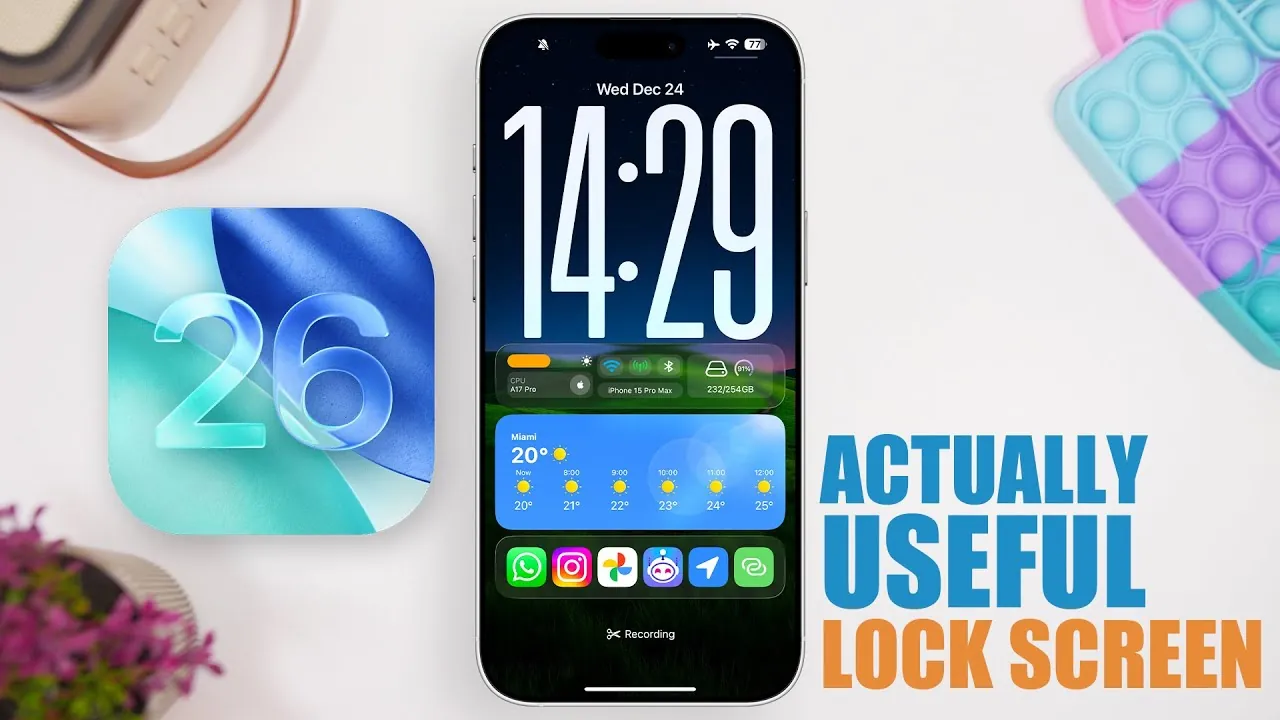
The iPhone lock screen has undergone a significant evolution with the release of iOS 26, transitioning from a simple notification center to a dynamic and customizable interface. It now serves as a hub for productivity, real-time updates, and personal expression. By using features such as widgets, live activities, and interactive tools, you can enhance your lock screen to meet your daily needs. These features not only save time but also ensure that essential information is always at your fingertips. Here’s how you can maximize the potential of your iPhone lock screen.
Widgets: Instant Access to Key Information
Widgets are a cornerstone of the iOS 26 lock screen, offering a seamless way to access critical information without unlocking your device. These compact, interactive elements are designed to keep you informed at a glance, making your daily routine more efficient. With widgets, you can:
- Monitor essential device metrics such as battery life, connectivity, and storage capacity.
- Stay organized by tracking calendar events, reminders, and to-do lists.
- Personalize your lock screen with photo slideshows that showcase your favorite memories.
By placing vital information front and center, widgets eliminate the need to navigate through multiple apps, streamlining your workflow and saving valuable time.
Live Activities: Stay Updated in Real Time
Live activities elevate the functionality of the lock screen by delivering real-time updates on ongoing tasks and events. This feature is particularly useful for staying informed without constant app-switching. Some practical applications of live activities include:
- Tracking the progress of food deliveries or rideshares.
- Following live sports scores or game updates as they happen.
- Monitoring fitness stats during workouts without needing to open an app.
These real-time updates ensure you remain connected and informed, reducing the need for frequent app interactions and enhancing your overall user experience.
Enhanced Music Controls and Live Lyrics
Music enthusiasts will find the enhanced music controls and live lyrics display on the lock screen particularly appealing. These features are designed to make managing your music more intuitive and enjoyable. With these tools, you can:
- Control playback options such as volume adjustment, track skipping, and playlist shuffling directly from the lock screen.
- Enjoy real-time lyrics for songs on platforms like Apple Music or Spotify, even when your screen is dimmed.
This seamless integration allows you to immerse yourself in your favorite tunes without interruptions, making your listening experience more engaging and convenient.
Dynamic Weather Updates
The lock screen’s dynamic weather features provide a practical and visually appealing way to stay prepared for the day ahead. These updates include:
- Access to hourly forecasts and real-time weather conditions at a glance.
- Visually engaging backgrounds that reflect the current weather, such as rain, sunshine, or snow.
By combining functionality with aesthetic appeal, these weather updates ensure you’re always ready for whatever the day brings, whether it’s planning your commute or dressing appropriately for the elements.
System Monitoring and Quick Access Tools
For users who value control and insight into their device’s performance, system monitoring widgets offer a wealth of information. These tools transform your lock screen into a command center by allowing you to:
- Track cellular and Wi-Fi data usage, memory, and other system statistics in real time.
- Quickly access frequently used apps, shortcuts, or websites using tools like the Lock Launcher.
This functionality not only enhances your device’s usability but also ensures that you’re always aware of its performance and capabilities.
Interactive Counters and Notes
Interactive tools such as counters and notes add a new dimension of utility to the lock screen. These features are ideal for keeping important information visible and accessible. You can use them to:
- Track progress on tasks or projects with ease.
- Manage grocery lists or other reminders directly from the lock screen.
- Keep critical notes or information readily available for quick reference.
For instance, having a grocery list displayed on your lock screen can make shopping trips more efficient, allowing you to focus on what matters most.
Personalization: Make It Your Own
iOS 26 introduces extensive customization options, allowing you to design a lock screen that reflects your unique style and priorities. These personalization features allow you to:
- Create custom photo slideshows for a personal and visually appealing touch.
- Select widgets that align with your daily routines and priorities.
- Experiment with fonts, colors, and layouts to create a lock screen that resonates with your personality.
This level of customization ensures that your lock screen is not only functional but also a true reflection of your individuality, blending practicality with personal expression.
Unlock the Full Potential of Your Lock Screen
The iPhone lock screen in iOS 26 is no longer just a gateway to your device—it has become a versatile platform for productivity, personalization, and convenience. By integrating features such as widgets, live activities, enhanced music controls, and dynamic weather updates, you can transform your lock screen into a tool that keeps you informed, connected, and organized. Explore these options to tailor your lock screen to your lifestyle and unlock its full potential, making it an indispensable part of your daily routine.
Master iPhone lock screen customization with the help of our in-depth articles and helpful guides.
- How to Customize iPhone Lock Screen in iOS 26
- How to Customize Your iPhone Lock Screen with iOS 18 Features
- Essential iPhone Lock Screen Widgets
- iOS 26 Customization: How to Personalize Your iPhone
- Mind-Blowing iPhone Lock Screen Tricks You NEED to Try
Source & Image Credit: iReviews
Disclosure: Some of our articles include affiliate links. If you buy something through one of these links, Geeky Gadgets may earn an affiliate commission. Learn about our Disclosure Policy.
