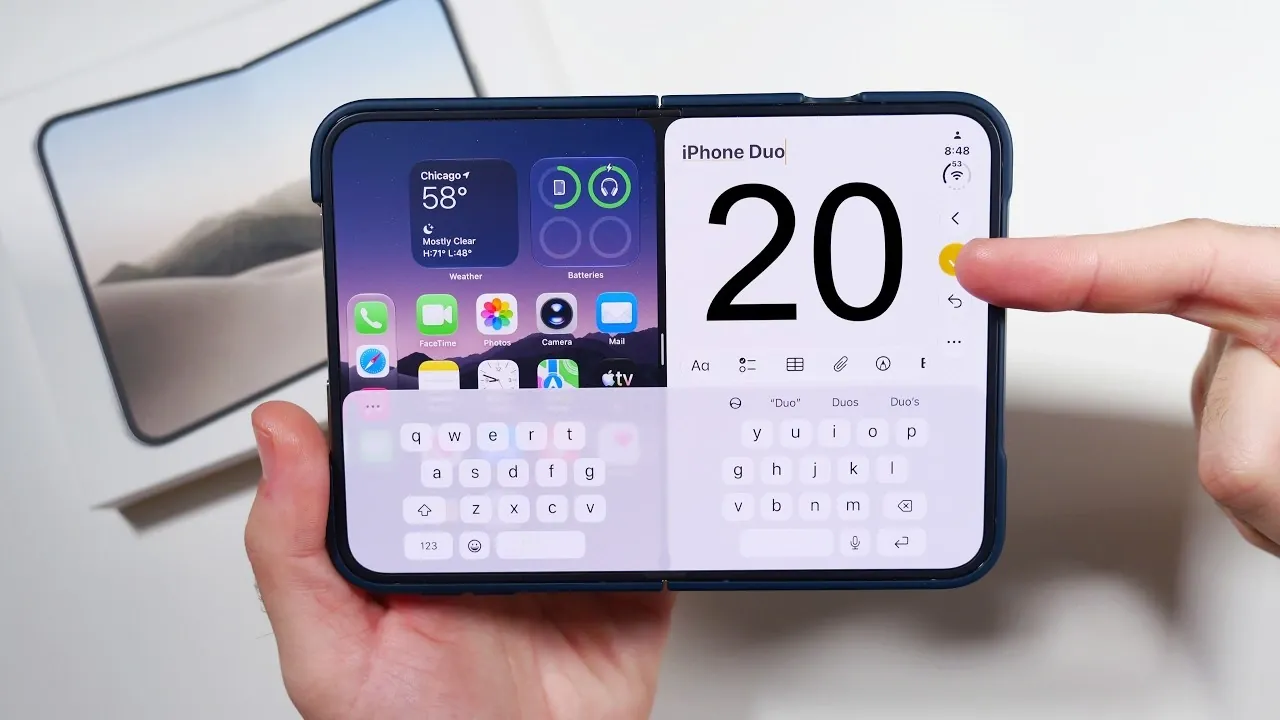
The iPhone Duo represents a bold step forward in foldable technology, blending advanced innovation with practical usability. To fully harness the capabilities of this device, proper setup and exploration of its unique features are essential. The video below from Nick Ackerman outlines key steps to help you maximize the potential of your iPhone Duo.

1. Start with Protective Accessories
Invest in a high-quality case specifically designed for foldable devices to protect your iPhone Duo. The hinge is a critical component and a durable case can help safeguard it from wear and tear while maintaining the device’s sleek design. Additionally, handle the device gently when folding and unfolding to ensure the hinge remains functional over time. Protective accessories are essential for preserving your investment.
2. Set Up Touch ID
Enhance security and convenience by configuring Touch ID. Register multiple fingerprints to ensure seamless access, whether the device is folded or unfolded. This feature is particularly useful for multitasking, allowing you to authenticate quickly without interrupting your workflow. Touch ID provides both ease of use and robust security.
3. Master Multitasking with Split-Screen
Take full advantage of the foldable design by allowing split-screen functionality. This feature allows you to run two apps side by side, making it ideal for tasks such as browsing while taking notes or watching videos while messaging. Experiment with different app combinations to discover what works best for your needs. Keep in mind that not all apps are optimized for this feature, so explore updates for improved compatibility.
4. Explore Advanced Camera Features
The iPhone Duo’s camera system is packed with tools to elevate your photography experience. Key features include:
- Duo Preview: Lets subjects view themselves on the external display during photo sessions, making sure better framing and engagement.
- Kid Q Mode: Uses animations to capture children’s attention, making it easier to take great photos of younger subjects.
- Smart Take: Analyzes multiple frames to help you select the best shot.
Additionally, the rear camera doubles as a selfie camera when the device is folded, offering superior image quality for self-portraits.
5. Use Tent Mode and Nano-Texture Display
The iPhone Duo’s Tent Mode transforms the device into a hands-free tool, perfect for video calls, watching media, or even typing. The Nano-Texture Display minimizes glare and reflections, making sure a comfortable viewing experience in various lighting conditions. This combination enhances both productivity and entertainment.
6. Discover the Under-Display Camera and Dynamic Island
The under-display camera provides a seamless, uninterrupted screen, ideal for immersive media consumption. Meanwhile, the Dynamic Island adapts to the foldable design, offering notifications and controls in a way that complements your content without causing distractions.
7. Learn Control Center Gestures
Navigating the Control Center on the iPhone Duo requires mastering gestures tailored to its foldable interface. Spend time familiarizing yourself with these gestures to access settings and notifications efficiently. The smooth fold animations further enhance the overall user experience, making navigation intuitive and enjoyable.
8. Test Gaming Performance
Push the limits of the iPhone Duo by exploring its gaming capabilities. Test game compatibility and monitor heat management during extended sessions. Enable the battery percentage display to keep track of power levels and ensure uninterrupted gameplay. The device’s performance and display quality make it a strong contender for mobile gaming enthusiasts.
9. Customize Your Dock
Organize your dock by rearranging app icons to prioritize frequently used tools. While customization options are somewhat limited, this feature allows you to streamline your interface for quicker access to essential apps. A well-organized dock can significantly improve your daily efficiency.
10. Personalize with Duo-Specific Wallpapers
Choose from exclusive Duo-specific wallpapers to make your device uniquely yours. These designs are tailored to complement the foldable display, adding a personal and aesthetic touch to your iPhone Duo. Customization enhances the overall user experience.
11. Activate Reading Mode
The foldable design of the iPhone Duo enhances the reading experience by mimicking a book-like layout. Enable Reading Mode for a more immersive and comfortable experience, especially during long reading sessions. This feature is particularly beneficial for e-books and articles.
12. Adjust with Left Edge Shift
If your protective case covers part of the screen edges, use the Left Edge Shift feature to reposition content for better visibility. This ensures a seamless viewing experience, even with accessories in place. Screen adjustments like this enhance usability.
13. Enable the Split Keyboard
Improve typing efficiency by activating the split keyboard option. This feature is especially useful when using the device in its unfolded state, allowing you to type comfortably with both hands. The split keyboard is a practical addition for productivity.
14. Learn Powering Off Methods
Familiarize yourself with both software and hardware methods for powering off the iPhone Duo. Knowing these options ensures you can shut down the device quickly when needed. Power management is a fundamental aspect of device operation.
15. Experiment with Tent Mode Applications
Beyond media consumption, Tent Mode can be used for creative tasks such as sketching, following recipes hands-free, or even conducting virtual meetings. Explore its versatility to integrate it into your daily routine. Tent Mode opens up new possibilities for multitasking.
16. Optimize Battery Life
Monitor your battery usage and enable power-saving features to extend battery life. This is particularly important during heavy multitasking or gaming sessions. Regularly check for apps that consume excessive power and adjust settings accordingly. Battery optimization ensures longer usage between charges.
17. Explore App Compatibility
Not all apps are fully optimized for the foldable interface. Test your favorite apps to see how they perform and look for updates that may improve compatibility over time. Staying informed about app updates can enhance your overall experience.
18. Adjust Display Settings
Fine-tune the display settings to suit your preferences. Adjust brightness, color profiles and refresh rates to enhance your viewing experience. The iPhone Duo’s adaptive display ensures optimal performance in various scenarios.
19. Stay Updated
Regularly check for software updates to ensure your iPhone Duo runs smoothly. Updates often include bug fixes, performance improvements and new features tailored for the foldable design. Keeping your device up to date is essential for long-term performance.
20. Embrace the Foldable Experience
The iPhone Duo is more than just a smartphone; it’s a versatile tool designed to adapt to your lifestyle. By exploring features like Tent Mode, Duo Preview and multitasking, you can fully embrace the possibilities of this innovative device. Foldable technology offers a unique blend of functionality and convenience.
Enhance your knowledge on iPhone Duo by exploring a selection of articles and guides on the subject.
- Early iPhone Duo 2 Leaks Reveal Major Hardware Upgrades
- iPhone Duo: Key Details Apple Barely Mentioned on Stage
- Apple’s iPhone Duo 2 Just Leaked: Everything Changing With the Next Foldable
- iPhone Duo Buyer’s Guide: How to Choose Without Regrets
- iPhone Duo vs. Galaxy Z Fold 8: Did Apple Just Catch Samsung?
- iPhone Duo: 5 Features That Make It Worth the Price
Source & Image Credit: Nick Ackerman
Disclosure: Some of our articles include affiliate links. If you buy something through one of these links, Geeky Gadgets may earn an affiliate commission. Learn about our Disclosure Policy.
