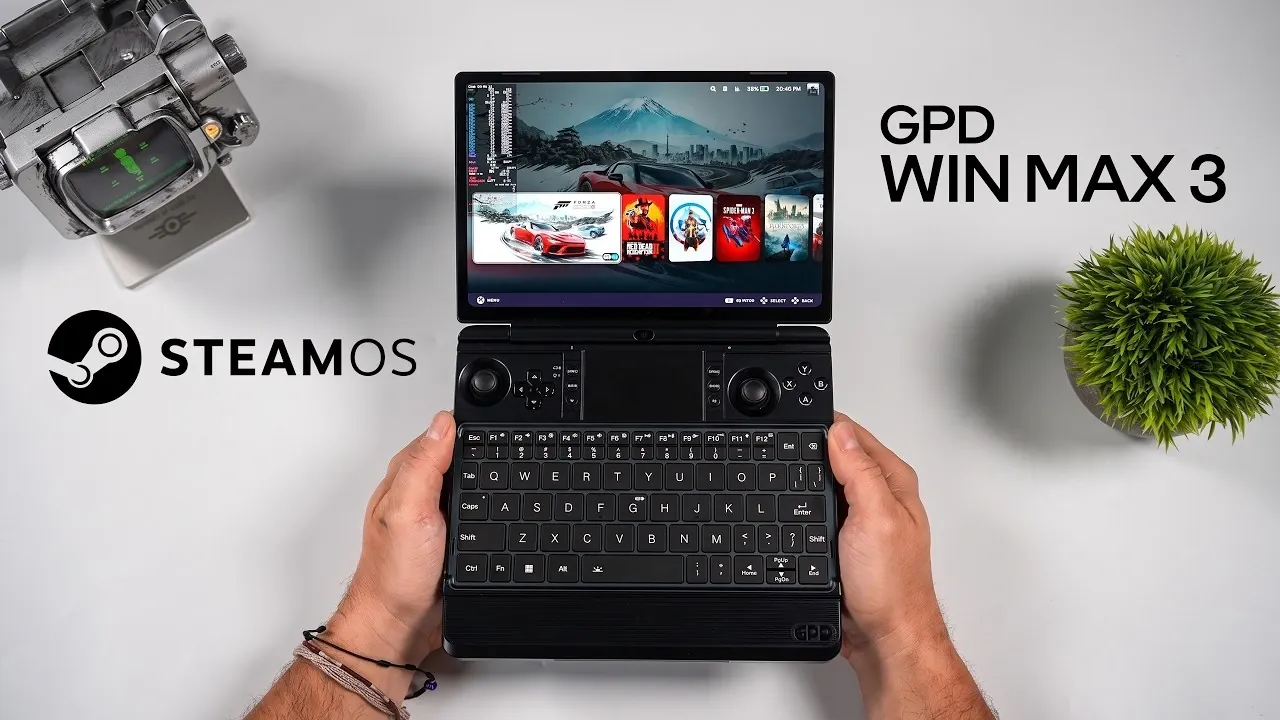
ETA Prime demonstrates the process of installing SteamOS on the GPD Win Max 3, a device that blends handheld gaming with the functionality of a compact laptop. Using the Steam Deck recovery image, the installation enables features such as full Wi-Fi and Bluetooth support, adjustable screen brightness and a gaming-focused interface. While minor adjustments like configuring software for additional buttons are required, these steps are straightforward and contribute to a more tailored user experience.
Explore how SteamOS performs on the GPD Win Max 3, including its handling of demanding games like Cyberpunk 2077 and Forza Horizon 6. Learn how to fine-tune settings such as TDP for specific tasks and discover the potential of its desktop mode for productivity. This breakdown also covers BIOS-based customization options and how they enhance the device’s versatility.
Key Features That Set the GPD Win Max 3 Apart
- The GPD Win Max 3 is a hybrid device combining a compact laptop with a high-performance gaming handheld, offering portability and power for gamers and multitaskers.
- Key features include a built-in controller, replaceable 98Wh battery, optional cooling module and an integrated keyboard and trackpad for seamless transitions between gaming and productivity.
- Powered by an AMD Ryzen AI Max 388 processor and Radeon 8060SIG GPU, it delivers exceptional performance with a 9-inch OLED display featuring 2400×1504 resolution and a 165Hz refresh rate.
- Installing SteamOS unlocks its full potential, providing optimized gaming functionality, comprehensive hardware support and customizable performance settings via BIOS controls.
- While it excels in gaming and productivity, minor limitations include the lack of Variable Refresh Rate (VRR) support and slightly better optimization for some games on Windows.
The GPD Win Max 3 is designed to cater to both gaming enthusiasts and productivity-focused users. Its standout features include:
- Built-in Controller: Hidden beneath magnetic panels, the integrated controller is ideal for handheld gaming without the need for external peripherals.
- Replaceable 98Wh Battery: Provides extended gaming sessions, making sure uninterrupted playtime.
- Optional Cooling Module: Maintains optimal performance during demanding tasks by preventing overheating.
- Integrated Keyboard and Trackpad: Enables seamless transitions between gaming and productivity tasks, making it a versatile tool for work and play.
This compact yet feature-rich design ensures the device is equally suited for gaming marathons and professional tasks, offering a balance of entertainment and efficiency.
Hardware That Delivers Exceptional Performance
The GPD Win Max 3 is equipped with innovative hardware that ensures smooth performance across a variety of applications:
- Processor: Powered by the AMD Ryzen AI Max 388, featuring 8 cores, 16 threads and clock speeds reaching up to 5 GHz for exceptional multitasking and gaming performance.
- Graphics: The Radeon 8060SIG GPU with 64GB of unified memory (26GB allocated to VRAM) delivers outstanding graphical capabilities for modern games.
- Display: A 9-inch OLED screen with a 2400×1504 resolution and a 165Hz refresh rate ensures vibrant visuals and fluid gameplay.
These specifications make the GPD Win Max 3 a formidable contender in the portable gaming market, capable of handling graphically intensive titles while also excelling in productivity tasks.

Below are more guides on SteamOS from our extensive range of articles.
- Its Time to Ditch Windows for Valve’s Lightweight SteamOS Gaming Platform
- Valve Restructures SteamOS with Distinct X86 and ARM Builds
- SteamOS 3.8 Adds Ray Tracing and Improved 4K Display Support
- SteamOS Beta Update Fixes CPU Degradation and Wi-Fi Bugs
- ONEXPLAYER X2 Mini Pro Runs SteamOS with Ryzen AI Max Plus 388
- How to Build a DIY Steam Machine Using Your Existing PC and SteamOS
- Why Valve’s Steam OS is Quietly Replacing Windows on Gaming PCs
- Valve Brings Official SteamOS Support to Nvidia Desktop GPUs
- Valve’s Free SteamOS Runs Arch Linux for Daily Desktop Use
- SteamOS 3.8 Changes the Game for Steam Deck, Legion Go and Xbox Ally X Users
Installing SteamOS: Unlocking the Device’s Full Potential
Installing SteamOS on the GPD Win Max 3 is a straightforward process, made easier by the availability of the Steam Deck recovery image. Once installed, SteamOS offers a range of benefits:
- Comprehensive Functionality: Full support for Wi-Fi, Bluetooth, screen brightness adjustments and built-in speakers ensures a seamless user experience.
- Optimized Gaming Interface: The user-friendly interface is designed specifically for gaming, making navigation intuitive and efficient.
While the installation process is smooth, there are minor limitations to consider. For example, an additional menu button requires software mapping and native TDP (Thermal Design Power) control is absent. However, these issues can be addressed with third-party plugins, making sure that SteamOS runs efficiently and enhances the overall gaming experience.
Gaming Performance: A Portable Powerhouse
The GPD Win Max 3 excels in gaming performance, delivering impressive results across a variety of titles. Here are some examples of its capabilities:
- Forza Horizon 6: Runs at 1200p ultra settings with a 35-65W TDP, achieving over 80 FPS for smooth and immersive gameplay.
- Cyberpunk 2077: Plays at 2400×1504 ultra settings with a 65W TDP, maintaining an average of 78 FPS, showcasing its ability to handle demanding games.
- Hogwarts Legacy: Delivers high 70s FPS at 1440p high settings without the need for FSR (FidelityFX Super Resolution).
- Spider-Man 2: Offers playable performance at 1440p ultra settings with FSR quality enabled, making sure a visually stunning experience.
- Mortal Kombat 1: Runs smoothly at 1440p very high settings, providing a responsive and fluid gaming experience.
- Red Dead Redemption 2: Provides excellent visuals at 1440p with a high-ultra mix and a 65W TDP, demonstrating its versatility.
Performance can be further enhanced by increasing the TDP settings, particularly in desktop mode when paired with the optional cooling module. This flexibility allows users to optimize the device for specific games or workloads, making sure a tailored experience that meets individual preferences.
Additional Features for Customization and Versatility
Beyond its gaming capabilities, the GPD Win Max 3 offers a range of features that enhance its versatility and adaptability:
- Desktop Mode: The built-in keyboard and trackpad make it easy to switch to productivity tasks, such as document editing or web browsing.
- Adjustable Refresh Rates: The display supports refresh rates up to 165Hz, providing smoother visuals for both gaming and general use.
- Half-Rate Shading: Optimizes performance for demanding games, making sure a balance between visual quality and frame rates.
- BIOS-Based Controls: Users can customize fan speeds and TDP settings directly through the BIOS, tailoring the device’s performance to their needs.
These features make the GPD Win Max 3 an adaptable device that excels in both gaming and productivity, offering users control over performance and efficiency.
Considerations and Limitations
While the GPD Win Max 3 performs exceptionally well with SteamOS, there are a few limitations to keep in mind:
- Display Limitations: The OLED screen lacks Variable Refresh Rate (VRR) support, which may result in occasional synchronization issues in certain games.
- Windows Optimization: Some titles are better optimized for Windows, offering slightly improved performance on that platform.
These drawbacks are relatively minor and do not significantly detract from the overall experience. The device’s versatility and performance more than compensate for these limitations, making it a strong contender in the portable gaming market.
A Device That Excels in Gaming and Productivity
The GPD Win Max 3, when paired with SteamOS, offers an outstanding combination of gaming performance and productivity features. Its powerful hardware, customizable settings and seamless integration of gaming and work capabilities make it a versatile device for a wide range of users. Whether you’re a gamer seeking portability or a multitasker in need of a compact yet capable machine, the GPD Win Max 3 with SteamOS delivers a remarkable experience that excels in both performance and functionality.
Media Credit: ETA PRIME
Disclosure: Some of our articles include affiliate links. If you buy something through one of these links, Geeky Gadgets may earn an affiliate commission. Learn about our Disclosure Policy.
