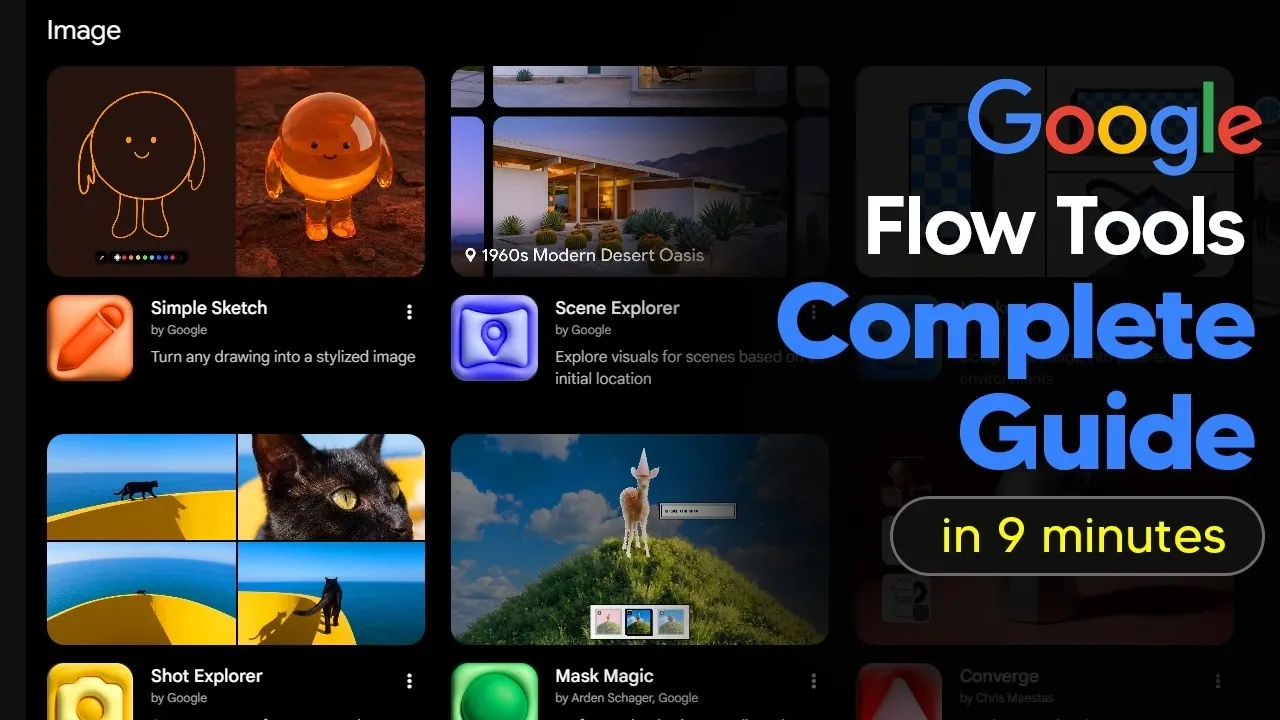
Google Flow provides a structured way to manage workflows through natural language commands. It includes both ready-made configurations and customizable options that do not require coding expertise. For instance, users can modify an image editing feature to handle video conversion, expanding the range of project possibilities. AI Grid examines how these features can be applied effectively in different use cases.
Discover how to refine creative prompts for better results, share customized workflows to enhance collaboration and compare the differences between free and paid functionalities. This step-by-step guide also covers strategies for working within constraints like daily usage limits and offers actionable tips to maximize what Google Flow has to offer.
What Are Google Flow Tools?
TL;DR Key Takeaways :
- Google Flow Tools is a platform designed to automate workflows and enhance creativity using natural language commands, catering to both free and paid users with varying skill levels.
- The platform offers pre-built and customizable tools across categories like image editing, video editing, creative prompting and experimental features for innovative tasks.
- Users can customize or create new tools without coding knowledge, allowing flexibility and adaptability for specific needs, though a daily quota on tool creation applies.
- Collaboration features allow users to share, edit and remix tools, fostering teamwork and efficient project management.
- The free version provides essential functionality, while the paid version unlocks advanced features like tool creation, sharing and remixing for more complex requirements.
At its foundation, Google Flow Tools offers a suite of pre-built and customizable tools aimed at simplifying creative and productivity tasks. The platform is designed to be intuitive, allowing you to interact with tools through natural language commands. Whether you’re editing images, refining videos, or managing creative prompts, Google Flow Tools provides a streamlined and efficient approach to achieving your objectives. Its user-friendly interface ensures accessibility for both beginners and experienced users.
Core Features and Tool Categories
Google Flow Tools organizes its capabilities into distinct categories, each tailored to specific tasks. These categories provide a structured way to explore the platform’s offerings:
- Image Tools: Convert sketches into realistic images, apply filters and edit visuals effortlessly.
- Video Tools: Edit videos, apply advanced effects like 4D motion and experiment with unique filters for added depth.
- Prompting Tools: Refine creative prompts to improve clarity and efficiency in your projects.
- Experimental Tools: Test innovative features, such as generating multiple perspectives of a scene or applying innovative effects to media.
These categories serve as a foundation for users to explore, innovate and enhance their workflows, regardless of their technical expertise.

Explore further guides and articles from our vast library that you may find relevant to your interests in Google Flow.
- How Google’s New Gemini Omni is Reshaping Multimodal AI
- 20 Google Flow Veo3 Examples, First Tests and Impressions
- Google’s New AI Music Tool Gives You 500 Free Credits Every Day
- How To Use Googles Flow Complete 2025 Beginners Guide
- Inside Google’s Powerful New Suite of Free AI Tools
- Your Samsung Galaxy Phone Just Got Smarter: Google Gemini Now Controls Samsung Apps
- The Hidden Google AI Tools You Probably Aren’t Using Yet
- The Tensor G6 Makes the Google Pixel 11 Pro XL Unstoppable
- Best 5 AI Video Generators Compared : See Which Delivers True Realism
- Google Workspace Gemini Flows : Makes Creating AI Agents Easy Using a Single Prompt
Customizing and Creating Tools
One of the standout features of Google Flow Tools is its ability to adapt to your specific needs. The platform allows you to customize existing tools or create entirely new ones using natural language commands. This flexibility eliminates the need for coding knowledge, making it accessible to users with diverse technical backgrounds. For example, you can:
- Modify an image editing tool to include video conversion capabilities.
- Adapt a video tool to generate multiple angles of a single scene for enhanced storytelling.
If the pre-built tools don’t meet your requirements, you can design your own. Using natural language processing, the platform simplifies the creation process. For instance, you could develop a tool to automate repetitive tasks, such as generating product shots from various perspectives. However, keep in mind that a daily quota on tool creation is in place to ensure fair usage.
Collaboration and Sharing Capabilities
Collaboration is a key feature of Google Flow Tools, making it particularly useful for team-based projects. You can share your tools with others via links, allowing them to use, edit, or remix your creations. Additionally, you can customize tool names, icons and default settings to improve organization and usability. These features foster seamless collaboration, making sure that team members can work together efficiently and creatively.
Maximizing Your Experience
To fully use the potential of Google Flow Tools, consider these practical tips:
- Begin by experimenting with pre-built tools to familiarize yourself with the platform’s capabilities.
- If a tool isn’t performing as expected, refine prompts or adjust settings to improve outcomes.
- Use Google’s built-in models to enhance the functionality of your custom tools.
By applying these strategies, you can optimize your workflows and achieve better results in your creative endeavors.
Free vs Paid Features
Google Flow Tools offers both free and paid versions to accommodate a wide range of user needs. Here’s a breakdown of what each option includes:
- Free: Access pre-built tools for images, videos and prompts, providing essential functionality for basic tasks.
- Paid: Unlock advanced features such as tool creation, remixing and sharing, offering greater flexibility and customization options.
While the free version is sufficient for most users, the paid subscription is ideal for those with more complex or large-scale requirements.
Advantages of Google Flow Tools
This platform offers several benefits that can significantly enhance your productivity and creativity:
- Automation: Simplifies repetitive tasks, saving time and effort.
- Streamlined Workflows: Allows you to focus on innovation and execution rather than manual processes.
- Encourages Experimentation: Provides tools to explore new possibilities and push creative boundaries.
These advantages make Google Flow Tools a valuable resource for individuals and teams aiming to optimize their workflows.
Limitations to Keep in Mind
Despite its many strengths, Google Flow Tools has a few limitations that users should consider:
- A daily quota restricts the number of tools you can create, which may pose challenges for heavy users.
- Some advanced features, such as tool remixing and sharing, are only available with a paid subscription.
Understanding these constraints can help you plan your usage effectively and make the most of the platform.
Unlocking Creativity and Efficiency
Google Flow Tools is a versatile platform that enables users to enhance creativity and productivity through automation, customization and collaboration. Whether you’re using pre-built tools or designing your own, the platform offers a wealth of opportunities to streamline workflows and bring ideas to life. While some advanced features are reserved for paid subscribers, the free version provides ample functionality for most users. By exploring its capabilities and applying its tools effectively, you can transform the way you approach creative tasks, achieving new levels of efficiency and innovation.
Media Credit: TheAIGRID
Disclosure: Some of our articles include affiliate links. If you buy something through one of these links, Geeky Gadgets may earn an affiliate commission. Learn about our Disclosure Policy.
