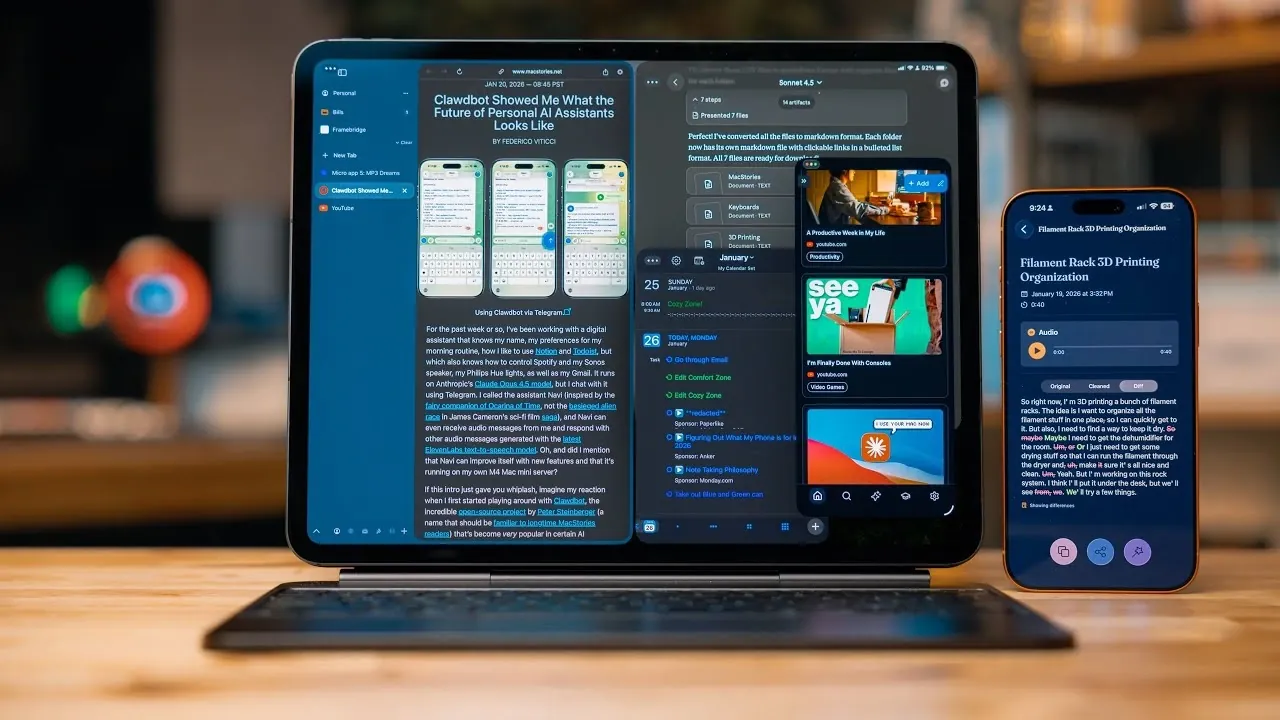
What if your productivity setup could do more than just keep you organized, what if it could genuinely transform the way you work? Christopher Lawley breaks down how the latest apps for 2026 are reshaping productivity, introducing features that feel almost futuristic. From AI-driven assistants that anticipate your needs to NFC-powered distraction blockers, these apps are designed to tackle the challenges of modern workflows head-on. Whether you’re juggling multiple projects or struggling to stay focused, the innovations highlighted in his video promise to make your day-to-day feel smoother and more intentional. The question is: are you ready to rethink how you approach your tasks?
In this breakdown, you’ll discover a curated selection of apps that go beyond the basics, offering smarter ways to manage your time and energy. Explore how features like natural language input and AI tagging can simplify even the most chaotic schedules, or how gamified time management can turn focus into a rewarding experience. Each app offers something unique, whether it’s seamless integration across devices or creative solutions to common distractions. By the end, you might just find yourself reimagining what productivity means in 2026.
Top Productivity Apps 2026
TL;DR Key Takeaways :
- Productivity tools in 2026 use advanced technologies like AI, NFC, and natural language input to enhance workflows, improve efficiency, and simplify task management across iPad, iPhone, and Mac.
- Beam offers advanced tab and workspace management for iPad users, allowing seamless switching between work and personal setups, though it lacks browser extension support.
- QuickNote excels in dictation with an auto-cleanup feature and integration with tools like Obsidian, providing a streamlined note-taking experience for professionals.
- Recall uses AI to tag and summarize saved digital content, offering a graph view for visualizing connections and a Notion-style editor for detailed annotations.
- Innovative apps like Brick and Focus Friend address distraction management, with Brick using NFC technology to block apps and Focus Friend gamifying time management for better focus.
Beam: A Smarter Way to Browse
Beam is a third-party browser specifically designed for iPad users who require advanced tab and workspace management. It introduces features like spaces and profiles, allowing you to seamlessly switch between work and personal setups without losing context. The command bar enhances navigation, making it easier to access frequently used tools and websites. Beam’s compatibility with web apps such as Airtable adds to its appeal for professionals who rely on cloud-based platforms. While it does not support browser extensions, its focus on efficient tab management and streamlined workflows makes it a reliable choice for multitasking and productivity.
QuickNote: Dictation Made Easy
QuickNote is a versatile note-taking app that excels in dictation, offering an intuitive way to capture ideas on the go. Its auto-cleanup feature removes filler words and unnecessary pauses, making sure that your transcriptions are clear and professional. The app supports seamless integration with tools like Obsidian and allows you to create shortcuts for faster access. Whether you’re brainstorming, organizing your thoughts, or documenting meetings, QuickNote provides a streamlined experience that fits effortlessly into your workflow.
Obsidian: The Ultimate Writing Companion
Obsidian continues to be a top choice for long-form writing and comprehensive note-taking. Its robust template system enables you to track daily outputs, script content, and maintain detailed logs, making it ideal for professionals managing complex projects. The app’s control center toggles allow for quick access to notes and templates, enhancing usability. Obsidian’s flexibility and powerful features make it an indispensable tool for writers, researchers, and anyone who needs to organize large volumes of information effectively.
Recall: Organize and Retrieve Information Effortlessly
Recall is a powerful app designed to help you save, organize, and retrieve digital content such as links, articles, and media. By using AI, it automatically tags and summarizes saved items, allowing quick and intuitive retrieval. The graph view visually maps connections between your saved content, offering a unique perspective on how your resources are interrelated. Additionally, the Notion-style editor allows for detailed annotations, making Recall a comprehensive solution for managing and understanding your digital resources.
Drafts: Capture Temporary Notes
Drafts is a lightweight app designed for capturing temporary information, such as phone numbers, quick edits, or fleeting ideas. Unlike long-term note-taking apps like Obsidian, Drafts focuses on short-term use, helping you avoid clutter in your primary workspace. Its simplicity and speed make it an essential tool for everyday tasks, making sure that you can quickly jot down and access information without disrupting your workflow.
2026 Productivity Apps

Browse through more resources below from our in-depth content covering more areas on productivity apps.
- Best Productivity Apps for ADHD: Stay Focused and Organized
- How to Use the iPhones Built In Productivity Apps
- 10 Awesome Apple Mac Productivity Apps
- Top iPad Apps for Productivity and Creativity in 2025
- 10 Free Must-Have Apps to Supercharge Your Windows 11 Workflows
- 10 Mac Apps to Improve Productivity and Workflow in 2026
- Best Mac Apps for Productivity : Notes, Files & System Tweaks
- 13 Excellent iPad Apps to Boost Your iPad’s Capabilities in 2025
- Best Mac Productivity Apps to Streamline Your Workflow in 2025
- Boost Your Productivity with These 10 Killer Android Apps
Claude AI: Your Virtual Assistant
Claude AI is an advanced chatbot that supports a wide range of professional tasks, from reviewing contracts to answering technical queries about 3D printing. Its memory feature retains context across sessions, making it particularly useful for project-specific workflows. While it does not provide inline source citations, Claude AI excels in research, automation, and repetitive task management, offering valuable support for professionals looking to streamline their processes.
BusyCal: Seamless Calendar and Task Integration
BusyCal is a premium calendar app that integrates effortlessly with platforms like Google Calendar and Todoist. Its natural language input simplifies event creation, allowing you to quickly schedule meetings or deadlines. The app’s extra-large widget provides a clear three-day view of tasks and events, making it easier to manage packed schedules. BusyCal is particularly useful for professionals who need to stay on top of multiple commitments and deadlines.
Brick: Innovative Distraction Management
Brick takes a unique approach to distraction management by using NFC technology. By scanning a physical device, you can lock distracting apps until you manually disable them, creating a tangible barrier to interruptions. This innovative method helps you maintain focus during critical work periods, making Brick a standout addition to any productivity toolkit. Its practical application of NFC technology sets it apart from traditional app-blocking tools.
Focus Friend: Gamify Your Time Management
Focus Friend is a timer app designed to make time management more engaging, particularly for individuals with ADHD or those who struggle with focus. The app rewards you with virtual items for completing focus sessions, turning productivity into a gamified experience. Additionally, it blocks distracting apps during work periods, making sure that you stay on track. By combining incentives with practical app-blocking features, Focus Friend offers an effective and enjoyable way to manage your time.
Essential Tools for a Productive 2026
The productivity apps of 2026 reflect the growing integration of advanced technologies like AI, NFC, and natural language processing into everyday workflows. These tools address common challenges such as distraction, task management, and organization, offering practical solutions that enhance efficiency and focus. Whether you’re managing a busy schedule, capturing ideas, or organizing digital resources, this curated selection of apps equips you with the tools needed to stay productive and achieve your goals in the year ahead.
Media Credit: Christopher Lawley
Disclosure: Some of our articles include affiliate links. If you buy something through one of these links, Geeky Gadgets may earn an affiliate commission. Learn about our Disclosure Policy.
