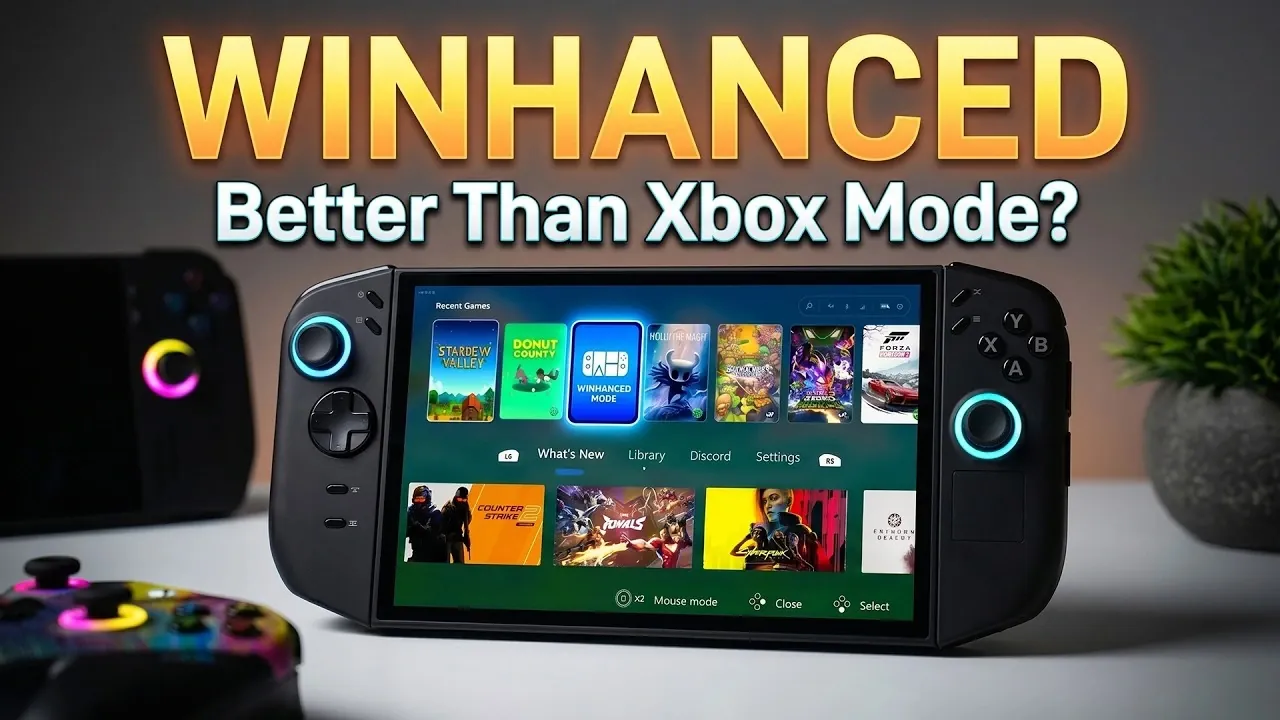
ETA Prime introduces WinEnhanced, a front-end application designed to improve the gaming experience on Windows-based handhelds, laptops and desktops. One notable feature is its ability to consolidate games from platforms such as Steam, Epic Games, GOG and Xbox into a single library. This simplifies game management by reducing the need to navigate multiple apps, allowing users to access their collections more efficiently.
Discover how to customize your setup with features like dynamic themes and animated artwork, while also exploring performance options such as adjustable TDP settings and real-time metrics. Gain insight into its compatibility with cloud gaming services, remote play functionality and integration with devices like the ROG Ally and Legion Go 2. This breakdown provides a detailed look at optimizing both usability and performance for a better gaming experience.
Why WinEnhanced Stands Out
TL;DR Key Takeaways :
- Unified Gaming Platform: WinEnhanced consolidates multiple gaming storefronts (Steam, Epic Games, GOG, Xbox) and services (GeForce Now, Xbox Remote Play, PS Remote Play) into a single, easy-to-navigate interface.
- Extensive Customization: Offers dynamic themes, animated artwork, background effects and startup launch options for a personalized gaming experience.
- Performance Optimization: Features adjustable settings, smart profiles and real-time performance metrics to ensure smooth and efficient gameplay.
- Device Compatibility: Works seamlessly with handheld PCs, laptops, desktops and supports advanced AMD Radeon features like Anti-Lag and Boost for enhanced performance.
- Advanced Tools and Updates: Includes a Command Center, controller-based navigation and connectivity management, with regular updates making sure compatibility and new features.
WinEnhanced distinguishes itself as a versatile and powerful alternative to the Xbox app, offering a unified platform for managing gaming libraries while enhancing the overall experience. Its broad compatibility with various devices and services makes it an essential tool for gamers aiming to streamline their setup and maximize convenience.
- Unified Access: Manage games from Steam, Epic Games, GOG and Xbox in one place.
- Comprehensive Support: Compatible with Xbox Remote Play, PS Remote Play, GeForce Now and DRM-free games.
- Customizable Interface: Includes themes, animated artwork and background effects for a personalized touch.
These features make WinEnhanced a practical choice for gamers who value efficiency and customization.
Streamlined Gaming Libraries and Ecosystem Integration
One of the most notable features of WinEnhanced is its ability to consolidate multiple gaming storefronts into a single, easy-to-navigate platform. Instead of switching between multiple apps, you can access your entire game library from Steam, Epic Games, GOG and Xbox in one location. This integration extends to cloud gaming services like GeForce Now and remote play options for Xbox and PlayStation, making sure compatibility with a wide range of gaming ecosystems.
By centralizing access to these platforms, WinEnhanced simplifies your gaming experience, saving time and reducing the hassle of managing multiple applications.

Deep dive into the latest in handheld gaming by exploring our other resources and articles.
- New Switch 2 Firmware Adds Handheld Mode Boost & Improves Invites, Screen-Share & More
- Why the Latest PlayStation 6 Leaks Are Shocking the Gaming Industry
- Forza Horizon 6 on SteamOS : Steam Deck vs Z2 Go vs Z1 Extreme Tested
- Intel Readies Custom Panther Lake Chips Built for Portable Gaming
- RG56 Pro Max First Look & Performance Guide: What Runs Well & What Struggles
- Steam Deck Restocks Resume After Valve Fixes RAM Supply
- Intel Panther Lake Processor : Redefining Handheld Gaming Performance
- DJI Osmo Pocket 4 vs Insta 360 Luna Ultra : Everything You Need to Know
- Thunderboost eGPU Graphics Upgrade for Handhelds and Laptops
- 2025 GPD Win Mini Review : The Powerful Gaming PC in Your Pocket
Personalized Customization for a Unique Experience
WinEnhanced enables gamers to tailor their gaming environment to their preferences, offering a range of customization options that enhance both functionality and aesthetics. These include:
- Dynamic Themes: Choose from a variety of themes and animated game artwork to create a visually engaging interface.
- Background Effects: Blur effects and other visual enhancements improve the overall look and feel of the interface.
- Enhanced Sleep and Wake Modes: Reduce battery drain and improve efficiency during gameplay sessions.
- Startup Launch: Quickly access your gaming setup as soon as your device powers on.
These features allow you to create a gaming interface that reflects your unique style while optimizing usability.
Performance Optimization for Smooth Gameplay
Performance is a critical factor for any gamer and WinEnhanced provides robust tools to help you achieve the ideal balance between power and efficiency. Its performance management features include:
- Adjustable Settings: Modify Thermal Design Power (TDP), resolution and power profiles to suit your needs.
- Autopilot Smart Profiles: Automatically optimize settings for each game, making sure the best performance without manual adjustments.
- Real-Time Metrics: A performance overlay displays key data such as FPS, battery usage and GPU performance.
These tools ensure that your device operates at peak performance, whether you’re gaming on a handheld or a desktop.
Seamless Compatibility Across Devices
WinEnhanced is designed to work seamlessly with a variety of devices, including handheld gaming PCs like the Legion Go 2 and ROG Ally, as well as traditional laptops and desktops. It supports advanced AMD Radeon features, such as:
- Anti-Lag: Reduces input latency for improved responsiveness.
- Boost: Enhances performance for demanding games.
- Fluid Motion Frames: Delivers smoother visuals for an immersive experience.
Additionally, the integration of Lossless Scaling improves image clarity, though this feature requires a separate purchase. These capabilities ensure that WinEnhanced adapts to the specific needs of your device, providing a consistent and optimized gaming experience.
Effortless Setup and Continuous Updates
Installing WinEnhanced is straightforward, with support for the Microsoft .NET Framework making sure smooth operation. Once installed, you can set it as the default app for Xbox mode, simplifying your gaming setup. Regular updates keep the software compatible with the latest drivers and gaming technologies, while also introducing new features and improvements. This commitment to ongoing development ensures that WinEnhanced remains a reliable and innovative solution for gamers.
Advanced Tools for Total Control
WinEnhanced goes beyond being a simple front-end application by offering advanced tools that give you complete control over your gaming experience. These include:
- Command Center: Pause, suspend, or exit games effortlessly with a centralized control hub.
- Mouse Mode via Controller: Simplify navigation with intuitive controls.
- Connectivity Management: Optimize Bluetooth and Wi-Fi connections for smoother gameplay and reduced interruptions.
These tools ensure that every aspect of your gaming environment is manageable, allowing you to focus on what matters most, enjoying your games.
Elevate Your Gaming Experience with WinEnhanced
WinEnhanced is a comprehensive solution for gamers seeking a better interface and enhanced control over their Windows gaming devices. By integrating multiple storefronts, offering extensive customization options and providing powerful performance management tools, it delivers a streamlined and feature-packed experience. Whether you’re gaming on a handheld device, laptop, or desktop, WinEnhanced equips you with the tools to optimize and personalize your setup for maximum enjoyment.
Media Credit: ETA PRIME
Disclosure: Some of our articles include affiliate links. If you buy something through one of these links, Geeky Gadgets may earn an affiliate commission. Learn about our Disclosure Policy.
