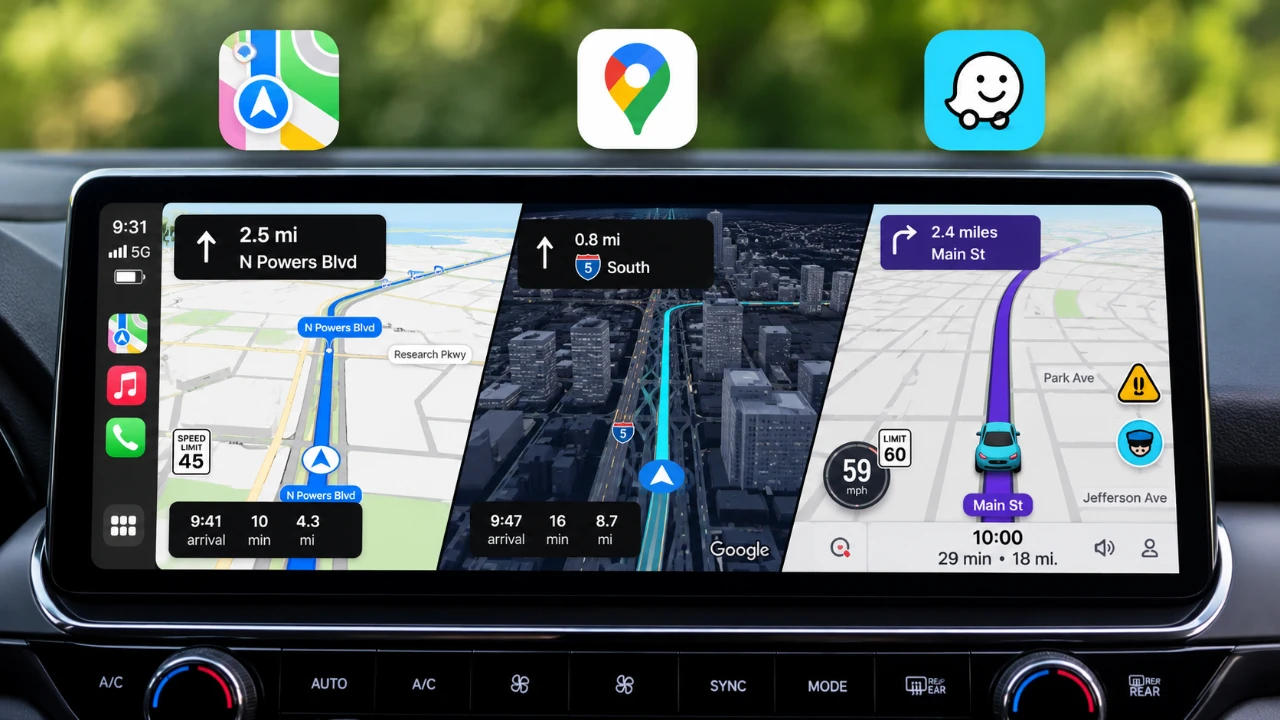
Selecting the right navigation app for Apple CarPlay is essential for a smoother and more efficient driving experience. With Apple Maps, Google Maps and Waze offering distinct features, your choice should align with your driving habits and personal preferences. The video below from HotshotTek provides a detailed comparison of these apps, highlighting their strengths and limitations to help you make an informed decision.

Google Maps: Versatile Features and Offline Navigation
Google Maps continues to be a leading choice for navigation, thanks to its extensive features and consistent performance. Recent updates have introduced advanced visuals, such as 3D building models and overpass animations, which enhance navigation clarity and usability. Key features include:
- Live Speedometer: Monitor your speed in real time to ensure compliance with speed limits.
- Route Customization: Options to avoid toll roads, highways, or select fuel-efficient routes for eco-conscious driving.
- Satellite View: Offers a detailed, bird’s-eye perspective for better route planning and situational awareness.
One of its most valuable features is offline navigation, allowing you to download maps for areas with limited or no connectivity. This is particularly useful for long trips or rural areas. However, Google Maps on CarPlay has some limitations. It does not support pinch-to-zoom gestures, and its alerts for speed and red-light cameras are less precise compared to other apps. If real-time hazard awareness is a priority, this may be a drawback.
Apple Maps: Optimized for Apple Ecosystem Users
Apple Maps has undergone significant improvements, especially with the release of iOS 27. It now offers enhanced GPS accuracy and visually appealing, intuitive icons that simplify navigation. Unique features include:
- Live ETA Sharing: Share your estimated time of arrival with friends or family in real time.
- Seamless Integration: Works effortlessly with Apple devices, such as the Apple Watch, allowing features like marking parking locations or syncing directions across devices.
Offline maps are available but must be set up through your iPhone, which can feel less intuitive compared to Google Maps’ straightforward download process. Additionally, Apple Maps offers fewer customization options, which might not appeal to users who prefer a highly tailored navigation experience. However, for those deeply invested in the Apple ecosystem, its seamless integration and user-friendly design make it a strong contender.
Waze: Real-Time Alerts and Personalization
Waze distinguishes itself with its community-driven approach and emphasis on real-time updates. It is designed to make navigation both practical and engaging. Key features include:
- Personalized Interface: Customize your experience with avatars, voice options, and themes.
- Advanced Hazard Reporting: Powered by its Gemini engine, Waze provides real-time alerts for accidents, road closures, and other traffic issues.
- ETA Planning: Learns your driving habits over time and adjusts estimated arrival times based on traffic patterns.
While Waze does not display gas prices, it compensates with detailed parking information and a strong focus on user-driven updates. These features make it an excellent choice for drivers who value real-time information and a personalized experience. However, its reliance on community input means that its accuracy can vary depending on the activity level of users in your area.
How to Choose the Best Navigation App for You
When deciding which navigation app to use with CarPlay, consider the following factors to ensure the app aligns with your needs:
- Offline Navigation: Google Maps offers robust offline capabilities, while Apple Maps requires prior setup through your iPhone.
- Customization: Waze excels in personalization with avatars, voice options, and user-driven updates.
- Device Integration: Apple Maps provides seamless functionality with Apple devices, making it ideal for users in the Apple ecosystem.
- Real-Time Alerts: Waze leads in hazard reporting, while Google Maps offers moderate accuracy for speed and red-light cameras.
- Visual Features: Google Maps’ 3D visualization and satellite view enhance navigation clarity, while Apple Maps focuses on simplicity and intuitive design.
Each app offers unique advantages tailored to different driving needs. By evaluating these factors, you can determine which app best suits your preferences and enhances your overall driving experience.
Browse through more resources below from our in-depth content covering more areas on Apple CarPlay Navigation Apps.
- The CarPlay Map Wars are Over: This App is the Clear Winner for 2026
- Level Up Your Commute: The MUST-HAVE Apple CarPlay Apps You’re Missing
Source & Image Credit: HotshotTek
Disclosure: Some of our articles include affiliate links. If you buy something through one of these links, Geeky Gadgets may earn an affiliate commission. Learn about our Disclosure Policy.
