
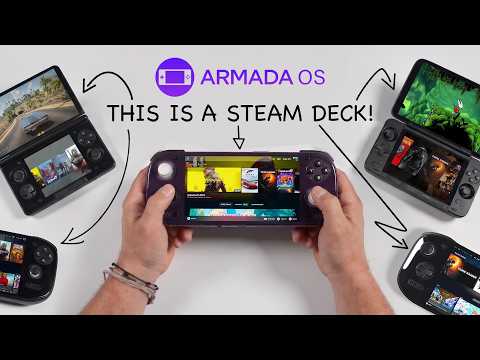
Armada OS is a Linux-based operating system designed for ARM architecture that brings native PC gaming to Android handheld devices. As detailed by ETA Prime, this operating system is compatible with devices like the AYN Odin 3, AyaNeo Pocket DS and Retroid Pocket. With features such as performance profiles, GPU and CPU clock adjustments and settings for thermal and visual optimization, Armada OS allows users to customize their gaming experience. Its interface, inspired by SteamOS, provides a familiar environment for those looking to explore portable PC gaming on non-Steam Deck devices.
Discover how Armada OS can be installed either on internal storage for better performance or on a microSD card for added flexibility. Learn about its ability to run popular games like Cyberpunk 2077 and Shadow of the Tomb Raider, along with its functionality as a full Linux desktop for productivity tasks. This overview examines the key features and practical applications of Armada OS for ARM-based handheld gaming.
What Makes Armada OS Unique?
TL;DR Key Takeaways :
- Armada OS is a Linux-based operating system designed for ARM-based handheld devices, allowing native PC gaming and bridging the gap between Android handhelds and PC gaming.
- It offers extensive performance customization, including performance profiles, GPU/CPU adjustments and advanced settings for optimized gaming experiences.
- The OS supports a growing library of popular PC games on ARM hardware, with regular updates to expand compatibility and improve performance.
- Armada OS includes a full Linux desktop interface, allowing users to switch between gaming and productivity tasks, enhancing device versatility.
- It supports Decky plugins for interface customization, performance monitoring and visual enhancements, while encouraging community contributions to expand device compatibility.
Armada OS is purpose-built for ARM architecture, offering a gaming-focused environment that stands apart from traditional Android systems. Its interface, inspired by SteamOS, is intuitive and optimized for handheld devices, making it ideal for gaming enthusiasts. Popular models like the AYN Odin 3, AyaNeo Pocket DS and Retroid Pocket benefit from its tailored design.
This operating system enables native PC gaming on ARM hardware, a significant leap forward for portable gaming. By using the efficiency of ARM processors and the adaptability of Linux, Armada provides a compelling alternative to the Steam Deck. It combines portability with power, offering gamers a robust solution for playing demanding titles on the go.
How to Install Armada OS
Armada OS offers flexible installation options, allowing users to choose the method that best suits their needs. The process is designed to be straightforward, making sure accessibility for both tech-savvy users and beginners.
- Internal Storage: Installing Armada directly onto your device ensures faster load times and smoother gameplay. This option is ideal for users prioritizing performance.
- MicroSD Card: For those who prefer not to modify their device’s primary operating system, running Armada from a microSD card offers convenience and flexibility.
The OS includes built-in tools to simplify both installation and removal, making sure a hassle-free experience. Whether you prioritize speed or adaptability, Armada accommodates your preferences.
Learn more about AYN Odin with other articles and guides we have written below.
- AYN Odin 2 powerful Android handheld gaming console launching soon
- New AYN Odin 2 handheld games console soon launching
- Most Gamers Buy the Wrong Handheld : Here is How to Avoid Their Mistake
- Why Valve is Pausing Steam Deck Sales in Select Regions
- AYN Odin 3 Hands-On Review : OLED Handheld Built for 120 FPS Android Play
- AYN Odin 2 Portal 7 inch OLED Handheld Games Console Outshining the Competition
Performance Customization and Optimization
Armada OS excels in performance customization, giving users the tools to optimize their gaming experience. Its robust features allow for precise adjustments to suit individual preferences and game requirements.
- Performance Profiles: Select from eco, balanced, or performance modes to manage power consumption and enhance gameplay.
- Granular Controls: Use Armada Control to adjust GPU and CPU clock speeds, allowing game-specific optimization for smoother performance.
- Advanced Settings: Fine-tune parameters such as refresh rate limits, fan curves and half-rate shading for improved thermal management and visual quality.
These features ensure that even resource-intensive games run efficiently, providing a seamless and enjoyable gaming experience.
Expanding Gaming Compatibility
One of Armada OS’s standout features is its ability to enable native PC gaming on ARM-based handhelds. This capability sets it apart from other operating systems and highlights the potential of ARM architecture for gaming. Armada has been tested with a variety of popular titles, including:
- Ratchet & Clank: Rift Apart
- Left 4 Dead 2
- Shadow of the Tomb Raider
- Cyberpunk 2077
While performance varies depending on the game and device hardware, Armada demonstrates impressive results. Regular updates aim to expand the library of supported games and built-in troubleshooting tools help users optimize performance for a smooth gaming experience.
Beyond Gaming: A Versatile Linux Desktop
Armada OS is not limited to gaming. It also features a full Linux desktop interface, allowing users to switch seamlessly between gaming and productivity tasks. This dual functionality makes Armada a versatile choice for handheld devices, allowing users to:
- Run a wide range of Linux applications for work or entertainment.
- Access productivity tools for tasks such as document editing, web browsing and multimedia playback.
- Use the flexibility of Linux for advanced customization and development purposes.
This combination of gaming and desktop functionality enhances the overall utility of ARM-based handhelds, making them suitable for a variety of use cases.
Customization and Plugin Support
Armada OS supports Decky plugins, which allow users to personalize their experience and add new functionality. These plugins enable features such as:
- Interface customization for a tailored user experience.
- Performance monitoring tools to track system metrics in real time.
- Visual enhancements to improve the aesthetic appeal of the OS.
Additionally, Armada Control provides per-game settings for performance and visuals, giving users complete control over their gaming experience. This level of customization ensures that Armada meets the diverse needs of its user base.
Supported Devices and Community Contributions
Armada OS has been tested on several popular handheld devices, including:
- AYN Odin 3: Equipped with the Snapdragon 8 Elite chipset for high-performance gaming.
- AyaNeo Pocket DS: A compact yet powerful device designed for gaming on the go.
- Retroid Pocket Models: Known for their affordability and versatility, making them accessible to a wide audience.
A comprehensive list of supported and untested devices is available on Armada’s GitHub repository. The project encourages community contributions to expand compatibility, fostering a collaborative ecosystem that benefits all users.
The Future of Armada OS
Armada OS is under active development, with future updates expected to enhance its capabilities further. As ARM chipsets continue to evolve, the OS will benefit from improved hardware performance, allowing smoother gameplay and support for more demanding titles. Planned updates include:
- Expanded game compatibility to include a broader range of titles.
- Enhanced performance optimization tools for greater control.
- Improved user interface features for a more intuitive experience.
With its focus on innovation and adaptability, Armada is poised to become a leading solution for handheld PC gaming as the ARM ecosystem grows.
Why Choose Armada OS?
Armada OS represents a significant advancement in the realm of handheld gaming. By combining the flexibility of Linux with the efficiency of ARM architecture, it offers a powerful alternative to traditional gaming platforms. Key benefits include:
- Performance Customization: Tailor your device’s performance to suit your gaming needs.
- Gaming Compatibility: Enjoy native PC gaming on ARM hardware with a growing library of supported titles.
- Desktop Functionality: Switch seamlessly between gaming and productivity tasks for a versatile user experience.
Whether you’re a casual gamer or a tech enthusiast, Armada OS unlocks new possibilities for gaming on the go, redefining what ARM-based handhelds can achieve.
Media Credit: ETA PRIME
Disclosure: Some of our articles include affiliate links. If you buy something through one of these links, Geeky Gadgets may earn an affiliate commission. Learn about our Disclosure Policy.
