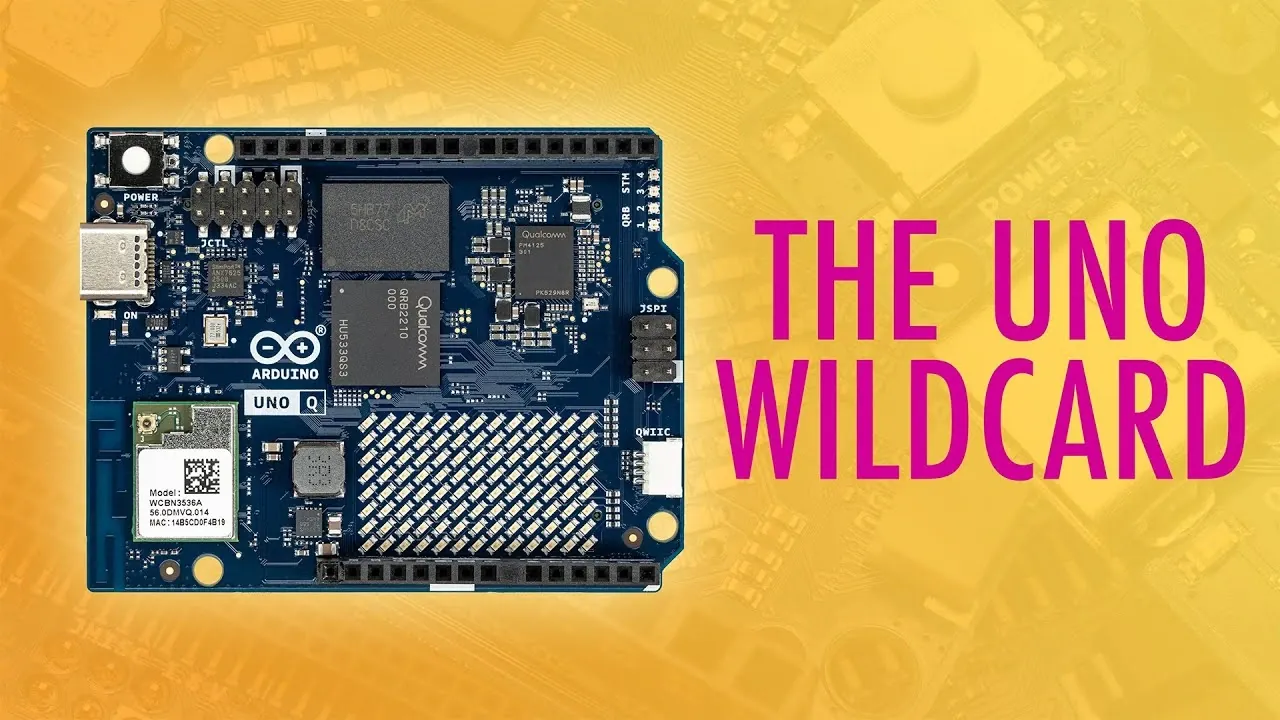
Is the Arduino Uno Q the missing piece in your next project? With its hybrid design that fuses the precision of a microcontroller with the flexibility of a Linux-based single-board computer, this development board is stirring up excitement among makers and engineers alike. Core Electronics takes a closer look at how this innovative platform bridges the gap between real-time hardware control and advanced software capabilities, offering a unique solution for robotics, IoT, and beyond. Whether you’re a seasoned developer or just starting out, the Arduino Uno Q promises to redefine what’s possible in prototyping and project design. But is it truly the fantastic option it claims to be?
In this breakdown, we’ll explore the standout features that make the Arduino Uno Q a compelling choice for diverse applications. From its energy-efficient Dragon processor to its seamless compatibility with existing Uno shields, this board offers a blend of power and adaptability. You’ll also discover how its hybrid architecture unlocks new possibilities for multitasking and precision control, making it ideal for everything from autonomous robotics to multimedia installations. By the end, you’ll have a clearer picture of whether this innovative platform aligns with your creative ambitions. So, is the Arduino Uno Q ready to elevate your projects, or is it a niche solution for specialized needs? Let’s find out.
What Sets the Arduino Uno Q Apart?
TL;DR Key Takeaways :
- The Arduino Uno Q combines a microcontroller for real-time hardware control with a Linux-based single-board computer for advanced software tasks, making it ideal for hybrid applications like robotics and IoT devices.
- Powered by a Dragon processor with configurations of 2GB RAM/16GB storage or 4GB RAM/32GB storage, it balances performance and energy efficiency, consuming just 2.5W idle and 4-5W under load.
- Key microcontroller features include ADC, DAC, and PWM, allowing precise control for robotics, sensor-based projects, and multimedia applications.
- The AppLab IDE simplifies development with multi-language support, modular code bricks, and Docker integration, catering to both beginners and experienced developers.
- Maintaining the classic Arduino Uno form factor, it ensures compatibility with existing shields and accessories, making it a versatile platform for prototyping and development.
The defining feature of the Arduino Uno Q is its hybrid architecture. By integrating a microcontroller with a Linux-based operating system, it enables seamless management of both hardware and software tasks. This unique design offers several advantages:
- Microcontroller: Handles tasks requiring precise timing, such as motor control, sensor data processing, and real-time operations.
- Linux Environment: Supports complex software operations, including multitasking, advanced computing, and network connectivity.
This combination makes the Arduino Uno Q particularly suitable for projects that demand both deterministic hardware control and the flexibility of a full operating system. Whether you’re building a robotics platform or developing an IoT device, this hybrid approach ensures that the board can handle diverse requirements.
Specifications and Performance
At the heart of the Arduino Uno Q is the Dragon processor, which features four Cortex A53 cores. This processor is available in two configurations to cater to different project needs:
- 2GB RAM with 16GB storage: Ideal for lightweight applications and simpler projects.
- 4GB RAM with 32GB storage: Designed for more demanding tasks that require additional memory and storage.
Despite its powerful capabilities, the board is designed with energy efficiency in mind. It consumes just 2.5W when idle and 4-5W under load, making it well-suited for battery-powered applications or energy-conscious designs. This balance of performance and efficiency ensures that the Arduino Uno Q can handle a wide range of use cases without excessive power consumption.
Arduino Uno Q Overview

Find more information on Arduino by browsing our extensive range of articles, guides and tutorials.
- DIY Arduino Wind Speed Meter Anemometer Project
- Arduino Zero Pro 32 bit Cortex M0 Arduino Now Available From
- Atto tiny Arduino USB development board
- UDOO Mini PC Single Board Android, Linux, Arduino System
- Arduino UNO R4 Minima vs UNO R4 WiFi boards
- Arduino Opta Expansions
- Arduino wearable heart rate monitor
- Arduino GIGA R1 WiFi dual core 32-bits microcontroller
- Arduino Engineering Kit nominated for Bett Award 2020
- Create Arduino Cloud interactive dashboards for Raspberry Pi data
Microcontroller Features for Precision
The microcontroller on the Arduino Uno Q is optimized for tasks that require accuracy and reliability. Key features include:
- Analog-to-Digital Converter (ADC): Converts analog signals into digital data, allowing precise sensor readings and environmental monitoring.
- Digital-to-Analog Converter (DAC): Assists audio processing, voltage control, and other analog signal applications.
- Pulse Width Modulation (PWM): Provides fine control over motors, LEDs, and other components requiring variable output signals.
These features make the Arduino Uno Q an excellent choice for robotics, sensor-based projects, and other applications where precise hardware control is essential. Its ability to handle real-time tasks ensures that it can meet the demands of even the most intricate designs.
AppLab IDE: Simplifying Development
The Arduino Uno Q is supported by the AppLab Integrated Development Environment (IDE), which is designed to streamline the development process. Key features of the AppLab IDE include:
- Multi-language Support: Program in Python, JavaScript, or C++ to suit your project’s specific requirements.
- Modular Code Bricks: Access prebuilt functions for tasks such as API integration, sentiment analysis, and object detection, reducing development time.
- Docker Integration: Set up isolated development environments with ease, making sure streamlined workflows and compatibility across systems.
These tools make the Arduino Uno Q accessible to both beginners and experienced developers. By reducing the complexity of coding and offering a range of prebuilt functionalities, the AppLab IDE enables users to focus on innovation rather than troubleshooting.
Form Factor and Compatibility
The Arduino Uno Q retains the familiar form factor of the classic Arduino Uno, making sure compatibility with a wide range of existing Uno shields. This design choice offers several benefits:
- Accessory Compatibility: Use a vast ecosystem of shields and modules to expand the board’s functionality.
- High-Speed Peripherals: Connect devices like cameras, displays, and sensors for multimedia and vision-based applications.
This compatibility makes the Arduino Uno Q a versatile platform for prototyping and development. Whether you’re working on a simple educational project or a complex system, the board’s adaptability ensures that it can meet your needs.
Applications: Ideal Use Cases
The Arduino Uno Q excels in scenarios where hybrid functionality is essential. Common applications include:
- Robotics: Combine precise motor control with advanced software for autonomous systems and intelligent machines.
- IoT Devices: Build connected devices that require both real-time data processing and cloud integration.
- Educational Tools: Teach programming, electronics, and system design using a single, versatile platform.
- Multimedia Projects: Use high-speed connectors for audio processing, vision-based applications, or interactive installations.
The board’s ability to bridge hardware and software makes it a valuable tool for both hobbyists and professionals. Its versatility ensures that it can adapt to a wide range of projects, from simple prototypes to complex systems.
Considerations and Limitations
While the Arduino Uno Q offers impressive capabilities, it is important to understand its limitations:
- Not a Desktop Replacement: The board is not designed for high-performance computing or as a substitute for desktop systems.
- Focused on Hybrid Applications: Its primary strength lies in bridging hardware and software, making it less suitable for projects requiring extensive multitasking or significant processing power.
By recognizing these constraints, you can better assess whether the Arduino Uno Q aligns with your project’s specific requirements.
Why the Arduino Uno Q Deserves Your Attention
The Arduino Uno Q stands out as a unique development board that bridges the gap between microcontrollers and single-board computers. Its hybrid architecture, combined with the AppLab IDE and modular code bricks, makes it a powerful tool for makers, educators, and robotics enthusiasts. While it may not be the best fit for every project, its ability to handle both hardware and software tasks effectively ensures its relevance in specialized applications.
If your projects demand precise hardware control alongside the flexibility of a Linux environment, the Arduino Uno Q offers a compelling solution. Its versatility, energy efficiency, and compatibility with existing accessories make it a valuable addition to any developer’s toolkit.
Media Credit: Core Electronics
Disclosure: Some of our articles include affiliate links. If you buy something through one of these links, Geeky Gadgets may earn an affiliate commission. Learn about our Disclosure Policy.
