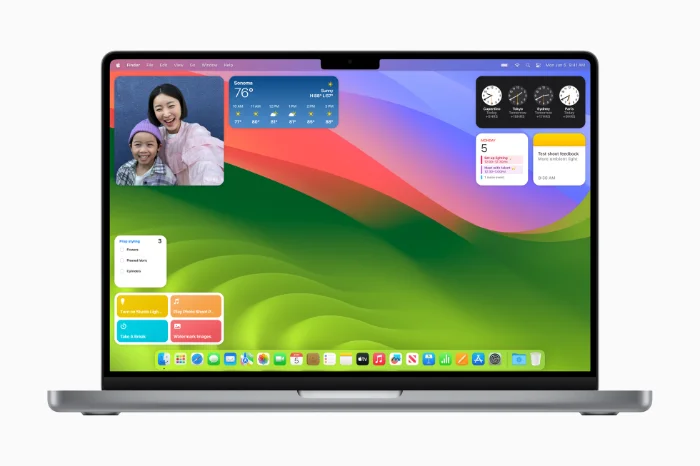
Apple has released its new macOS Sonoma software update for the Mac. Apple’s latest operating system, macOS Sonoma, is packed with new features designed to enhance user experience, boost productivity, and bring the Mac ecosystem closer to its iOS counterpart. From dynamic wallpapers to enhanced video conferencing controls, macOS Sonoma offers a plethora of updates that cater to both casual users and professionals.
Here’s a rundown of the top 10 new features that make this new version of Apple’s macOS an improvement on the previous version and it is definitely worth considering updating to this new version.
Dynamic Wallpapers and Screen Savers
Gone are the days of static, boring backgrounds. macOS Sonoma introduces high-resolution aerial views that serve dual purposes: as wallpapers and screen savers. These visuals are dynamic, subtly changing each time you wake your Mac, offering a fresh and engaging user experience.
Multiple Profiles in Safari
Safari now allows users to create multiple profiles, making it easier to separate work and personal browsing. Each profile can have its own bookmarks and login credentials, providing a more organized and secure browsing experience.
Desktop Widgets in macOS Sonoma
Widgets have broken free from the Notification Center and can now be placed directly on your desktop. Whether it’s the Weather widget or Reminders, these interactive elements can fade into the background when another window is active, ensuring a clutter-free workspace.
Enhanced PDF Tools in Preview
Filling in PDF forms is now easier than ever with a new set of tools in Preview. These tools simplify the process of filling in fields, checking boxes, and even adding your own text fields, making document handling a breeze.
iPhone Widgets on Mac
If your iPhone and Mac share the same Apple ID, you can now display iPhone widgets on your Mac’s desktop or Notification Center. This feature works even if the corresponding app isn’t installed on your Mac, offering seamless integration between devices.
Web Apps in Safari
Websites can now be saved as Web Apps in the Dock, functioning like standalone apps. These Web Apps are essentially Safari browsers restricted to specific websites, offering a streamlined user experience.
Sections in Reminders App
The Reminders app now allows users to add sections to lists. A special ‘Groceries’ type list automatically sorts items into predefined sections like ‘Produce’ and ‘Dairy’, making your grocery shopping more organized.
Note-to-Note Links in Notes App
The Notes app has received a significant upgrade, allowing users to create links between different notes. This feature essentially enables the creation of personal wikis within the app, offering a new dimension to note-taking.
In-line Text Suggestions in macOS Sonoma
As you type, macOS Sonoma offers in-line suggestions to complete your current word or even suggest the next few words. This feature aims to speed up your typing and make text input more efficient.
People & Pets in Photos App
The ‘People’ section in the Photos app has been expanded to include pets, specifically dogs and cats. Now you can tag your furry friends in photos just like you would with human family members.
The new macOS Sonoma is more than just a software update; it’s a comprehensive overhaul designed to improve every aspect of the Mac experience. Whether you’re a student, a professional, or someone who just loves using your Mac, these new features are sure to make your life easier and more enjoyable. The new macOS Sonoma software is now available to download, you can download the update from the Apple Menu on your Mac.
Source Apple
Disclosure: Some of our articles include affiliate links. If you buy something through one of these links, Geeky Gadgets may earn an affiliate commission. Learn about our Disclosure Policy.
