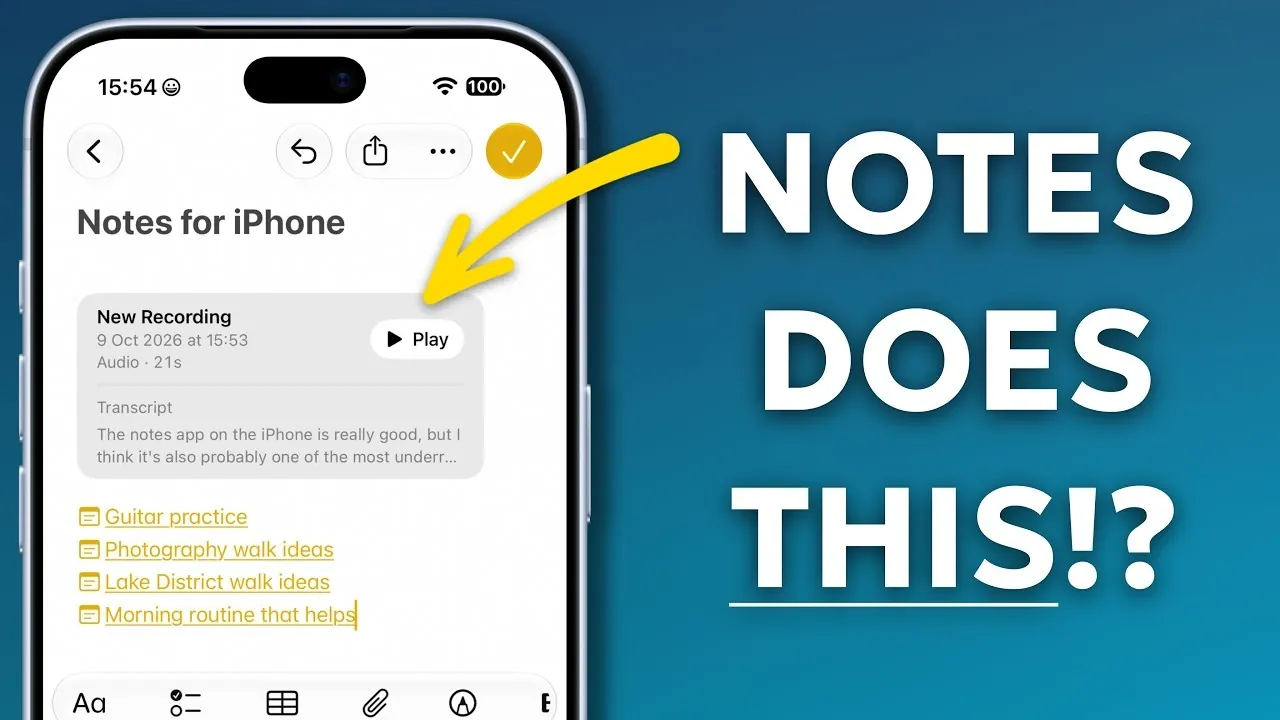
Apple Notes has evolved from a basic note-taking app into a versatile productivity powerhouse. With the latest updates in iOS 27, it now offers a range of advanced tools for document management, collaboration, and organization. Whether you’re a professional juggling multiple projects or a student managing study materials, these eight features can help you optimize your workflow and stay organized. The video below from Proper Honest Tech gives us more details.

1. Scan and Search Documents with Ease
Apple Notes allows you to scan physical documents directly into the app, simplifying the process of digitizing important papers. The built-in scanning tool automatically enhances the clarity of scanned documents, making sure that text remains legible. Once digitized, these documents become fully searchable, allowing you to locate specific information using keywords. This feature is particularly valuable for organizing items such as receipts, contracts, or handwritten notes, which can then be stored and retrieved effortlessly. By eliminating the need for separate scanning apps, Apple Notes streamlines your document management process.
2. Record Audio and Transcribe It
The app’s audio recording feature is a powerful tool for capturing meetings, lectures, or personal reminders. What sets Apple Notes apart is its ability to transcribe audio recordings into searchable text, making it easier to revisit and organize important discussions. You can link these recordings to specific notes, keeping all related content in one place. This functionality is especially useful for managing complex projects or detailed conversations, allowing you to focus on the content without worrying about missing critical details.
3. Link Notes for Seamless Navigation
Apple Notes introduces the ability to link notes together, creating a more interconnected and organized system. You can set up master notes that act as central hubs, linking to other notes or even specific sections within them. This feature is ideal for managing large projects, conducting research, or organizing related content. Additionally, you can pin important notes to the top of your list for quick and easy access. By allowing seamless navigation between interconnected ideas, this feature enhances both productivity and clarity.
4. Organize Content with Structure and Focus
The app’s formatting tools make it simple to organize your notes with a clear structure. You can use headers, subheaders and bullet points to break down information into manageable sections, improving readability and navigation. For larger notes, collapsible sections allow you to minimize content, helping you focus on what’s immediately relevant. This feature is particularly useful for managing extensive information, such as research projects or detailed plans, without feeling overwhelmed. By offering tools to structure your content effectively, Apple Notes ensures that your ideas remain accessible and well-organized.
5. Perform Calculations Directly in Notes
Apple Notes now supports basic calculations, allowing you to perform math operations directly within the app. Whether you’re working on budgets, invoices, or quick calculations, you can input equations and insert the results into your notes. This eliminates the need to switch between apps, saving time and helping you stay focused on your tasks. By integrating this functionality, Apple Notes becomes a more comprehensive tool for both personal and professional use.
6. Lock Notes for Enhanced Privacy
Protecting sensitive information is simple with Apple Notes’ locking feature. You can secure individual notes with a passcode, Face ID, or Touch ID, making sure that private content remains hidden until unlocked. This is particularly useful for storing confidential data, such as personal details, financial records, or work-related information. Locked notes are clearly marked, providing an extra layer of security and peace of mind. By prioritizing privacy, Apple Notes ensures that your sensitive information remains protected.
7. Collaborate in Real Time
Collaboration is made easy with Apple Notes’ real-time sharing capabilities. You can share notes with others, allowing multiple users to edit and update content simultaneously. Sharing permissions can be customized, giving you control over who can view or modify the note. This feature is invaluable for team projects, brainstorming sessions, or shared to-do lists, fostering seamless collaboration and improving productivity. By allowing real-time updates, Apple Notes ensures that everyone stays on the same page.
8. Maximize Productivity with Advanced Features
By using the advanced features of Apple Notes, you can transform the app into a powerful productivity tool. Whether you’re scanning documents, linking notes, or collaborating with others, the app’s capabilities are designed to enhance your workflow. The enhancements introduced in iOS 27 make Apple Notes more versatile than ever, offering tools that cater to both personal and professional needs. By exploring these features, you can unlock the app’s full potential and streamline your daily tasks.
Why Apple Notes Stands Out
Apple Notes strikes a balance between simplicity and functionality, making it a standout choice for users seeking an all-in-one productivity solution. Its ability to adapt to diverse needs, whether organizing thoughts, managing projects, or collaborating with others, sets it apart from other note-taking apps. By taking advantage of its robust features, you can boost your efficiency and stay organized, no matter the complexity of your tasks.
Explore further guides and articles from our vast library that you may find relevant to your interests in Apple Notes.
- Apple Notes Templates Are the Fastest Way to Organize Your Schedule
- How to Create Apple Notes Templates You Can Reuse to Save Hours
- Do You Still Need Notion? iOS 27 Gives Apple Notes a Huge Upgrade
- 6 Massive Upgrades Coming to Apple Notes in iOS 27
- Learn the Zettelkasten Notetaking Method with Apple Notes for Knowledge Mastery
Source & Image Credit: Proper Honest Tech
Disclosure: Some of our articles include affiliate links. If you buy something through one of these links, Geeky Gadgets may earn an affiliate commission. Learn about our Disclosure Policy.
